
The copilot
Ask a question about the construct that is open, or hand the workbench a job. It uses the same tools you do, on the same molecule, and asks before it changes anything.
| Reached by | The FIG button in the top bar |
| Works on | Whatever is open — the active document, your selection, the project's files |
| Sample projects | Any. It reads the project you already have open |
What it actually is
It is not a chat window bolted to the side of a sequence editor, and it is not a different program that happens to know about biology. It is the same tool catalog you use from the panels, offered to a language model.
That distinction is the whole design, and it has one consequence worth stating plainly: when the copilot tells you a plasmid has one BamHI site, that number came from the same restriction engine the Digest panel calls — checked against REBASE — not from the model's recollection of pBR322. When it assembles two fragments, the product is the one the assembly engine computes, verified against Biopython and pydna. The model chooses which tool to run and what to say about the result. It does not compute the result.
So the failure mode people expect from a chatbot — a confidently wrong number — is bounded here in a specific way: a tool either runs and returns real output, or it refuses and says why. What the model can still get wrong is which question you were asking, and that is the thing to read its answers for.
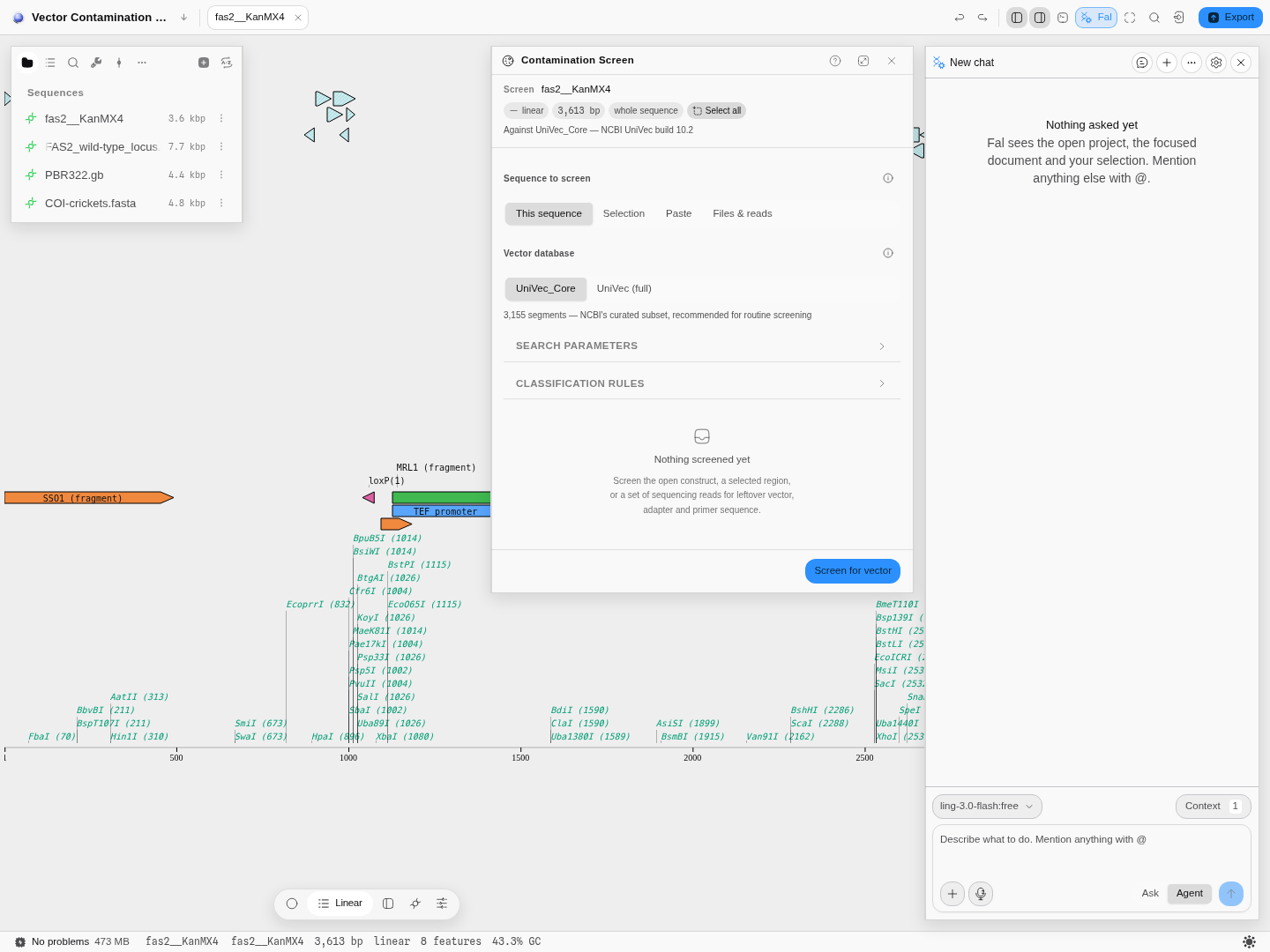 The dock sits beside the panels rather than over them, because the point is to watch a tool run on
the molecule you are looking at. Here the Contamination Screen panel is set up on a yeast locus with
a KanMX4 cassette knocked in, and the copilot can run that same screen itself.
The dock sits beside the panels rather than over them, because the point is to watch a tool run on
the molecule you are looking at. Here the Contamination Screen panel is set up on a yeast locus with
a KanMX4 cassette knocked in, and the copilot can run that same screen itself.
Ask, or Agent
Two modes, and the difference is not tone — it is which half of the catalog is offered.
- Ask is read-only. It may inspect anything, open a document, select a region and reveal a panel, but no tool that changes data is even shown to the model. A question cannot edit a construct by accident, which means you can leave it in Ask and stop thinking about it.
- Agent adds the tools that write: assemble, digest, optimise, scrub sites, design and apply. Each one still stops at an approval card before it runs.
The approval is per call, never sticky. Approving one write does not approve its sibling in the same step, and an approval does not carry to the next call of the same tool. If you stop a turn while a card is waiting, the call is settled as denied rather than left hanging — and pressing Approve on that stale card afterwards tells you the turn ended instead of claiming you approved something that could never run.
A small set of operations — anything that would wipe a library — is never offered in any mode.
Pointing it at a job
Beside the mode there is a job picker, and it does two things a mode cannot.
It narrows the catalog. With no job chosen the copilot is shown every tool it may use, which is the right default when you do not know yet what you are doing — and the wrong one when you do, because a model shown seventy equally plausible tools at each step will confidently run a plausible one instead of the one you needed. Choosing a job leaves only the tools that job is made of.
And it says what a good answer looks like. Ask for a protein expressed in a host and the deliverable is a comparison of design strategies, never one sequence, with the strategies left unranked because they disagree about what limits expression. Ask for a gene knocked out and the deliverable is one build package rather than six answers, with the homology-arm length and the screening flank asked for rather than chosen for you. Neither of those is something a list of tools can express.
Narrowing never widens what the copilot may do. Ask stays read-only inside a job exactly as it is outside one, and the tools that move the workbench — open this, focus that, look this up — are never narrowed away, because they are how it shows you its work.
What it can see
Before it answers, the copilot is told about your workbench: the active document with its name, length and topology, how many features it carries, your current selection, the tabs you have open, and the project's files. It is never sent sequence bases. That is a deliberate limit, and it is why the copilot stays responsive on a 140 kb record: to read bases it must call a tool, and the tool reads them locally.
It is also told what your panels are doing, which is the difference between an assistant that describes your screen and one that describes a screen you had ten minutes ago. For every panel you have open it reads whether the panel is idle, running — and for how long, because "running for four minutes" is a different situation from "running for two seconds" — holding a result, or failed, with the reason the panel itself gave. A result you have since changed the settings under is reported as out of date rather than as an answer. It is still described, because you may be asking about it; it is simply not presented as current.
Your settings travel with the same care. "You set the minimum overlap to 15 bp" and "the minimum overlap is 15 bp because that is the default" are different statements, and the copilot is told which is which: what you chose, what is still at its declared default, and — where a value was filled in from the live editor rather than typed by anyone — that nobody chose it at all.
Alongside that it reads what the workbench itself knows: the jobs still running and how long each has been going, the problems the app has recorded (so "why did my Gibson fail?" is answerable from what was written down rather than from memory), the pipeline on your workflow canvas, the recent edits to the document in front of you, and a one-line note on where your work is stored and whether that storage is durable. Nothing that identifies your machine — no browser fingerprint, no locale, no time zone — is included: what travels is what changes an answer, not what identifies you.
Positions always say which convention they are in. A feature reported as 301–1,501 is
1-based and inclusive, exactly as the ruler and the panels show it, and says so on the line; the
coordinates a tool takes are the editor's own, counted from zero. Both are stated, because a
position that does not say which it is sends you to the wrong base.
Anything else you want in the conversation you put there with @. Mention a document, a
feature, a gel, an experiment — the mention expands into the real record at send time. A mention of a
document that is not currently open is expanded with a note saying which parts could not be
included, rather than quietly arriving thinner than you think.
Long contexts are budgeted rather than truncated. A project with two hundred files does not paste two hundred lines into every step; it sends a grouped summary that ends by naming the tool that fetches the rest, so the model knows what it is not seeing and how to ask for it.
The canvas you are looking at, in its own units
A sequence editor is not the only thing you can have in front of you, and a copilot told about a plasmid while you are staring at a chromatogram will answer about the plasmid, confidently. So each canvas reports itself in the terms its own readers use:
| Looking at | What the copilot is told |
|---|---|
| A Sanger trace | The reads and their base counts, mean quality, whether a read is reverse-complemented, edited base calls, the consensus and how it was called, the verification against a reference, and the selected base with its call and its Q |
| A read pileup | The window, the reads drawn, mean depth, and the selected read with its span, strand, MAPQ and CIGAR |
| An alignment | Sequences by columns, which program aligned them, the row names, and the selected column with the residues actually in it |
| Reads compared to a reference | The reference and its length, the reads, how many positions differ, and the selected reference position with the base that sits there |
| A phylogeny | Tips, method, bootstrap support, and the rooting — including a plain warning when the tree is unrooted, because a tree drawn with a root for layout is not evidence of ancestry |
| A 3D structure | Entry, model of an ensemble, chains and what kind they are, resolution or its honest absence, ligands, how the scene is drawn, and what your Highlight selector reached |
| A variant table, FASTQ, spreadsheet, array, PDF, chemical structure, image or text file | Exactly the readings on the status bar for that canvas, each with the sentence the bar keeps behind its tooltip: which page, which sheet, which record, which region, which text encoding and how confident the detection was |
The last row is the one worth knowing about. Those readings are not written twice: the copilot is handed the same numbers the status bar is showing you, so it cannot describe a page you are not on or a sheet you did not pick.
What your tool panels are showing, from wherever you are
Run a Gibson, get four junctions and a warning, switch back to the plasmid to look at something, then ask about the assembly. The result is still on the status line — and now it is in what the copilot is told, too, headed by the same name the status bar gives it. The same holds for a tree you built, a guide set you screened, a codon table you loaded, a dot plot, a barcode set, a virtual gel and a record's provenance.
A tool you have not run contributes nothing at all. There is no "0 guides" line for a CRISPR panel nobody opened: a confident zero about something that never ran is worse than saying nothing, and this never says it.
What travels is each tool's headline readings, not its whole result table. The junction-by-junction list, the full guide table and a qPCR fit's coefficients are still fetched by asking — which is the same rule the rest of the context follows: what the model needs to decide what to look at, and a way to go and look.
What your lab uses
Tell it once that your lab runs Q5, orders 20–24 nt primers at 45–55% GC and expresses in E. coli, and it remembers. It can save those choices itself when you say them, and you can set or change them yourself under Settings · Lab:
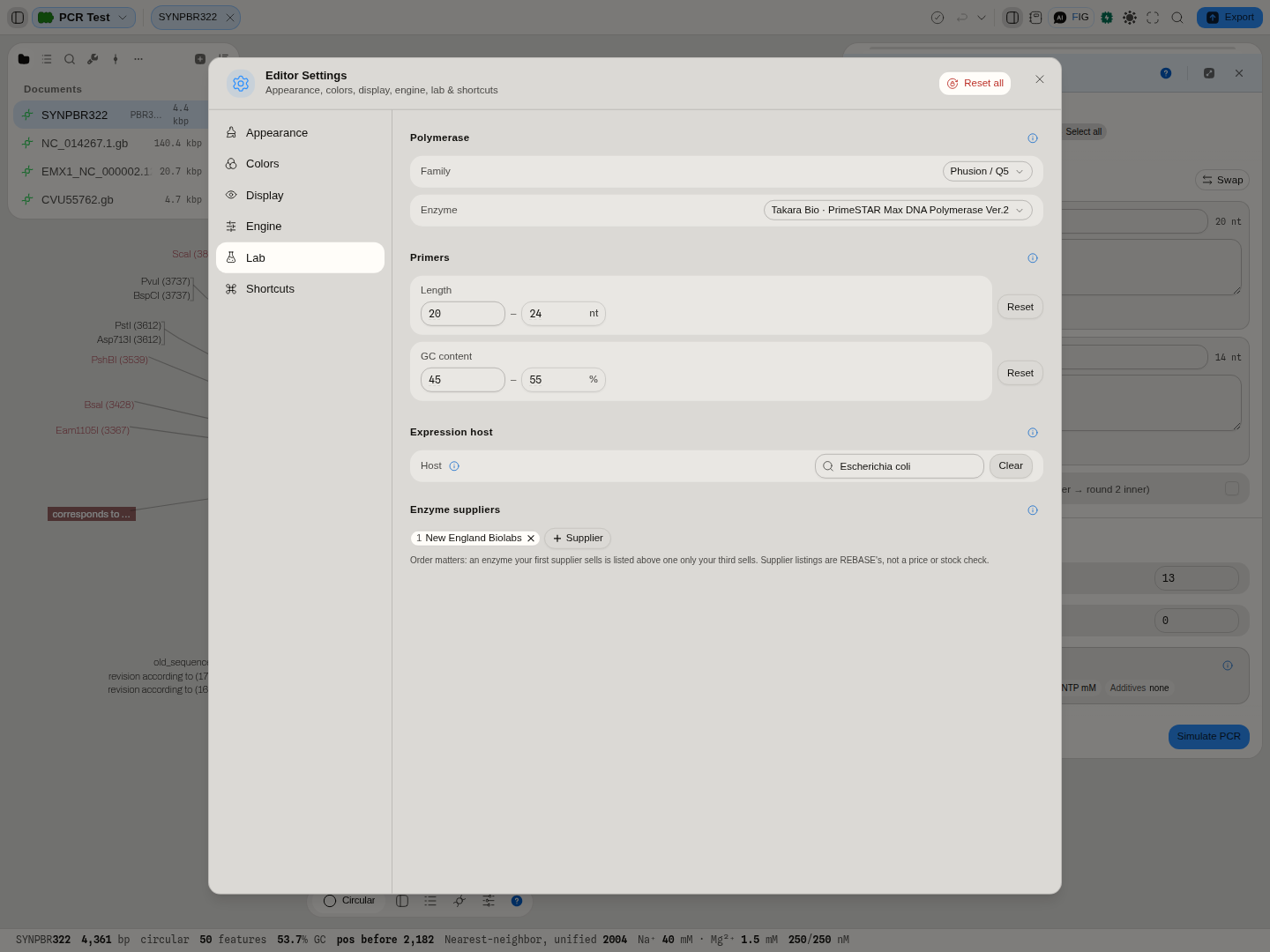 The polymerase, the primer length and GC windows, the expression host, and the order enzyme
suppliers are listed in. Every value can be reset to the panel's own default.
The polymerase, the primer length and GC windows, the expression host, and the order enzyme
suppliers are listed in. Every value can be reset to the panel's own default.
A preference is where a panel starts, never a value it hides. The PCR program opens on your polymerase, primer design on your length and GC windows, and codon optimisation on your host, and each one says so beside the control ("Your lab preference"). When a project holds something else, the same line offers the preference with a Use it button, and a project's own choice is never overwritten. The copilot is told what is set on every turn, so a request that leaves a choice open is answered with your lab's choice, and the answer says that it was.
No strain is kept, because no calculation here takes a host strain as an input. A digest names the methylase (Dam, Dcm and the rest) that blocks each site it blocks, so you read that against your own strain.
Every position comes with how to count it
A number like column 412 is worse than no number if you cannot tell whether it counts from zero, whether the end is included, or whether it runs along the strand you are reading. So a position is never sent bare. It arrives saying it is 1-based and inclusive, in the unit that canvas counts in, and it arrives with something you can check it against: the base and its quality for a trace, the residues in the column for an alignment, the reference base for a compare table.
Two cases are called out by name because they are the ones that catch people:
- A reverse-complemented read is numbered along the strand as drawn, not along the file. Base 12
in the viewer is not base 12 of the
.ab1a collaborator opens, and the copilot is told so. - Residue numbers in a structure are the depositor's own. They may start below 1 and they may skip. A gap in the numbering is not a gap in the molecule, and a reply that quotes a residue range is told which numbering it is quoting.
Clicking a position the copilot mentions takes you to it on the canvas, in that canvas's units — a called base in the chromatogram, a read in the pileup, a column or a row in the alignment, a reference position in the compare table. A position that is not on that canvas is refused by name ("read1 has 500 called bases, so base 9,999 is not on it") rather than quietly landing on the last one.
What is never sent, whatever else changes
The workbench is local-first, and the copilot is the one part of it that sends anything anywhere. So the boundary is a rule rather than a habit, checked on every single turn:
- Your provider API key never travels inside a message. It is checked for by its exact value as well as by shape, so a key cannot ride along inside some other field.
- No file bytes. A description of a file is context; the file is a payload.
- No sequence past a short limit. Bases are read by a tool, locally, when a tool needs them.
- Nothing that identifies your machine. What the browser can do may be useful context; which browser on which computer is not, and it is stripped.
If anything is ever removed on the way out, it is reported in the Problems list rather than removed in silence, so "the copilot did not seem to know about that" has an answer you can read.
What it can do
Every tool is grouped by bench task, the same seven groups the Tools menu uses. The model starts each message seeing only the names of the tools and loads the full description of the ones it decides to use, which shows in the conversation as a Load tools step before the call. The catalog covers restriction mapping, digests, Gibson, Golden Gate, MoClo grammar, assembly plans, ligation, recombination, PCR, fusion and multiplex PCR, primer design and checking, qPCR assay design, CRISPR guides, codon usage, sequence optimisation, RBS design, barcode sets, protein properties, profiles, membrane profiles and protease digests, ORFs, GC, melt curves, dot plots, trees, alignments, read verification, RNA folding, map export and protocol histories, plus tools that move the workbench itself (open a document, select a region, reveal a panel, undo) and lookups against the public databases, including a literature search. The scans a panel runs over a selection (promoters, terminators, melt profiles, LAMP and qPCR design) take the same start and end from the copilot, and say where the stretch starts so a position maps back onto the whole sequence.
Two things follow from the catalog being shared with the panels. First, anything you can run in a workflow pipeline the copilot can also run, with the same parameters and the same refusals. Second, a capability that is missing from the copilot is missing from both — there is no separate, thinner "chat version" of a tool that can drift from the real one.
An example of the seam
The Gibson panel designs the overlapping primers that create the homology an assembly needs. That same design is now a tool the copilot can call and a node you can drop in a pipeline:
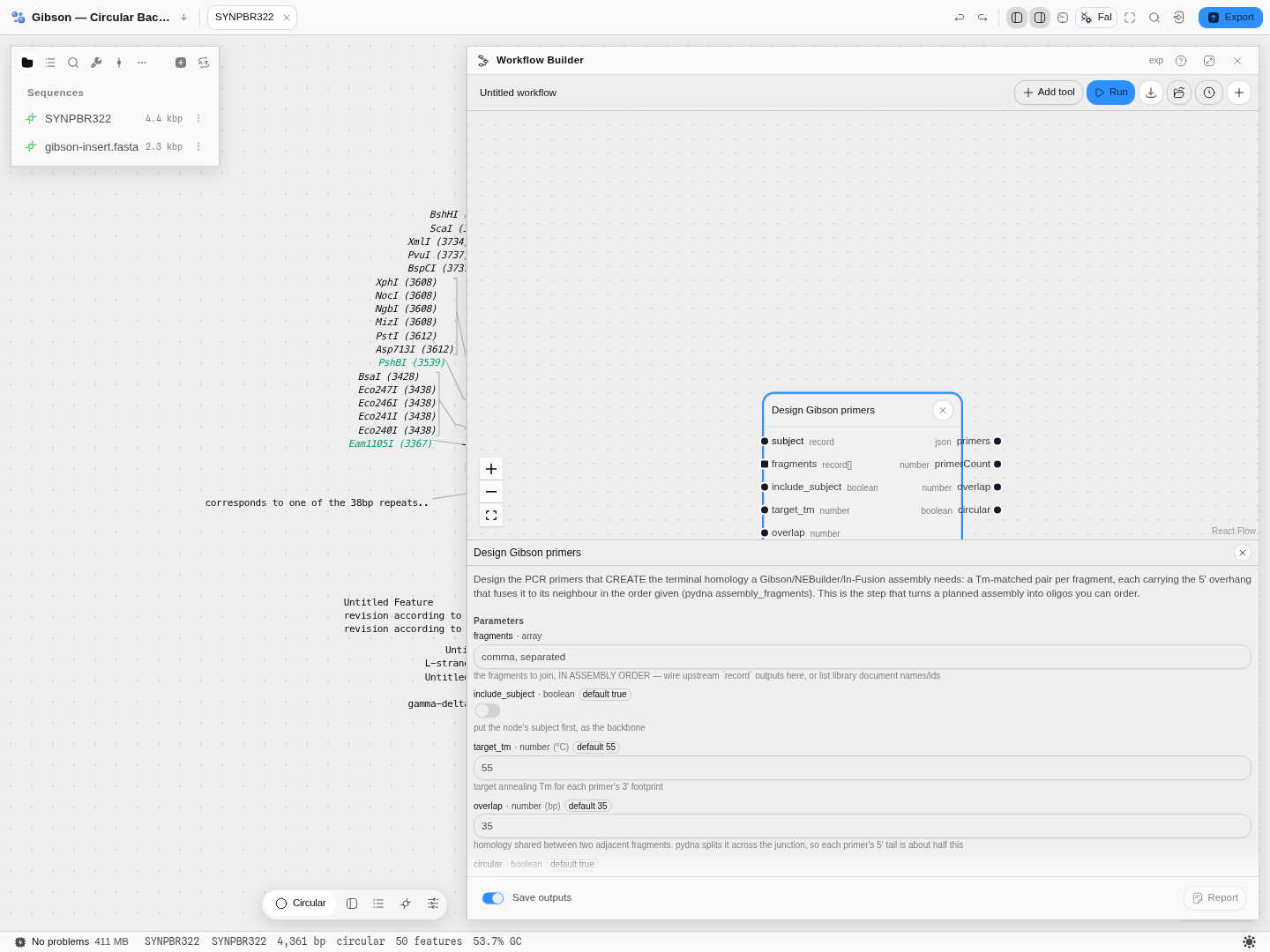 Target annealing temperature, the homology to share between neighbours, whether to close the ring,
and the shortest annealing footprint the designer may settle for — the same four decisions the panel
puts in front of you, in the same units, refusing the same inputs.
Target annealing temperature, the homology to share between neighbours, whether to close the ring,
and the shortest annealing footprint the designer may settle for — the same four decisions the panel
puts in front of you, in the same units, refusing the same inputs.
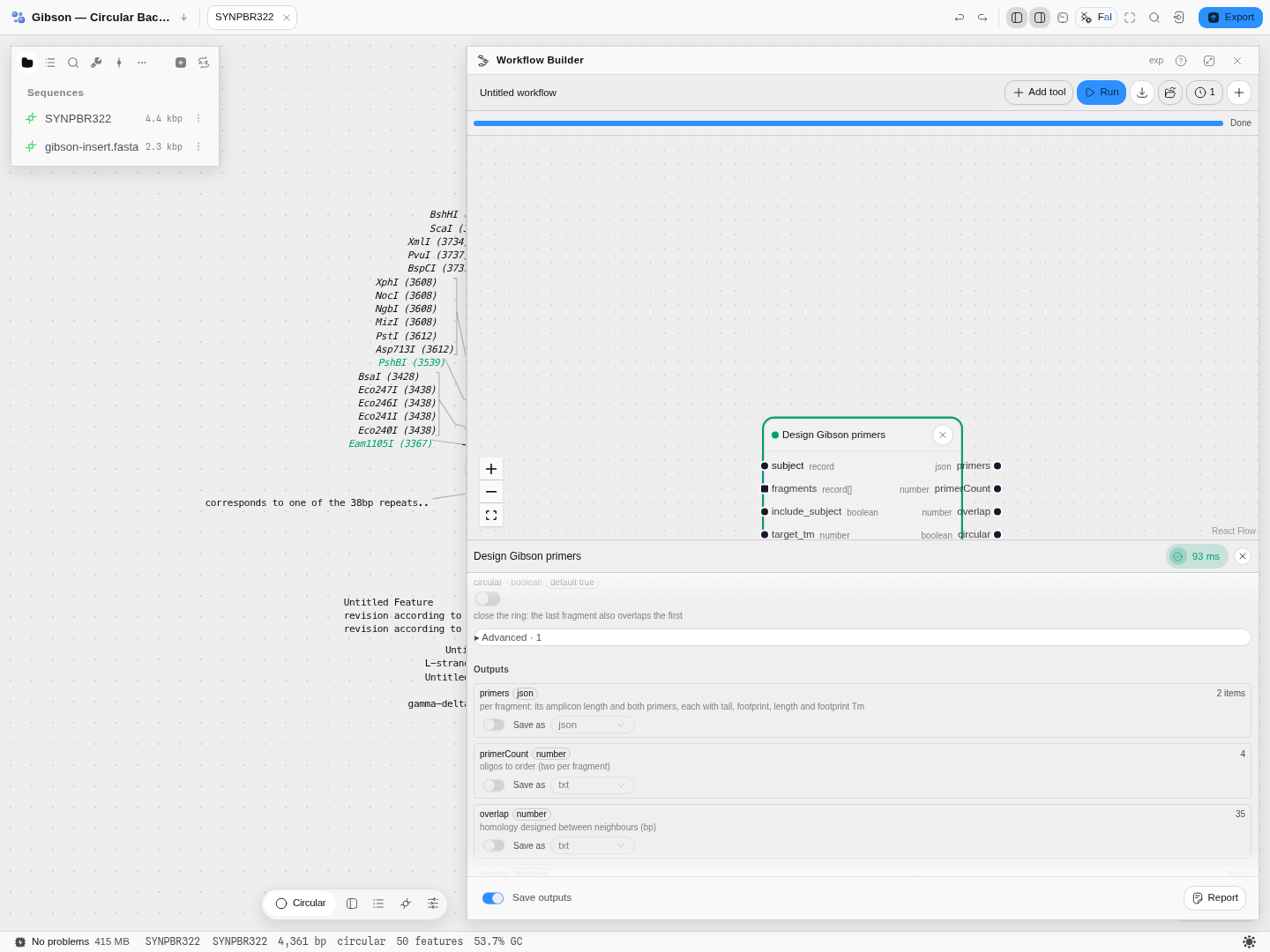 A real pBR322 backbone and a real 2.3 kb insert. Four primers — two per fragment — each carrying the
5′ overhang cut from its neighbour's actual 3′ end. The homology is counted once across the junction,
so 35 bp shared means about 18 bases of tail on each of the two primers that meet there.
A real pBR322 backbone and a real 2.3 kb insert. Four primers — two per fragment — each carrying the
5′ overhang cut from its neighbour's actual 3′ end. The homology is counted once across the junction,
so 35 bp shared means about 18 bases of tail on each of the two primers that meet there.
The same seam runs the other way, into diagnosis. Asking why won't these parts assemble used to have no tool behind it — the copilot could run a Type-IIS assembly and, when nothing came out, could only say that nothing came out:
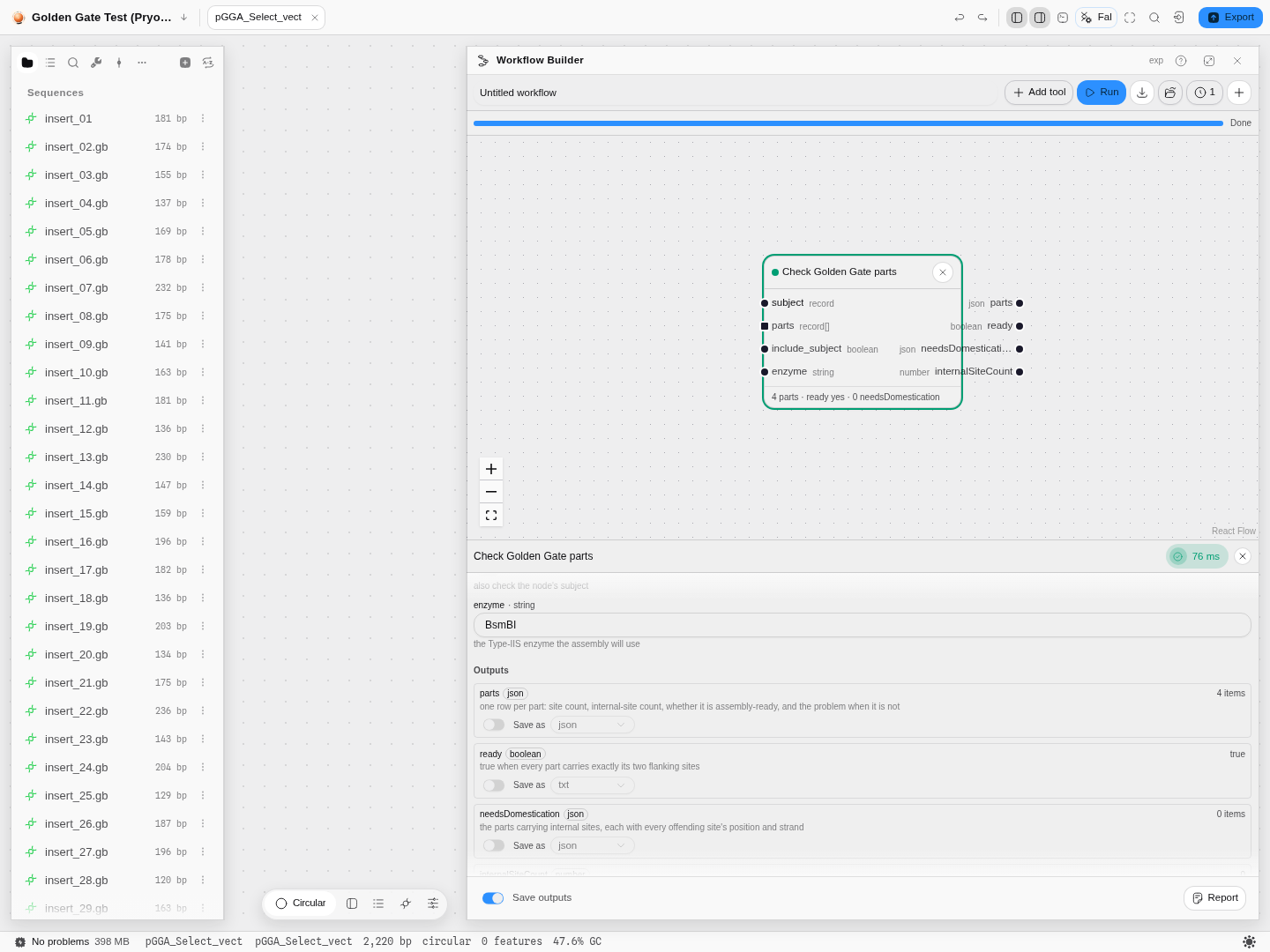 The real 35-fragment Pryor set. Per part: how many recognition sites it carries, whether those are
the two deliberate flanks, and the exact position of any internal site that would mis-cut it. Here
four parts, all ready, nothing to domesticate — and the same check names the culprit when they are
not.
The real 35-fragment Pryor set. Per part: how many recognition sites it carries, whether those are
the two deliberate flanks, and the exact position of any internal site that would mis-cut it. Here
four parts, all ready, nothing to domesticate — and the same check names the culprit when they are
not.
Where a capability has several forms, they are one tool with a choice rather than several tools with similar names — so recombination covers Gateway, Cre/loxP, a serine integrase whose half-sites you supply, plain homologous recombination, and a CRISPR knock-in that keeps only products whose repair region contains every guide's cut:
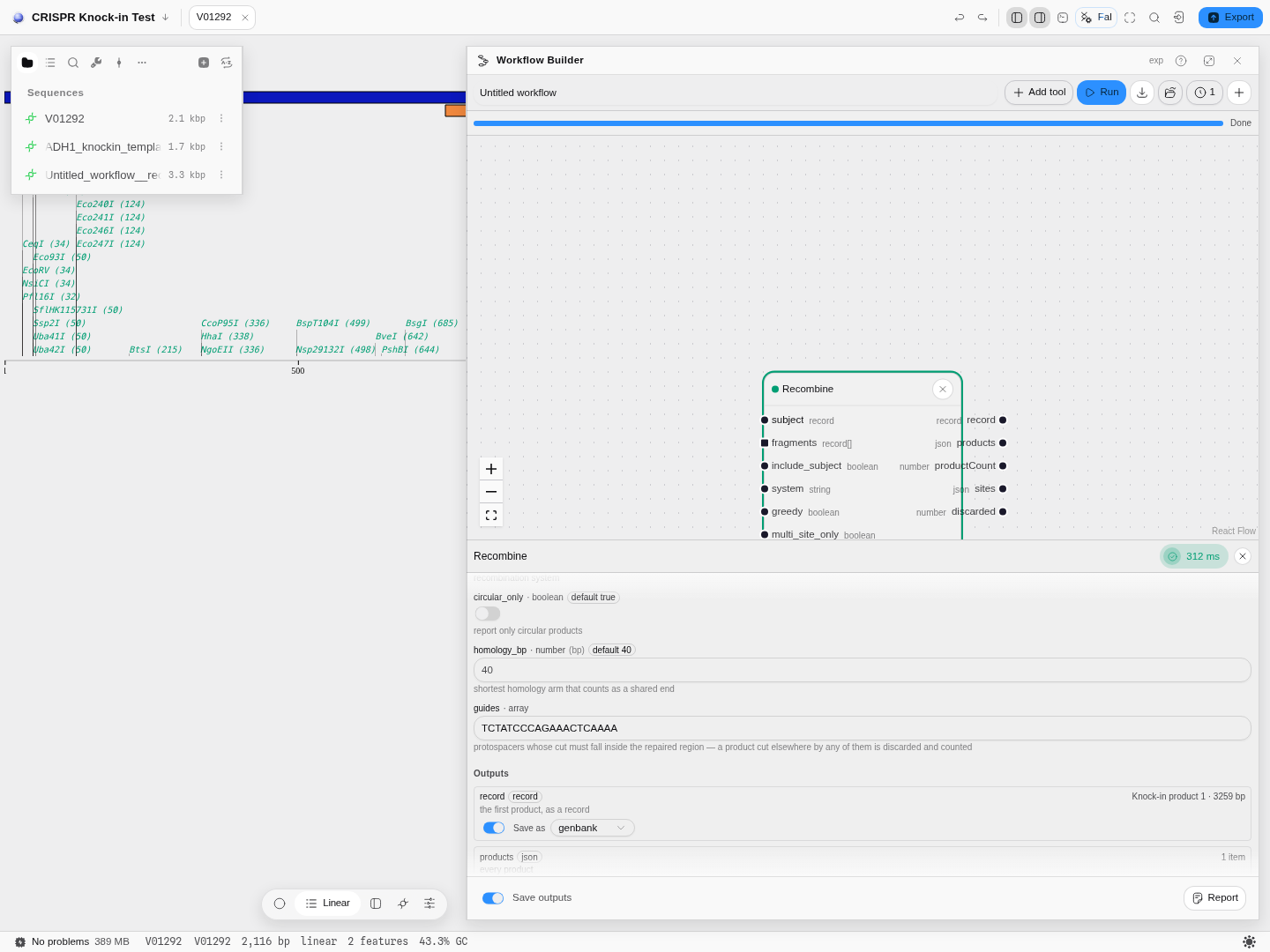 Yeast ADH1 and a real repair template, with the guide the template's arms were designed around.
Choosing the knock-in reveals the two controls only it uses — the homology-arm minimum and the
guides — and hides the Gateway ones. The product is 3,259 bp: the 2,116 bp locus with the 1,143 bp
payload knocked in, arms counted once. Any product a guide would also cut outside the repair is
discarded, and counted, because that is a finding about the guide rather than a warning to hide.
Yeast ADH1 and a real repair template, with the guide the template's arms were designed around.
Choosing the knock-in reveals the two controls only it uses — the homology-arm minimum and the
guides — and hides the Gateway ones. The product is 3,259 bp: the 2,116 bp locus with the 1,143 bp
payload knocked in, arms counted once. Any product a guide would also cut outside the repair is
discarded, and counted, because that is a finding about the guide rather than a warning to hide.
Getting an answer out of the chat
A reply that lives only in a transcript is not a record. Beside every answer, and in the panel's More menu for the whole conversation, are four destinations: save it as a new lab-notebook entry, append it under a rule to the entry already open, download it as markdown, or copy the whole hand-off.
What gets written is not just the prose. It carries the question with its mentions intact, each mention's expansion, the answer, and every tool call with the real parameters it ran with and the result it got back. That is the difference between a note that says "the assembly worked" and one you can check months later.
Which model answers
A key is included with the app, shared by everyone using it — so the copilot works the moment you open it, and hits free-tier limits sooner than your own key would. You can paste your own key instead; it is sent straight to the provider from your browser and stored only in this browser.
Model choice is filtered to models that report tool support, because a model that cannot call a tool cannot use this catalog at all — it can only talk about biology, which is the thing this design exists to avoid.
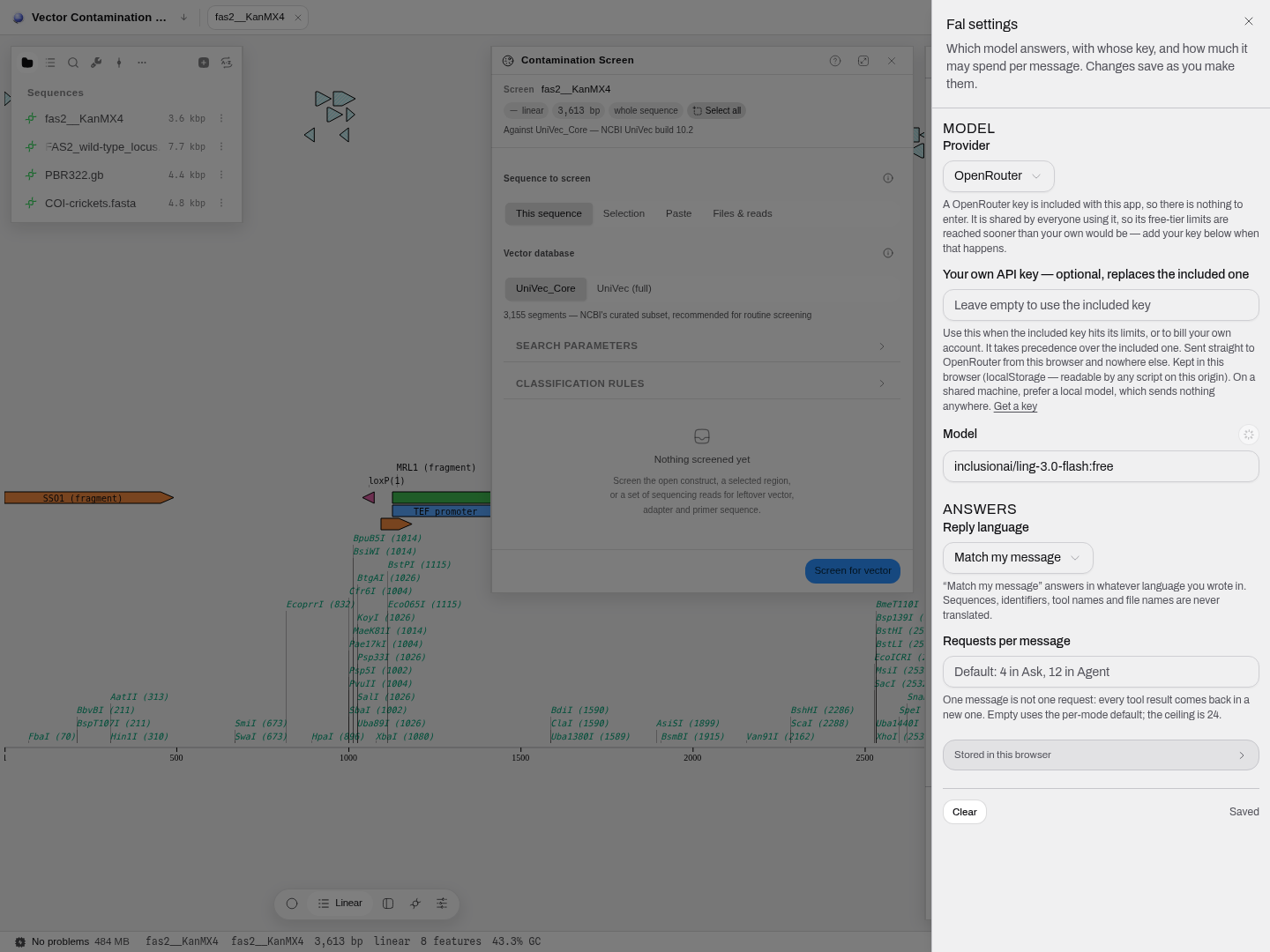 The per-message budget is the one worth understanding: one message is not one request. Every tool
result comes back in a new request, so a job that runs six tools costs at least seven. The default is
4 in Ask and 12 in Agent, and a run that hits the ceiling mid-plan says so rather than letting an
interrupted plan read as a conclusion.
The per-message budget is the one worth understanding: one message is not one request. Every tool
result comes back in a new request, so a job that runs six tools costs at least seven. The default is
4 in Ask and 12 in Agent, and a run that hits the ceiling mid-plan says so rather than letting an
interrupted plan read as a conclusion.
Limitations worth knowing
-
It needs the network; nothing else here does. The workbench itself is local-first — your files never leave the machine — but the copilot has to reach a model provider. On a network that blocks it, you get a plain statement of that rather than a stalled spinner:
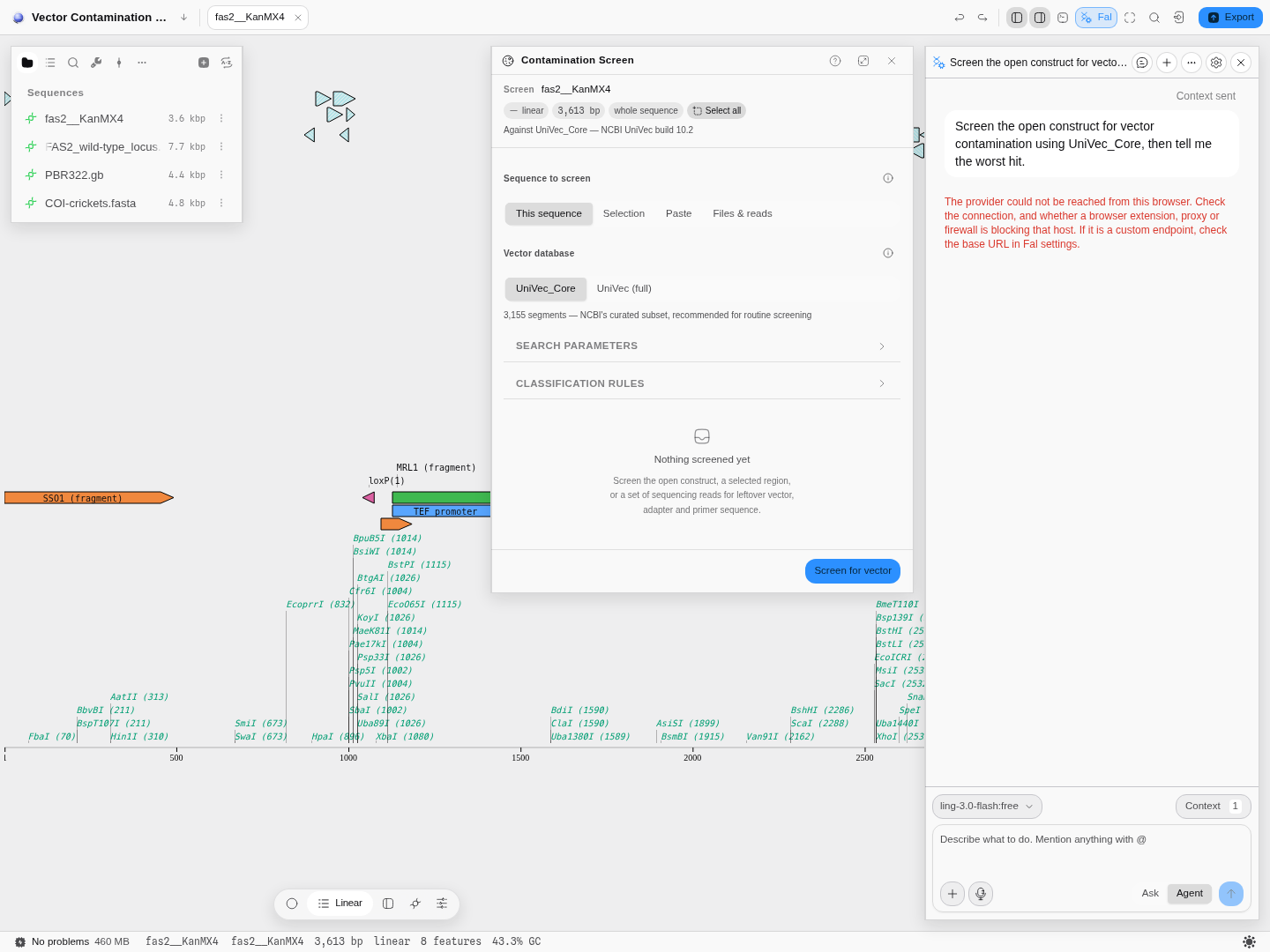 A blocked provider names the possible causes — connection, extension, proxy, firewall, or a wrong
base URL in settings. The tools themselves are unaffected: every panel keeps working.
A blocked provider names the possible causes — connection, extension, proxy, firewall, or a wrong
base URL in settings. The tools themselves are unaffected: every panel keeps working. -
A result is returned to the conversation, not always saved into the project. Tools that make a new record hand it to the model; opening it as a project file is still a step you take.
-
It reads the open document richly and a closed one thinly. Mention a document you have not opened and its topology and feature count are reported as not sent rather than as zero — but they are still absent from what the model sees.
-
Reasoning display depends on the provider. Some models emit their intermediate reasoning and it is shown; many do not, and an empty reasoning panel means the provider sent none.
Related
- The workbench tour — the shared context the copilot reads
- Workflow pipelines — the same tools, wired as a graph you can re-run
- Gibson Assembly — the panel behind the worked example above
Fetching a record from a database
You do not always start from a file. Often you start from a name you half-remember, an accession in a methods section, or a coordinate range on a chromosome.
Scripting the open document in Python and R
Every workbench eventually meets the analysis nobody built a panel for. The console is a real Python and a real R interpreter with the sequence you are looking at already bound to a variable.