
Workflow Builder
Marked experimental: the surface can change.
Wire the bench steps you already run into one graph, run it once, and keep the record.
| Reached by | Tools → Workflow Builder (Pipelines) |
| Sample project | Workflow pipeline |
What it does
Most analysis is not one operation. Verifying a clone is a digest, then a gel, then a look at the bands, then — only if the bands are right — a map and a sequencing submission. Done by hand that is six panels, six sets of parameters typed twice, and a judgement call in the middle that nobody writes down.
A workflow is that sequence, drawn. Each node is one operation, wires carry a result from one step into the next, and a step can be made to run only when a condition holds. Running it produces a timestamped record of what happened: which steps ran, how long each took, what each produced, and — just as important — which steps did not run and why.
It is a directed acyclic graph, not a list: one result can feed several steps at once (digest once, then gel it and map it and count its sites), and two branches can rejoin. That is the same abstraction the established scientific workflow systems use — Galaxy's workflow editor, UGENE's Workflow Designer, and the Common Workflow Language — and the vocabulary here is deliberately theirs, so a pipeline you understand in one is readable in the others.
When you'd use this
- The same protocol on many constructs. You verify clones the same way every week. Build it once, then run it against whichever molecule is open.
- A decision in the middle. "Only continue if the digest gives the expected bands" is the commonest step in a verification protocol and the one hardest to record. Here it is a node.
- One input, several readouts. Amplify once, then gel the product, map it, and count its cutters — three steps reading the same amplicon, run in one pass.
- The same step over every read on the plate. Twelve Sanger reads verified against one reference is four steps, not forty-eight: a step can be told to run once per item in a list.
- Choosing between ways of building the same construct. Run every assembly chemistry against the same parts at once and compare what each one costs and risks, instead of trying them one at a time.
- A record you can hand over. Each run is saved with its timings and its outputs written into the project as named, timestamped files, so "what did you actually do" has an answer.
What this computes
The graph itself computes nothing scientific — every step runs the same engine its own panel runs, from the same declaration, so a knob means the same thing in both places. What this surface adds is everything a chain of those steps needs to be a chain and to be readable afterwards.
Per step
subject— the molecule the step runs on. Unwired it uses whatever is open; wire an upstream product into it and the step runs on that, which is what makes the gel run on the amplicon rather than on the template it came fromrun if— a boolean condition. Unwired the step runs; wire a verdict in and it runs only when that verdict is true- Every real output, wired onward or written into the project as GenBank, FASTA, CSV, JSON, SVG or Markdown, chosen per output
For each — a step told to run once per item in a list. Name one of its inputs and the step runs once per element of that input, and every one of its outputs becomes a list of results in the same order. Verifying a plate of sequencing reads against one reference is the case it exists for: read each trace, align each read, grade each read — four steps whatever the number of reads, and each one reports per read, so eleven verified and the twelfth short on coverage is what you get back rather than one verdict for the plate.
Name more than one input and you choose how the lists combine: side by side, taking one element from each (which is what you want when three lists came out of the same earlier step, one per item), or every combination, which pairs each element of one with each of the other — the shape for sweeping a parameter across a set of molecules. Empty list in, empty lists out and nothing run. A step whose condition is false for one item leaves a gap at that position rather than shifting everything after it, so a result list and the list that produced it always line up. This is CWL's scatter, under a name that says what it does.
A batch can also rejoin: wire the list of results into a step that accepts many inputs at once — an alignment, an assembly — and the elements arrive as its inputs rather than as one nested item.
Which chemistry to build it with — every assembly chemistry run against the same parts, side by side. For each one: whether it produces the construct at all, how many bench steps and junctions it takes, how many oligos you would have to order, and the risk that is specific to that chemistry — the measured fidelity of a Type-IIS design's fusion overhangs (from published T4 ligase data, so "these four overhangs ligate correctly 99.8% of the time" is a number rather than an impression), or the weakest overlap of a Gibson, since an assembly fails at its worst junction and not at its average. Also, for each: the reading frames it would break, and how many enzymes cut the finished construct exactly once, which is the cleanest way to tell a correct clone from its parent.
The chemistries that cannot build it are given as much room as the ones that can, each with the reason it gave: "BioBrick standard assembly joins exactly 2 parts; this has 6" is as useful an answer as a success.
There is deliberately no single "best" score. Rolling these into one number needs weights, and the one criterion every published ranking leads with is cost — which no oligo supplier publishes a per-base price for that can be relied on. So that column says why it is empty rather than estimating, and the comparison is ordered by whichever criterion you care about, with the direction stated.
Summaries over a step's table — one number handed downstream, so a rule can compare one row with another rather than asking the same question of every row:
- Extremes: minimum, maximum, smallest and largest by magnitude, range
- Totals: sum, count, count of distinct values
- Centre: mean, trimmed mean, geometric mean, harmonic mean, median, mean square, root mean square
- Spread: percentile, lower and upper quartile, interquartile range, population and sample standard deviation and variance, median absolute deviation (scaled and unscaled)
- Shape: skewness and excess kurtosis (population and sample), and the Jarque–Bera and D'Agostino–Pearson normality p-values
- Values: first, last, most common, least common, the distinct values, every value
- Per group, when pointed at a grouping column, instead of over the whole table
Gates compare two of those, with a Scale that multiplies before the comparison and an offset after — so "the largest band is at least twice the smallest" and "within 50 bp of the size the parts predict" are each one gate rather than an arithmetic detour.
A region of a molecule as a step: the selected bases as their own linear record, carrying whichever of the parent's annotations fall inside it, optionally padded a stated number of bases each side (clamped on a linear molecule, wrapped on a circular one) and optionally emitted as the bottom strand. A selection crossing the origin is read as the continuous selection it is.
What it refuses, and what it says instead. A wire between incompatible types is rejected as you draw it. A required input left unset is a warning until you run. A summary that is not defined for the column it was given — a sample standard deviation of one value, a geometric mean over a negative number — refuses and says how many values it needed, rather than handing the gate a number that makes every comparison silently false. And where a hand-off cannot carry what it appears to carry, the step says which and what to do: a digest fragment wired into a ligation arrives as bases, and an overhang is structure that bases cannot express, so the ligation asks for the enzymes to cut with rather than reporting an uninformative "no product".
Stopping keeps what was computed. Stop halts at the next step boundary and a step already computing finishes and keeps its real result, because discarding a result already computed would be a lie about what happened.
Where it lives
Tools → Workflow Builder, in the right rail; ⌘K finds it by name. The panel is a board of two live sides: the canvas where the graph is built, and an options column that is both the tool catalogue and the inspector. Drag a tool from the column onto the canvas to place it; drag an output handle onto an input handle to wire them.
The graph belongs to the project it was built in and comes back when you reopen it — the panel says so, with the time it was saved.
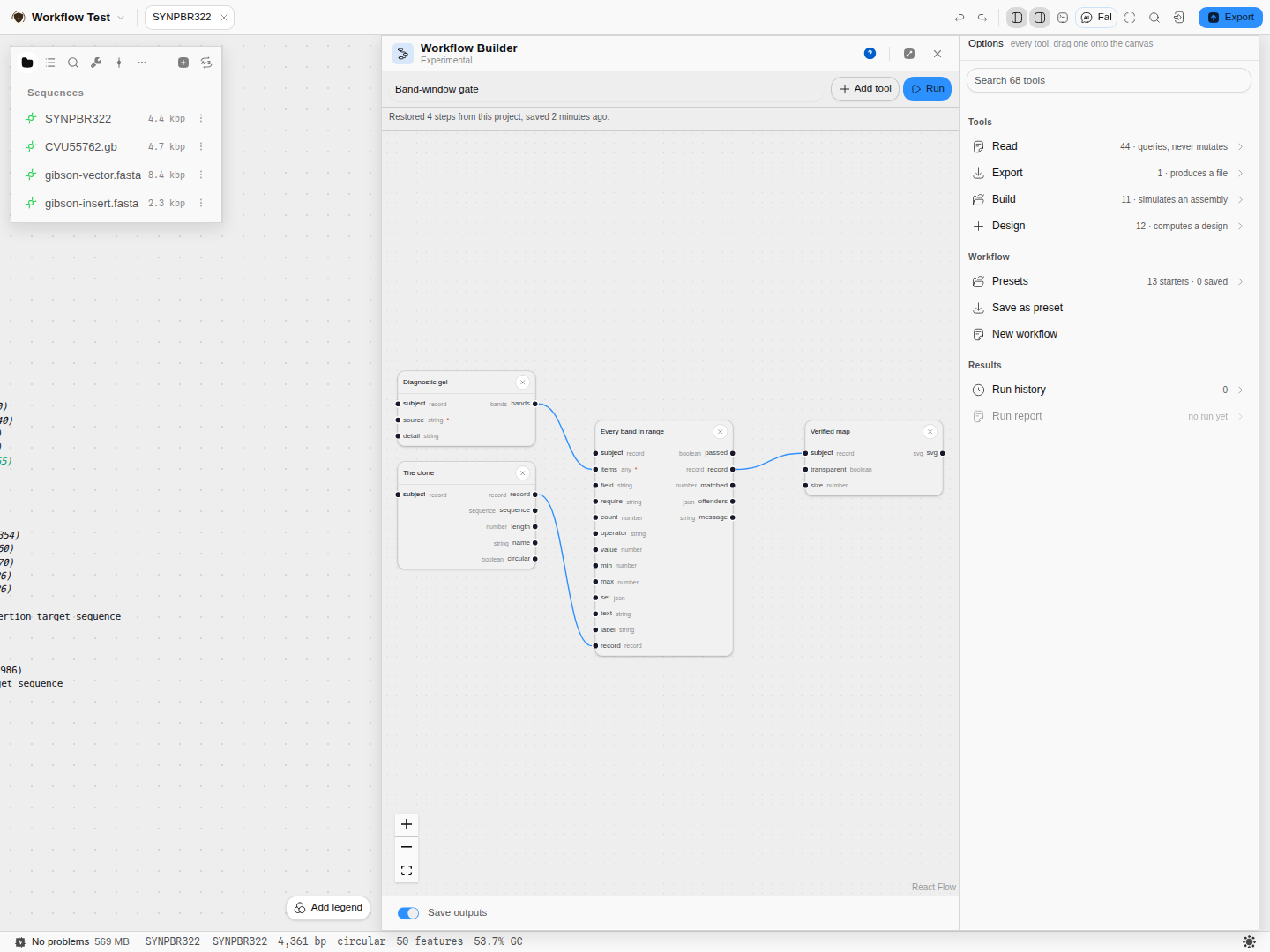 A pipeline in the builder. The left column produces (a diagnostic gel, and the open molecule); the
gate in the middle asserts something about the whole band table; the map on the right runs only if
the gate is satisfied.
A pipeline in the builder. The left column produces (a diagnostic gel, and the open molecule); the
gate in the middle asserts something about the whole band table; the map on the right runs only if
the gate is satisfied.
Inputs and outputs
It accepts whatever the tools themselves accept — the open molecule, another document in the project, or a product made earlier in the same run. Every node has two reserved inputs:
| Reserved input | What it does |
|---|---|
| subject | The molecule this step runs on. Unwired, the step uses whatever is open; wire an upstream product into it and the step runs on that instead. This is what makes a chain a chain: the gel runs on the amplicon, not on the template it came from. |
| run if | A boolean condition. Unwired, the step runs. Wire a verdict into it and the step runs only when that verdict is true. |
A region of the open molecule can be a step in its own right. Select a stretch on the canvas, right-click, and Send Selection to Workflow places it as a Get selection node: the selected bases as their own linear record, carrying whichever of the parent's annotations fall inside it. Wire its record into any step's subject and that step runs on the region rather than on the whole molecule. It can pad the selection by a stated number of bases on each side — clamped at the ends of a linear molecule, wrapped on a circular one — and emit the bottom strand, which is what a feature on the minus strand actually reads.
A selection that crosses the origin of a circular molecule is a real selection and is read as one.
It produces each step's real outputs, wired onward or written into the project as files (GenBank for records, FASTA, CSV, JSON, SVG, Markdown — you choose per output), plus a customisable run report.
What it refuses, and says so. A wire between incompatible types is rejected as you draw it. A required input left unset is a warning until you run. And where a hand-off cannot carry what it looks like it carries, the step says which and what to do instead — a fragment wired from a digest into a ligation, for instance, arrives as bases, and an overhang is structure that bases cannot express, so the ligation asks you to give it the enzymes to cut with rather than reporting an uninformative "no product".
Worked example
On pBR322 (4,361 bp, circular), from the Workflow pipeline sample project, using the Diagnostic digest with a band-window gate template:
- Set the enzymes. On the Diagnostic gel node,
EcoRI, HindIII. Both cut pBR322 once, so the digest gives two fragments. - Set the window. On the gate, between
20and5000bp, and label it in your own words. - Run. The gate reports
every band between 20 and 5000 bp: 2 of 2 row(s) matched, passes, and the map downstream runs. The run reads Done.
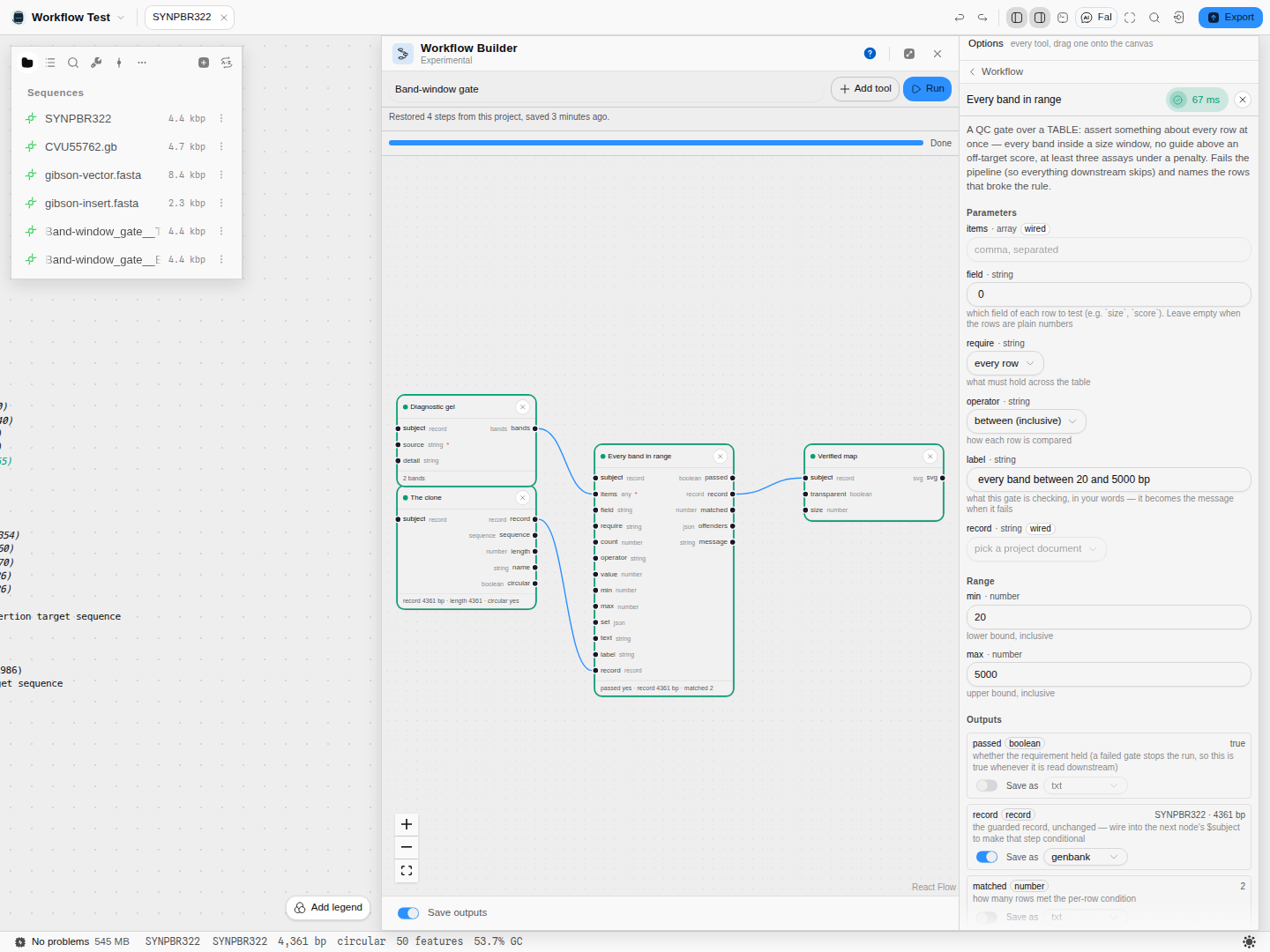 A passing run. The gate's card carries its verdict (
passed yes · record 4361 bp · matched 2) and
its outputs are on the right, each with its own "save to the project" control.
- Now tighten it. Change the lower bound to
100bp. The smaller fragment is 31 bp, so the assertion no longer holds: the gate fails, names the offending row, and everything downstream of it is skipped rather than run on a construct that did not pass.
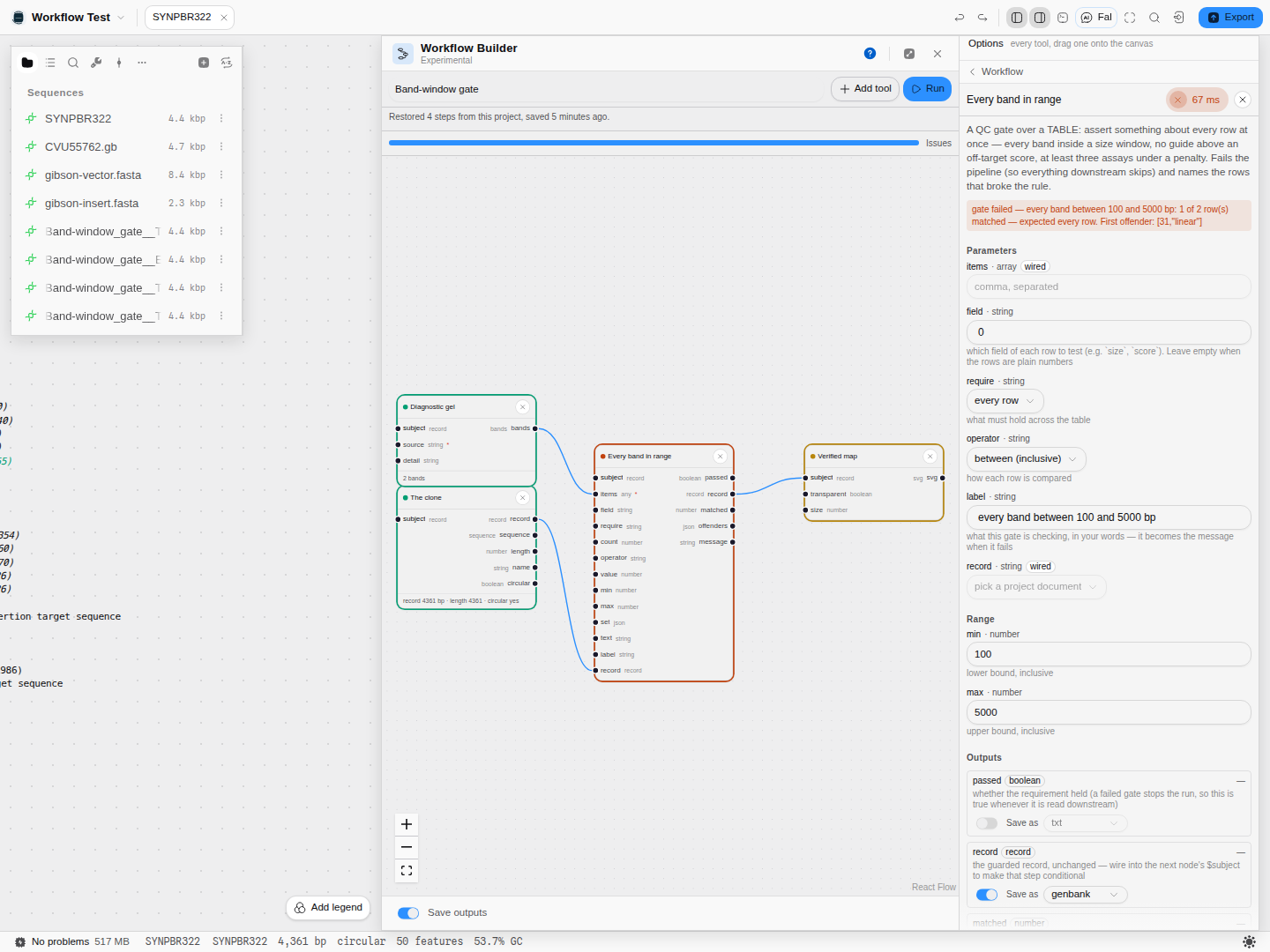
gate failed — every band between 100 and 5000 bp: 1 of 2 row(s) matched — expected every row. First offender: [31,"linear"]. The verdict names the actual number and the expectation, because a
check that only says "failed" is one you cannot act on.
Controls
Per node: every parameter the tool itself exposes, rendered from the same declaration the tool's own panel uses — so a knob means the same thing in both places. Plus the two reserved inputs above, and a per-output choice of whether that output is written into the project and in which format.
Per run: Save step outputs (on by default), Run, and Stop, which halts at the next step boundary — a step already computing finishes and keeps its real result, since discarding a result already computed would be a lie about what happened.
Per graph: name it, save it as a preset, load one of the eighteen built-in templates, auto-arrange it, and read the run history. Auto-arrange lays the graph out by its dataflow — one column per step away from a source, so every wire points right and nothing sits under anything else. It is a command you press, never something a load does: the positions in a graph you saved are your arrangement, and moving them without being asked would be moving your work. Presets travel between projects; the working graph belongs to its project.
By name: Save outputs is the per-run switch; Save as and Format decide whether a node's output is written into the project and in which format; How the lists combine sets what a For each step does when it is given more than one list (in step, or every combination); Presets and Save as preset hold a graph for reuse; Run history and Run report read back what a run did.
Conditional pipelines
This is the part that turns a recorded sequence into a protocol, and it comes in three strengths.
A gate stops the run. Check value compares one number against a threshold — or against
another step's output, which is what a diagnostic check actually is ("is the product the size the
parts predict?"). If the check does not hold the step fails, and everything downstream of it is
skipped. A run that stops at the first check that did not hold is exactly the behaviour you want
from a verification protocol.
A table gate asserts across every row. Check rows takes a table — the bands of a gel, the
guides of a design, the assays of a plate — and requires something of every row, or any row, or no
row, or at least N. It reports how many matched and hands back the rows that broke the rule. An
empty table is refused rather than passed: "every row is fine" is vacuously true of no rows, and a
check that goes green because its input never arrived is the worst answer a QC step can give.
A predicate chooses a branch. Turn on report only and a check reports its verdict instead of
stopping the run. Wire passed into one step's run if and failed into another's, and exactly
one of them runs; the other is marked not run — not failed, because the branch you did not take
is an ordinary outcome of a correct pipeline. Pick first rejoins them, carrying whichever arm ran,
so the steps after the branch do not need to know which way it went.
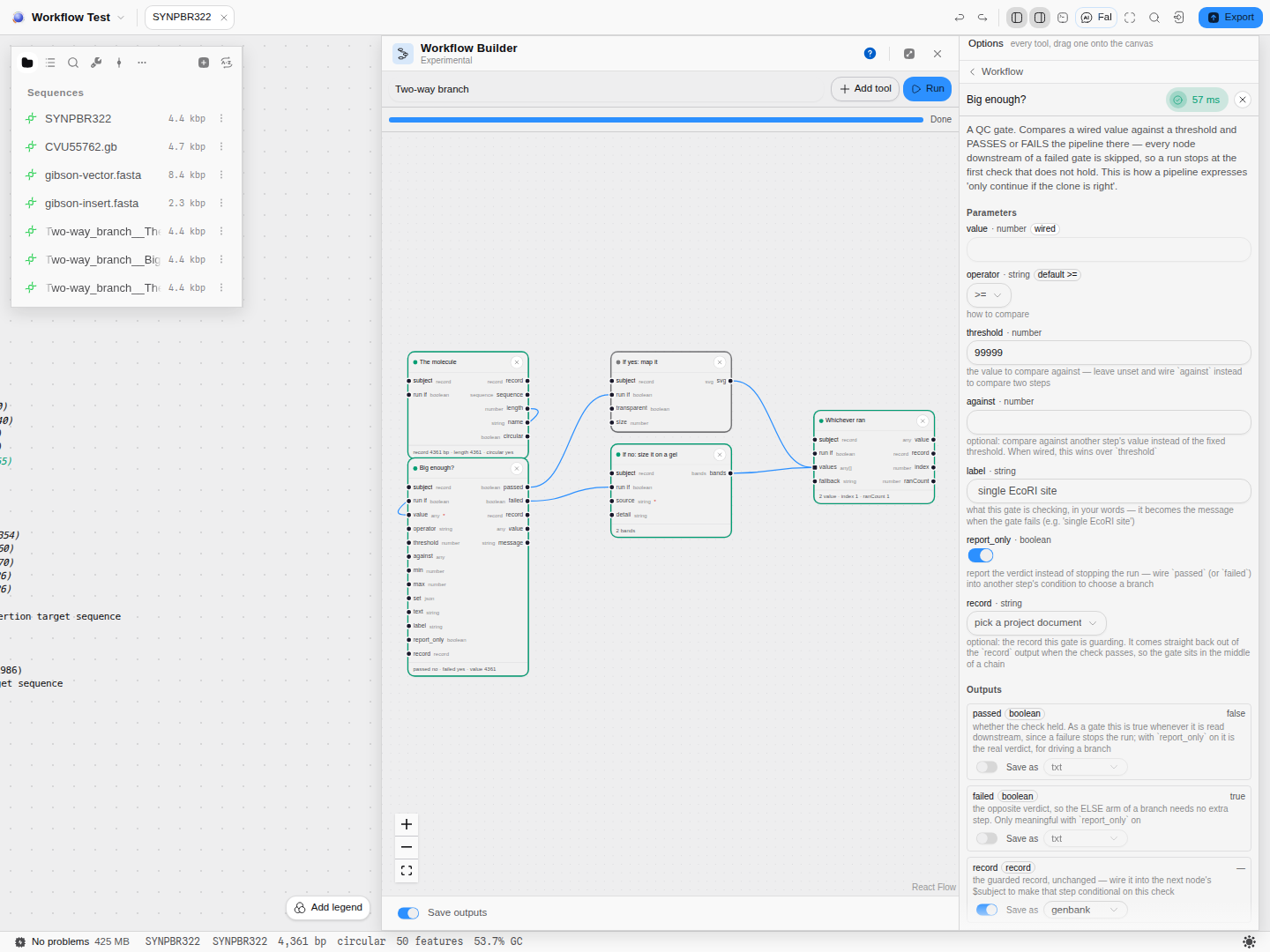 One graph, two behaviours. Here the condition came out false, so the gel arm ran and the map arm is
faint and un-run; the join reports
One graph, two behaviours. Here the condition came out false, so the gel arm ran and the map arm is
faint and un-run; the join reports index 1 · ranCount 1 — the second branch, and only one. The run
still reads Done.
Or write the rule out. Every step has a Run if field, and a rule typed there decides whether that step runs at all — no gate node, no wire. It reads the step's own inputs and the molecule it is about:
subject.circular and subject.length > 3000
len(items) >= 2
contains(subject.name, "pUC") or subject.length < 5000
Comparisons, and / or / not, arithmetic, and a small set of functions — len, min, max,
abs, round, floor, ceil, contains, lower, upper, isset. The field tells you what the
step can see and checks the rule as you type: a name that step does not have is reported under
the field and blocks Run, rather than becoming a step that mysteriously never runs.
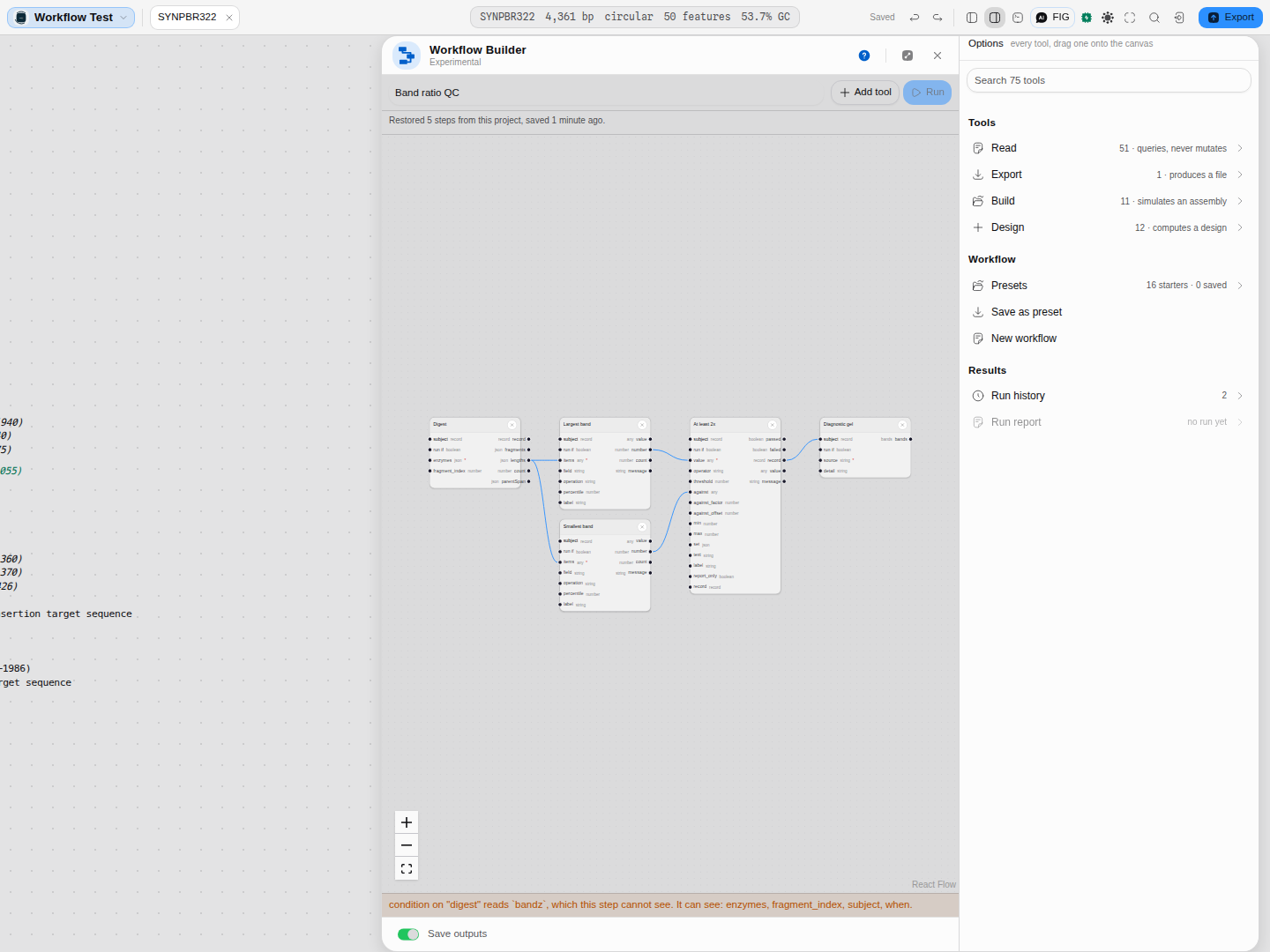 A rule can be perfectly good syntax and still unrunnable.
 len(bandz) > 2 and subject.circular
names a value this step has no access to, so it is refused before the run rather than halfway
through one — with the reason under the field and again beside the blocked Run button, and the list
of what the step actually can read.
The comparison vocabulary is the same in all three gates — equals, at least, between, is one of, contains — because a gate and a filter that disagreed about what "between" means would be a trap rather than a feature.
Rules that compare one row with another
A table gate asks the same question of every row. The check a diagnostic digest is really read by is not that — it is a relationship between rows: the largest band is at least twice the smallest, the top-scoring guide is clear of the runner-up, no assay is more than 2 °C off the median.
Summarize rows is what makes those expressible. Point it at a table and a column, choose a summary, and it hands one number downstream:
| Group | Summaries |
|---|---|
| Extremes | minimum, maximum, smallest and largest by magnitude, range |
| Totals | sum, count, count of distinct values |
| Centre | mean, trimmed mean, geometric mean, harmonic mean, median, mean square and root mean square |
| Spread | percentile, lower and upper quartile, interquartile range, population and sample standard deviation and variance, median absolute deviation (scaled and unscaled) |
| Shape | skewness and excess kurtosis (population and sample), and the Jarque–Bera and D'Agostino–Pearson normality p-values |
| Values | first, last, most common, least common, the distinct values, every value |
Then compare two of them. Check value's Scale multiplies the value it is comparing against before the comparison, and adds an offset after — so "at least twice the smallest band" and "within 50 bp of the size the parts predict" are each one gate rather than an arithmetic detour.
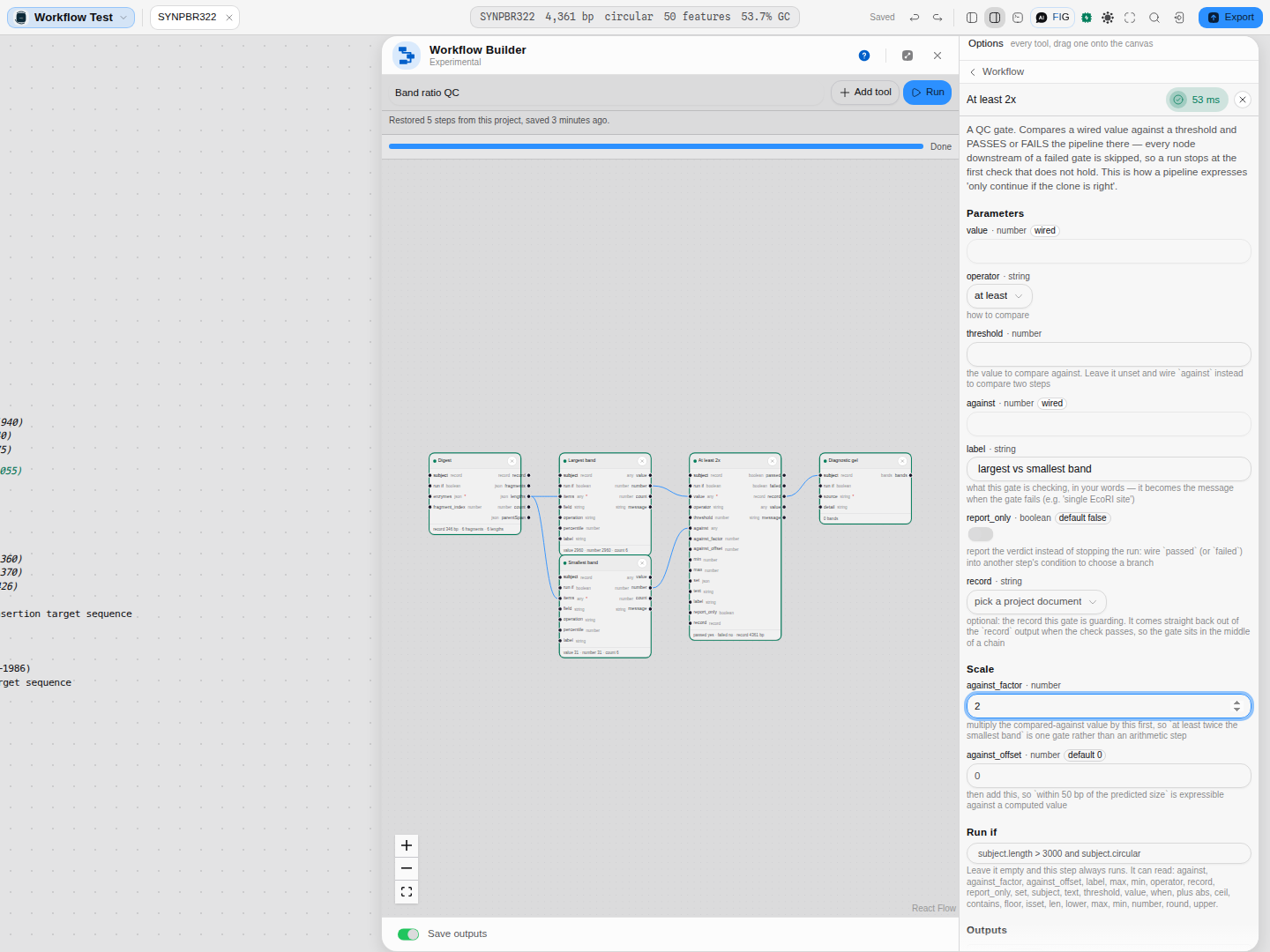 The Digest QC by band ratio starter, run on a real 4,361 bp plasmid. One digest feeds both a
largest-band and a smallest-band summary; the gate multiplies the smaller by the factor you set and
compares. Here
The Digest QC by band ratio starter, run on a real 4,361 bp plasmid. One digest feeds both a
largest-band and a smallest-band summary; the gate multiplies the smaller by the factor you set and
compares. Here largest vs smallest band: 2960, expected >= 62 — the two real fragment sizes, and
the rule they were held to.
A summary that is not defined for the column you gave it — a sample standard deviation of one value, a geometric mean over a negative number — refuses and says how many values it needed, rather than handing the gate a number that makes every comparison silently false.
One answer per group
Point the same step at a grouping column and it stops summarising the whole table and summarises each group instead: the mean product size per template on a multiplex screen, the best score per strand on a guide table, the largest fragment per enzyme. What comes back is itself a little table — one row per group, with the value, how many rows went into it, and how many of those actually carried a number — so the natural next step is to wire it straight into a table gate and hold every group to the same rule at once.
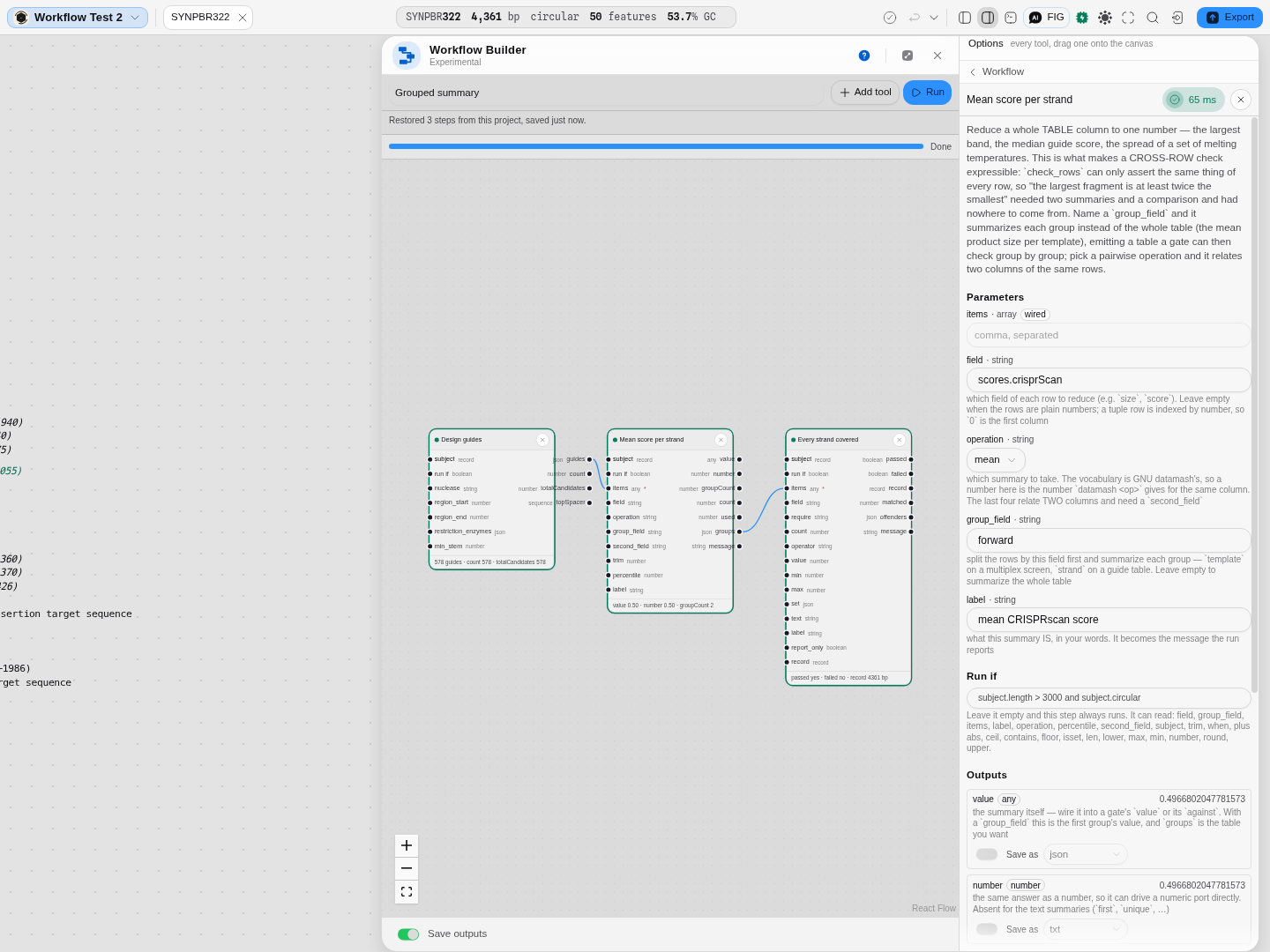 The Guide quality per strand starter. 578 guides go in; the summary splits them by strand and
reports the mean score for each, and the gate then asserts something of every group rather than of
every guide. The column being averaged is
The Guide quality per strand starter. 578 guides go in; the summary splits them by strand and
reports the mean score for each, and the gate then asserts something of every group rather than of
every guide. The column being averaged is scores.crisprScan — a nested field, addressed with a dot,
because that is the shape the real tables have.
Groups come back in the order a text sort gives, which is the same order datamash returns them in:
10 before 2, and B before a. A group too small for the statistic you asked for reports that
it is undefined and why, rather than a number.
Two columns at once
Four of the summaries relate two columns of the same rows instead of reducing one: sample and population covariance, and sample and population Pearson correlation. Name the second column and the step answers a question about the relationship — does fragment length track GC content, does the off-target count track the mismatch score — for the whole table or, with a grouping column, per group.
A row whose either cell is not a number is dropped as a pair, never one side of it: dropping half a row would re-pair every value after it with the wrong partner, and a covariance cannot survive that or show it on its face.
Steps that do not need you to type the value
A starter template ships operations and wiring, never scientific values: which enzymes you cut with is a fact about your construct, not about the pipeline, so a template that shipped one would be choosing your experiment for you. The cost used to be that every digest template loaded and then refused, because its enzyme list was empty by design.
A parameter can now name where it comes from instead. Leave a digest's enzymes blank and the run uses your active enzyme collection — the one you chose in Manage enzymes — and the field says so before you press Run.
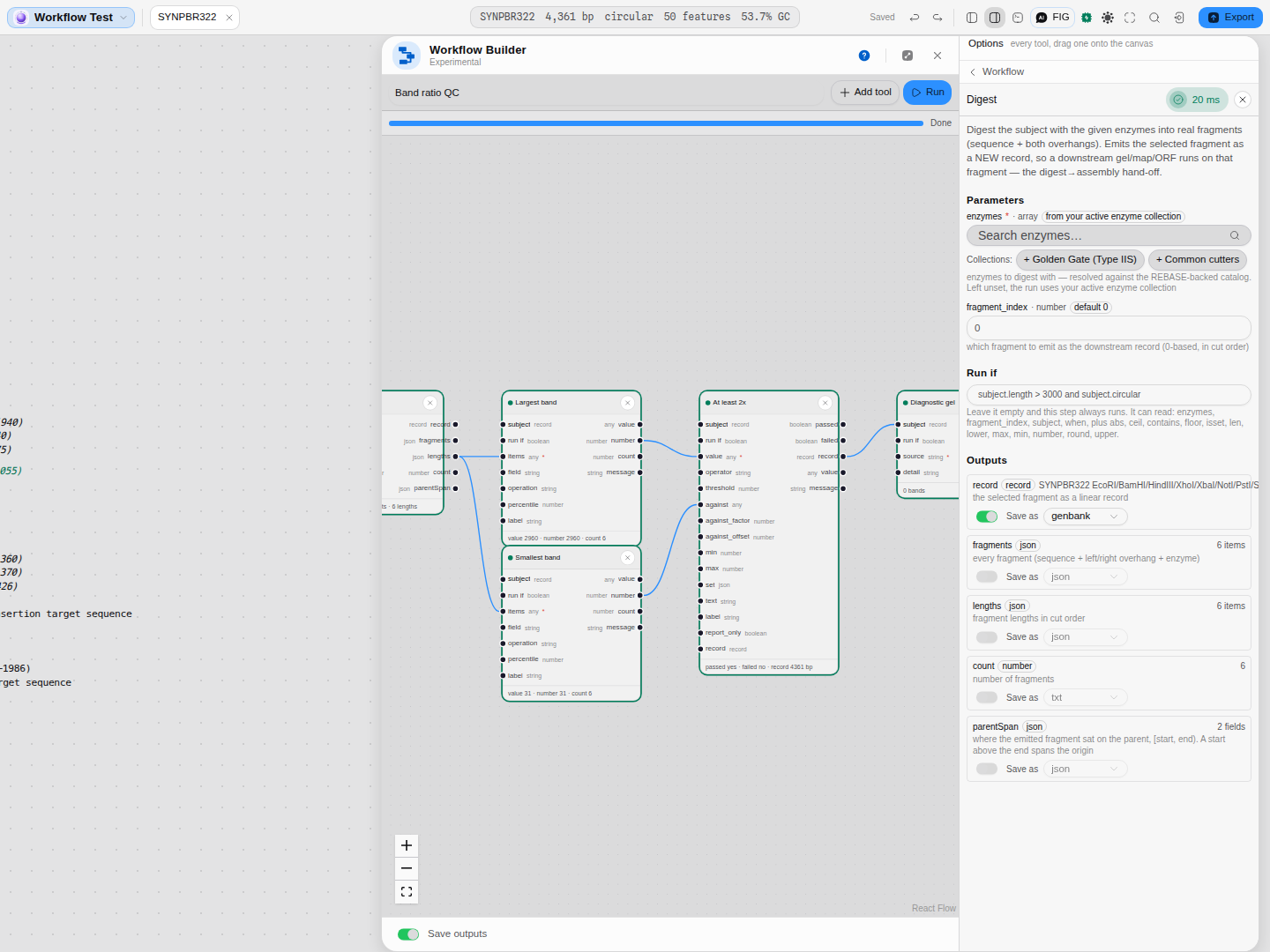 Nothing was typed into this graph. The badge beside
 enzymes says where the value will come from,
and the step's record output names the enzymes it really used.
Three rules make this safe to rely on:
- What you type always wins, and a wire wins over both. This only ever fills a hole.
- If there is nothing to fill it with, nothing is filled — no active collection means the step refuses exactly as it did before, naming what is missing. A default you cannot see is worse than no default.
- The run records what it used. A saved run can answer "which enzymes did this actually cut with", not just "whatever was active that day".
A sequencing read as a step
A Sanger trace is a file, not a sequence, and that is why it took a step of its own. Load trace
reads an .ab1, .scf or .ztr from the project you are in and hands the part of it a pipeline can
use to the next step: the base calls as a linear record, the per-base phred quality beside them, and
what the file says about itself (its format, its instrument comments, how many bases were called).
- It trims the way the chromatogram panel trims, by the same sliding-window mean-quality bounds, so the read a pipeline verifies is the read the panel shows you. Turn trimming off to get the calls exactly as the basecaller made them.
- The mean quality is reported over the bases actually emitted, not over the whole read: a mean that included the trimmed-off tails would flatter every read you ever load.
- It can read the other strand. A reverse primer's trace is the reverse complement of the strand you are verifying, so the step will complement it for you rather than making you do it elsewhere.
- The signal stays where it is. The four channels of trace are not on the wire — nothing downstream could carry them — so what travels is the calls and their quality. To look at the peaks, open the trace.
The Check a Sanger read against this clone starter is the shape this exists for: load the read, dot-plot it against the molecule you have open (a mismatch shows as a break in the diagonal), and report the read's mean quality against whatever bar you set.
Masking before a search
A similarity search seeds on short exact matches, so the parts of a query that are not informative — a poly-A tail, a serine-rich linker, an interspersed repeat — match thousands of unrelated things and bury the hits you wanted. Every BLAST-family tool masks them first, and a pipeline that skips that step gets an answer it then has to explain.
Mask sequence is that step, with all three of the standard maskers behind one choice:
- DUST for nucleotide sequence whose composition is biased: homopolymer runs, simple repeats.
- SEG for the same question in protein.
- WindowMasker for nucleotide stretches that are perfectly ordinary in composition but occur far more often than chance allows in the sequences you give it. It has no repeat library for your organism and does not need one — it takes its cut-offs from those sequences' own n-mer distribution, so what you wire into it decides what "over-represented" means, and the step reports the set it used along with every threshold it derived.
It hands on the soft-masked sequence (lower case, which is what a search treats as masked), the hard-masked one, the masked intervals, and the fraction of the query that went — that last one being what you gate on, because a query that is 80% masked will come back empty for a reason that is not "no homologues".
Reaching outside the machine
Four steps leave the local-first path deliberately, and each one says so before it runs:
- EBI alignment submits to the EMBL-EBI Job Dispatcher — Clustal Omega, MUSCLE, MAFFT, Kalign, T-Coffee, EMBOSS needle / water / matcher / stretcher, LALIGN, phmmer, hmmscan, PSI-BLAST or Phobius. These are the reference implementations a methods section names, so an alignment computed here can be checked against the tool the field cites. The step returns the job id, which is what makes the result citable and re-fetchable.
- BLAST search submits to NCBI BLAST+ at the same dispatcher — blastn, blastp, blastx, tblastn or tblastx, over ENA, UniProtKB, PDB and the vector-screening sets. The query alphabet follows from the program you pick and is never asked for twice: blastx takes DNA and searches protein, tblastn the reverse. Left alone, the database and every parameter are the ones the service itself advertises as its defaults for that search space, and the run reports which it used; name a database the program cannot search, or a parameter the service does not offer, and it says so before anything leaves. What comes back is the hits with their E-values, the best hit's identity and coverage, the subjects as FASTA (ready for an alignment or a tree), the tabular report, and the job id. A query shorter than the word size the run is using cannot seed a single match, so that is refused up front rather than returned as an empty table that reads like "no homologues".
- Fetch record pulls one accession from NCBI Nucleotide or Protein, ENA, UniProtKB, the iGEM Registry, Addgene, or the EBI Dbfetch gateway, and hands it downstream as a real record with its annotations — so a pipeline can start from a published sequence rather than from whatever is open.
- Query database asks any of about sixty authoritative databases and hands back its rows, ready for a filter or a gate.
Your sequences leave the machine when you run one of these, and only then. They are ordinary steps in a graph you pressed Run on; nothing here is automatic. An authority this deployment cannot reach directly is refused up front, with the reason, rather than after a timeout that reads like an empty result.
Limitations
- The graph must be acyclic. No loops, and no "repeat until": a cycle is rejected when you draw it. Batch work over many files is not expressible yet.
- Batch work is the missing shape, not grouping. A summary can group and can relate two columns (above); what a graph still cannot say is "do all of this for each of these forty files".
- A hand-off carries bases, not structure. Sticky ends and trace signal do not survive a wire between steps: a record travels as bases, and a chromatogram peak cannot be written as one. Where that matters the step says so instead of quietly doing the wrong thing — and where it can be worked around it is (a Sanger read is loaded from the project by the step that needs it, below, rather than pushed down a wire).
- A written condition sees only its own step. It can read that step's inputs and the molecule handed to it, and nothing else — so to test something another step computed, wire that value into this one first. This is deliberate: a condition that could reach anywhere would let a graph depend on a step nothing connects it to, and the drawing would stop being the truth.
- A condition is one expression. No statements, no assignment, no loops, and no calling anything but the listed functions.
- A selection is read when the pipeline runs, not when it was sent. The Get selection node takes whatever is selected at the moment you press Run, so moving the selection between building the graph and running it changes what the step sees. If it finds nothing selected it says so and stops, rather than treating an absent selection as an empty region.
- A failed step stops its whole downstream. That is deliberate, but it means a long pipeline reports one failure and a lot of skips; read the first red node, not the last.
Compared with other tools
Most sequence-analysis software has no workflow layer at all: the operations exist, and stitching them together is your job, done by hand each time. The systems that do have one — Galaxy, UGENE, CWL-based runners — are separate installations that operate on files you export to them.
What is different here is that the graph runs inside the editor, on the molecule you have open, against the same engines the panels use, and writes its results back into the same project. The conditional vocabulary is also unusually granular for a bench tool: as well as branching, the gates compare two computed values against each other, test set membership, and assert across a whole table with a stated requirement — checks that in most pipelines are a script somebody wrote once and nobody can read.
Provenance of correctness
Every node runs the same engine as the corresponding panel, so a digest in a workflow and a digest in the Digest panel are the same computation — cut sites checked against REBASE, assemblies verified against pydna and DnaCauldron byte for byte. The workflow layer itself adds no science: it decides what runs when, and the conditional semantics follow Galaxy 23.0 and CWL v1.2, which agree — a step whose condition is false is skipped and yields nothing, and the arms of a branch are rejoined by an explicit pick-the-one-that-ran step.
The summary statistics are checked against GNU datamash, operation by operation, on real columns — every one of the summaries listed above, ungrouped and grouped, compared digit for digit with what datamash prints for the same numbers. Two answers deliberately differ, and both are worth knowing:
- Asked for the least common value, datamash 1.8 can return a value that occurs twice, because of how it scans for the shortest run. This tool answers the least common value.
- The two normality p-values are computed directly here. datamash subtracts its result from 1 and then subtracts that from 1 again, which throws away the small end of the scale: on a real digest it reports a p-value of exactly 0, which is not a probability any test produces. The numbers agree everywhere that agreement is meaningful; deep in the tail, ours is the value.
The condition language follows CWL v1.2, where a step's when is an expression over that step's
own inputs. It is evaluated without a JavaScript engine: there is no eval, a rule can read only
plain fields of the values it was given, and the only things it can call are the functions listed
above — so a condition is a question, never a program.