
Contamination Screen
Find the parts of a sequence that came from the vector rather than from your insert.
| Reached by | Tools → Screen for vector contamination… |
| Sample project | Vector contamination screen |
What it does
When you sequence a clone, some of what comes back is usually not your insert. Plasmid backbone either side of the cloning site, the adapter or linker used to build the library, the primer that started the read — all of it is real sequence that belongs to the construction, not to the biology you are studying. Left in, it corrupts assemblies, produces spurious BLAST hits, and is the single most common reason a GenBank submission is sent back.
This screen compares your sequence against UniVec, NCBI's non-redundant collection of the vectors, adapters, linkers and primers used in cloning and library preparation, and reports every stretch that looks like it came from one of them. It is the same check NCBI runs on every sequence submitted to GenBank, and it reports its results in the same categories, so a sequence that screens clean here will screen clean there.
Each match is graded Strong, Moderate or Weak — how confident the evidence is that the match is real contamination rather than coincidence — and every one is drawn on the map at its real coordinates so you can see where the boundary between vector and insert actually falls.
When you'd use this
- Before submitting a sequence to a public database. Vector contamination is the most common cause of rejection. Screening first, and trimming what is found, avoids the round trip.
- After getting Sanger reads back from a clone. Reads routinely start inside the vector and run into the insert. The screen tells you where the insert actually begins, which is what you need before comparing the read to the intended construct.
- After assembling reads into a contig. A single contaminated read can carry backbone into the middle of an assembly, where it is much harder to notice than at an end.
- When a BLAST search returns results that make no biological sense. Hits to unrelated organisms that all happen to be sequenced plasmids are the classic signature of vector left in the query.
The natural order is: read the trace → screen for vector → trim → verify against the intended construct. Screening before verification matters, because vector at the end of a read otherwise shows up as a long mismatched stretch and drags the identity score down for a reason that has nothing to do with whether the clone is correct.
What this computes
Per match
- A local alignment score against every record in the vector database, scoring
+1per matching base and−5per mismatch, with gaps at 3 to open and 3 per base — harsh on mismatches on purpose, so only a nearly exact stretch reaches a reportable score - Coordinates, strand and percentage identity, and the UniVec record it matched, linked to that record at NCBI
- A strength category — Strong, Moderate or Weak — read off two different ladders depending on whether the match is terminal (starting within 25 bases of the beginning, ending within 25 of the end, or touching or lying inside a match that does) or internal. Terminal: ≥ 24 / 19–23 / 16–18. Internal: ≥ 30 / 25–29 / 23–24. The ladders differ because the prior differs, and the gap in the internal ladder is deliberate: an internal match scoring 16 to 22 is not reported at all. Each category is calibrated against how often a score like it turns up between unrelated sequences: Strong expects about 1 chance match in 1,000,000 queries of 350 kb, Moderate about 1 in 1,000, and Weak about 1 in 40 — which is why a Weak verdict is treated as undecided rather than as a finding
- A reading of the whole result, in words, built from the run rather than chosen from a list: the grade and how much of the sequence it covers, then the chain that produced it — the category, the ladder it was read off and the boundary it crossed; the raw score, the identity and the strand; the search settings the run actually used; and the database, with how many raw record matches collapsed into how many reported regions
- The uncertainty, which is the category and nothing else. Vector screening reports a raw alignment score, not normalised for the length of your sequence or the size of the database, so there is no E-value and no p-value to quote and none is shown. NCBI's answer to how confident is this is the ladder itself, calibrated per category against a 350 kb query: roughly 1 chance match in 1,000,000 for Strong, 1 in 1,000 for Moderate and 1 in 40 for Weak. Those figures describe NCBI's own boundaries, so if you move a boundary the panel says the calibration no longer applies rather than quoting it anyway. A number invented to fill that gap would be worse than the gap
- Cautions, only when the result earns them — every one naming what it is about. A verdict where every region is Weak, which is the case NCBI itself calls undecided. Each suspect-origin stretch, by its own coordinates. A sequence that is essentially vector end to end, which is the expected answer for a cloning vector screened against itself and not evidence of contamination in an insert. A clean screen, with the limit of the build that was searched. And any setting moved off NCBI's published values, named, because grades produced under changed boundaries are not the grades NCBI would report
Per sequence
- Suspect-origin segments — any stretch of 50 bases or fewer stranded between two vector matches, or between a match and an end. Reported as its own finding in its own colour, because it is not vector and is not a point on the Strong-to-Weak scale; it is simply too short to have come from anywhere trustworthy
- The total number and percentage of bases judged to be vector
- A masked FASTA, every reported base replaced by
N— the form NCBI asks a submitter to upload - A trimmed insert: the longest stretch containing no vector and no suspect-origin segment
- Origin-spanning matches drawn as arcs, not cut at the numbering's arbitrary start point, when a selection on a circular molecule crosses the origin
What it refuses, with the reason: a sequence shorter than the seed word length, which cannot produce a match at all; anything where fewer than half the characters are A/C/G/T/U, since vector screening is a nucleotide search; and an empty selection.
Where it lives
Open it from Tools → Screen for vector contamination…, or type "contamination" into the command palette. It docks in the right-hand rail beside the sequence.
While it is open, every match is drawn on the sequence — on the circular map, the linear map and the sequence view — coloured by category, with the score, the strand and the matched database record in the tooltip. Clicking a match in the panel selects that range on the canvas, and clicking the coloured bar at the top of the results does the same.
The marks are a view, not an edit. They are not written into your record and will not appear in anything you export. Closing the panel removes them and leaves the sequence exactly as it was.
Inputs and outputs
It accepts the open sequence, a region you have selected, sequence pasted in as plain bases or FASTA, or one or more FASTA files of reads — screened as a batch, each with its own result. On a circular molecule a selection may cross the origin: it is screened as the continuous stretch it really is, and any vector found inside it is drawn as an arc across the origin rather than being cut at the numbering's arbitrary start point.
It produces a list of matches with coordinates, score, strand, percentage identity and the
UniVec record each matched (linked to that record at NCBI); a list of suspect-origin segments; the
total number and percentage of bases judged to be vector; a tab-separated report of everything —
which records what was screened, the settings and category boundaries the run actually used, and,
where the molecule's own name differs from the file it came out of, both names, so a report read
weeks later still says which document it is about; a
masked FASTA, where every reported base is replaced by N — the form NCBI asks a submitter to
upload; and a trimmed insert, the longest stretch containing no vector and no suspect-origin
segment.
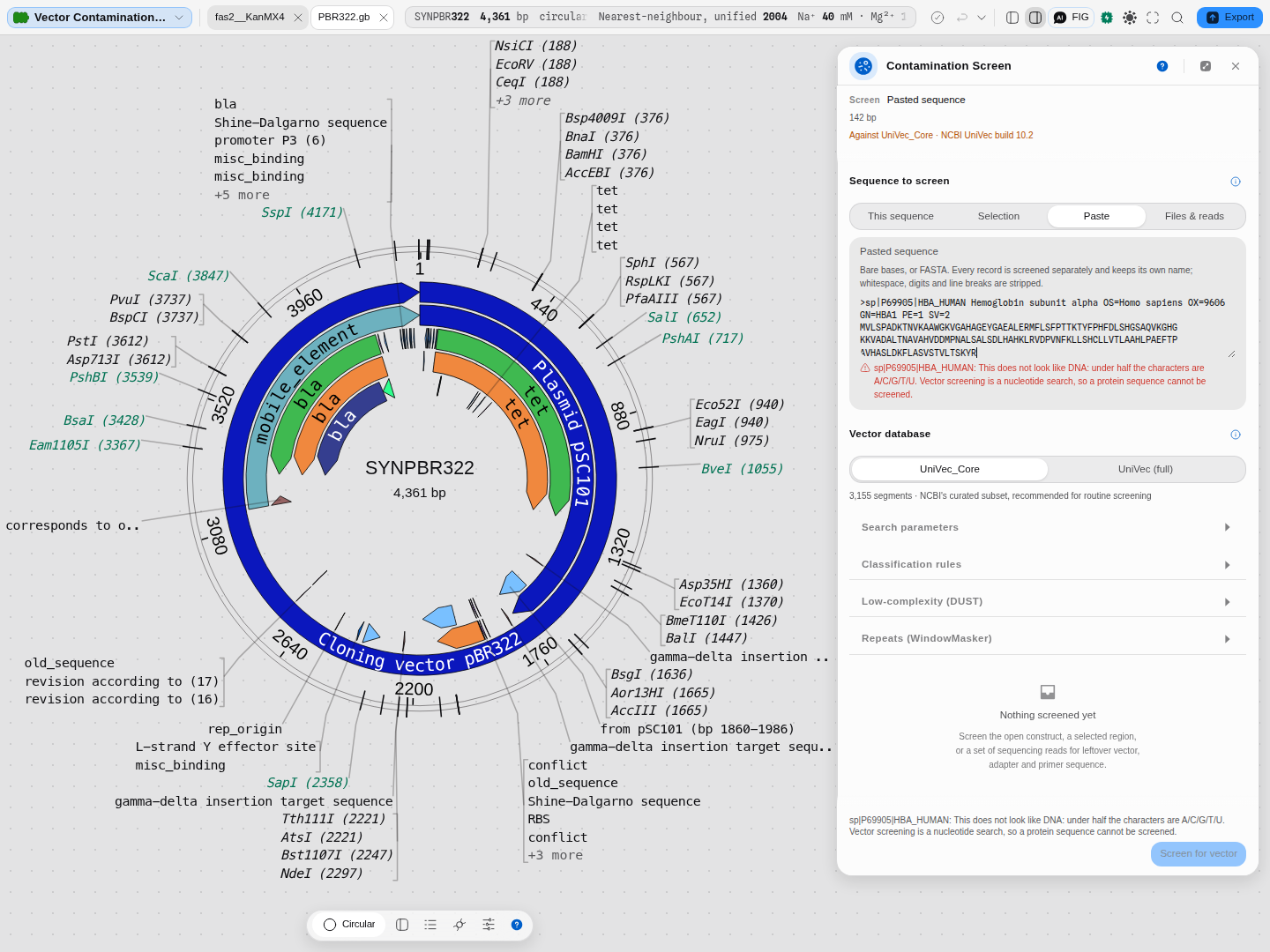
It refuses, and says why rather than returning an empty table: a sequence shorter than the seed word length, which cannot produce a match at all; anything where fewer than half the characters are A/C/G/T/U, since vector screening is a nucleotide search and a protein sequence cannot be screened; and an empty selection, where it tells you to select a region first.
Worked example
Open the Vector contamination screen sample project. It holds five real files, chosen so the screen can be judged in both directions — and one that it must refuse.
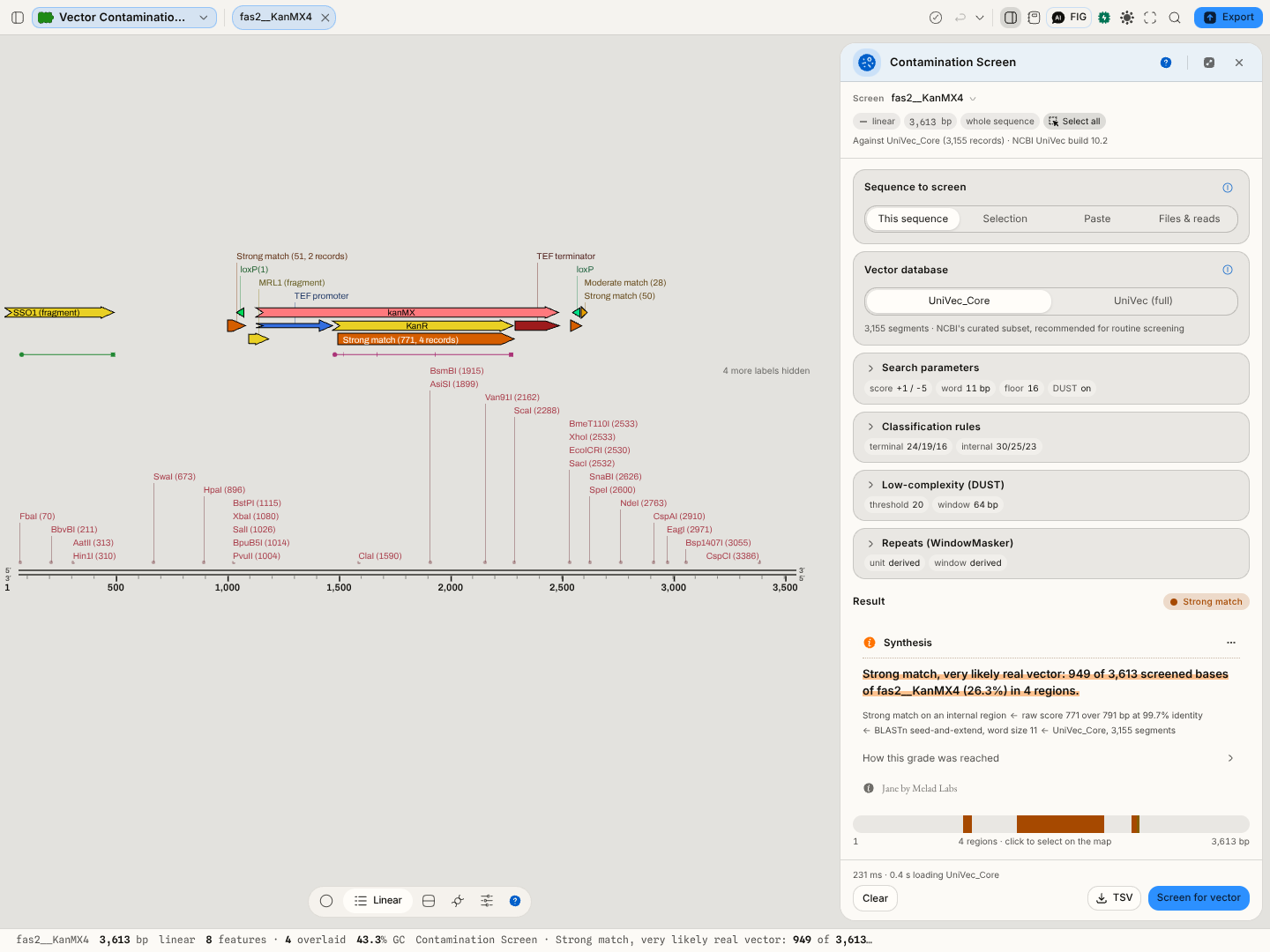
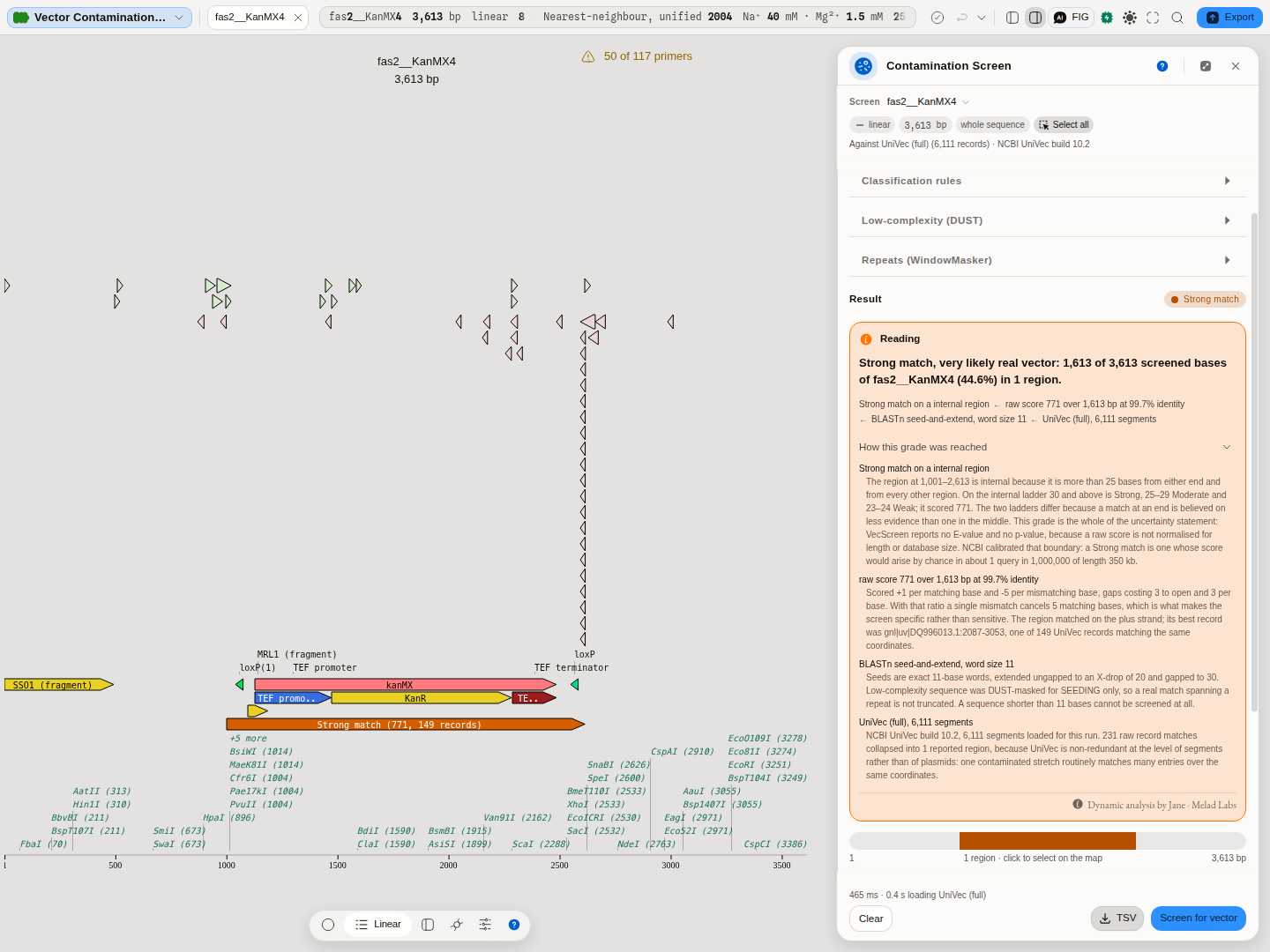
The positive, and the one that matters. The project opens on a yeast FAS2 locus with a
KanMX4 selection cassette knocked into it. Select the kanMX feature on the map — the panel's
target chip follows the selection — switch the database to UniVec (full), and press Screen for
vector. The cassette comes back as one Strong region, score 771, 99.7% identity, best of 81
UniVec records that all carry the same stretch. It is drawn on the map on the cassette itself.
Every region the screen reports is drawn on the map at its real coordinates, coloured by category, so the answer is a picture of the molecule and not only a table. Clicking a region in the panel selects it on the canvas, and the tooltip carries the score, the strand and the UniVec record it matched.
The marks are a view: they are not written into your record and will not appear in an export, and they come down when you close the panel.
This is what makes the example worth running rather than reading: the cassette is internal. The severity bar shows a band in the middle with clean genomic DNA either side, which is the shape real contamination usually has and the shape a whole-molecule positive can never show you.
The control. FAS2_wild-type_locus.gb is the same locus without the knock-in, and it screens
clean — 0 vector bases. It differs from the positive in exactly one thing, which is what makes it a
control rather than merely a different sequence. It also shows the subtlest part of NCBI's rules: it
does contain matches scoring 16–17, and they are correctly not reported, because an internal match
needs 23 to be reportable at all.
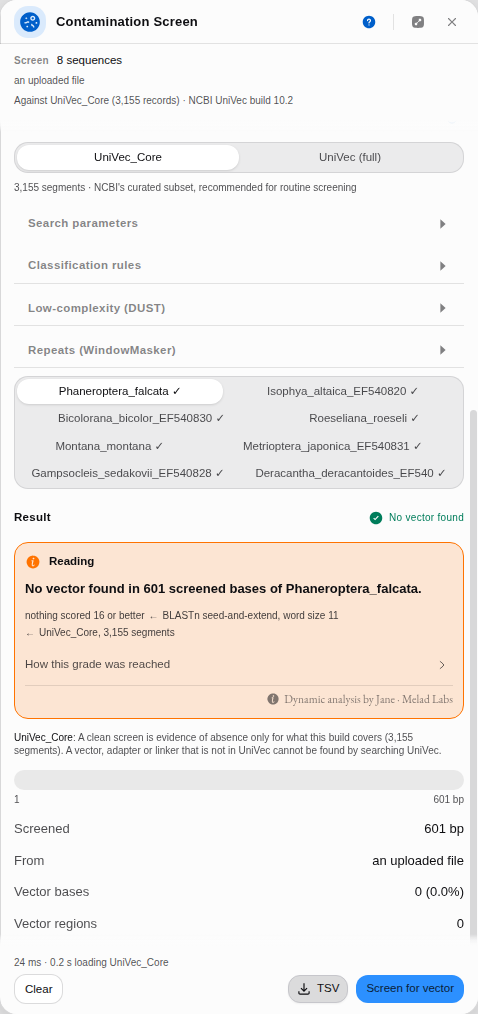
The extremes. PBR322.gb is the maximal positive — a whole molecule that is vector, matching
along essentially its entire length against its own UniVec record. COI-crickets.fasta is the
maximal negative: switch the source to Files & reads, drop the file onto the panel (or click to
pick it), and all eight real cricket mitochondrial COI barcodes screen with no vector found. A
multi-record FASTA splits into one entry per record, each listed with its length and removable on
its own, and the run gives every record its own result tab.
The one it must refuse. globins.faa is real haemoglobin protein, and it is in the project to be
turned down. Open it and press Screen for vector: the control is disabled and the panel states
the reason beside the input that chose it — vector screening is a nucleotide search, so a protein
sequence cannot be screened at all. Nothing is fetched and no empty table is returned. A tool that
answers a question it cannot answer is worse than one that declines, and declining is the behaviour
worth checking.
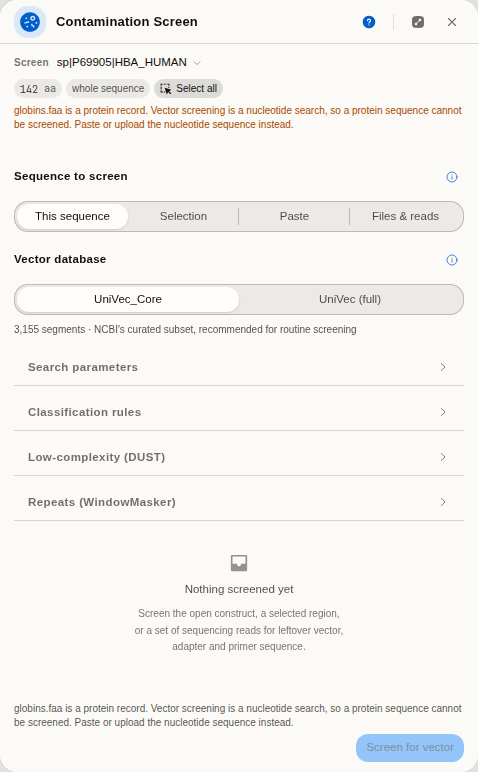
A screen that flags everything and a screen that flags nothing are both useless; this project shows it doing neither, on real data you can inspect — and shows it refusing the input it cannot judge.
Screening reads from elsewhere in the workbench
A read that just came off a sequencer is the commonest thing anyone screens, so you do not have to export it and bring it back:
- From Sequencing Verification — Screen N reads for vector, under the read list. Every read the panel is grading goes across at once.
- From an open trace — right-click the chromatogram, or use the Analyze section: Screen this read for vector. The read goes over with your edits and trim applied, so you are screening the sequence you corrected rather than the raw calls.
- From a read pileup — right-click the alignment, or use the inspector: Screen reads for vector. The reads in the current window go across, up to 200 at a time; if the window holds more, you are told how many were taken so a partial screen is never mistaken for a clean one.
This is often where the answer is most useful — and it is worth knowing which sequence in a run the vector actually turns up in. In the sequencing-verification sample project, hand all six sequences over and the five reads come back clean, while the M13 reference they are verified against carries 93 bases of vector in two regions (3.1%): a 20-base Moderate match at the very start and a 73-base exact Strong match on the minus strand at the very end. Knowing where that ends is what tells you where your insert really starts.
Do not read a clean read as "no primer in my data". VecScreen's rules are deliberately asymmetric: a match reaching within 25 bases of an end — or touching a match that does — is believed on a score of 16, while a match in the middle of a sequence needs 23. A 20-base stretch of M13 sitting in the interior of a read scores 21 and is not reported, because at that length and position it is as likely to be chance as contamination. If you want to see those, lower Internal · Weak at in Classification rules and screen again; the panel will show you exactly what the looser bar admits.
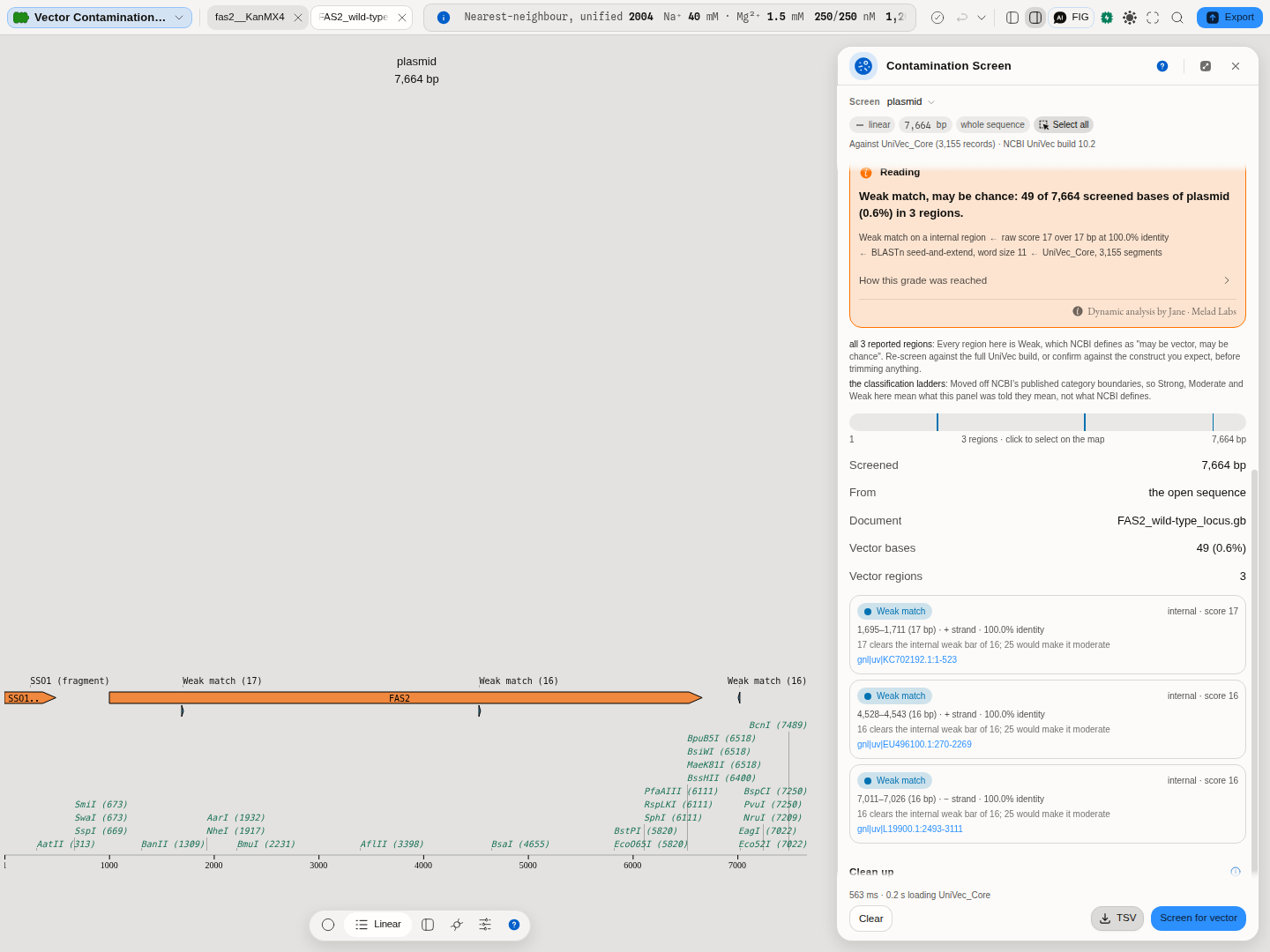
What that looks like on a real sequence: the wild-type yeast FAS2 locus, 7,664 bases with no
cassette in it, screens clean at NCBI's internal floor of 23. Lower Internal · Weak at to 16 and
the same screen reports three Weak regions covering 49 bases — 17 bases at 1,695, 16 at 4,528 and 16
at 7,011, each a perfect match to a different UniVec record. They are real matches and they are
correctly withheld by default: three exact 16- to 17-base agreements in 7,664 bases of yeast genomic
DNA is about what chance produces, which is precisely the calibration the internal floor encodes.
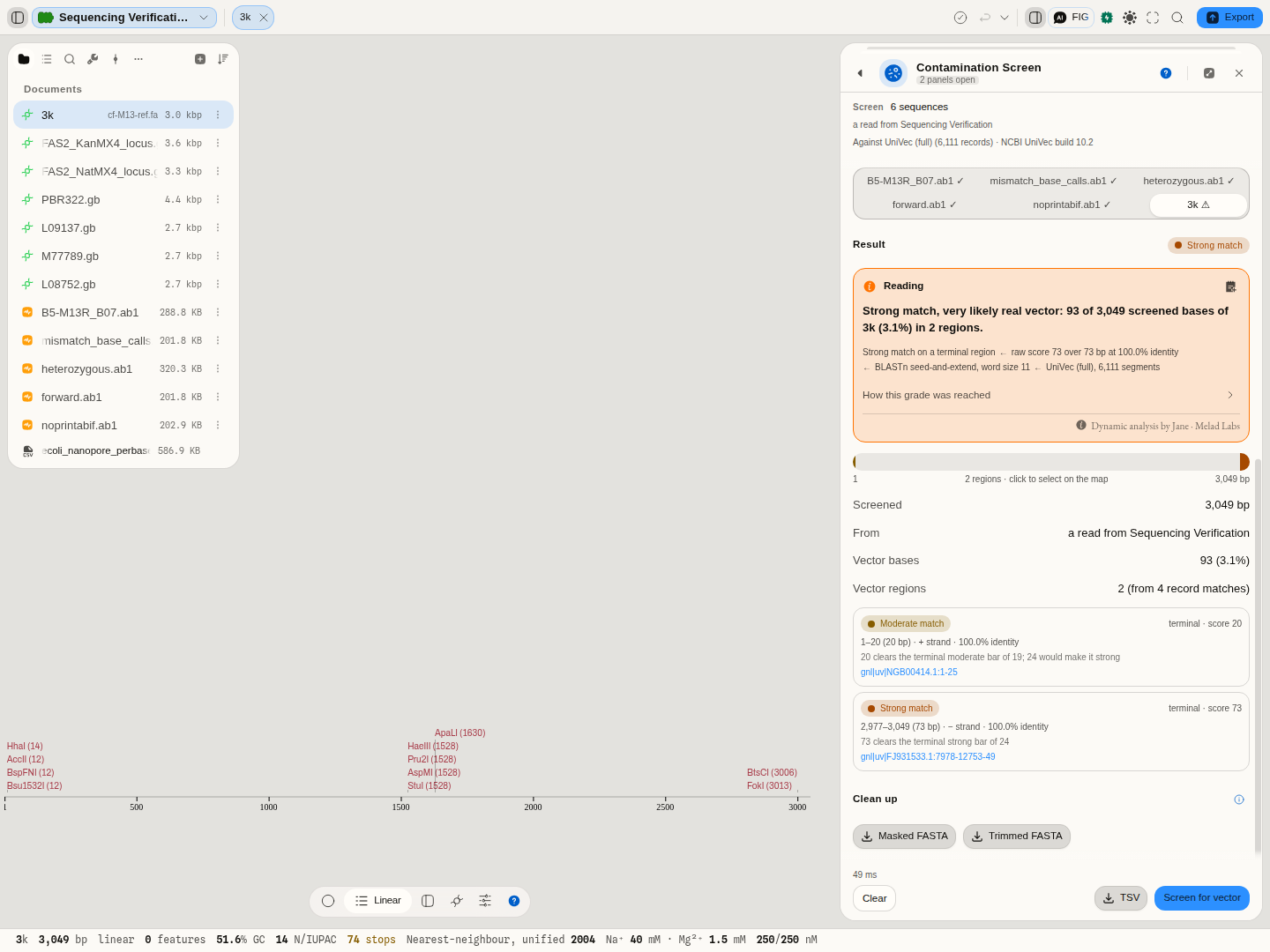
Reads screened this way are not on the open molecule, so they are reported on their own coordinates and are deliberately not drawn on its map — the panel says where each screened sequence came from so a result is never anonymous.
Screening as a pipeline step
Screening is most useful when it is not something you remember to do. Anywhere the workbench runs a chain of steps — a saved pipeline, or the assistant working through a request — the screen is available as a step called Screen contamination, so a construct can be checked automatically at the point it is produced rather than by hand afterwards.
Two things make it a step rather than a report, and they are the ones worth wiring:
- The masked sequence — your sequence with every reported match, and every suspect-origin
stretch, replaced by
N. This is the form a sequence archive asks a submitter to upload, so a submission pipeline can end here. - The longest clean region — the longest stretch carrying no match at all, ready to carry onward. Use this when the screen is a trimming step: what comes out is sequence you can build on.
The step asks the screen under the same settings the panel does. Both ladders, both distances, and the whole scoring scheme are parameters of the step, defaulting to NCBI's published values — so a pipeline that needs a stricter internal floor for long-read assemblies, or a looser one for short Sanger reads, states that in the step rather than being stuck with a screen it cannot re-grade.
Alongside them the step reports the highest category found and the percentage of your sequence
covered by matches, which are the two values to make a decision on. The category reads clean when
nothing was found — a definite word rather than a blank, so a pipeline can never confuse "nothing was
found" with "the step did not run".
A worked shape: assemble → screen → stop if anything is Strong. Assemble a construct, screen the product, and gate the rest of the chain on the category. A Golden Gate or Gibson product that comes back Strong is usually carrying backbone it should not have, and catching that before the construct is ordered or submitted is the whole point of screening at all.
Choosing the build matters as much here as in the panel, and more, because nobody is watching: the core set is the right default for routine gating, and the full set will report many more redundant hits that a naive percentage threshold will read as a worse result rather than a more thorough one.
Everything the step refuses, it refuses before downloading the database and says why — a protein sequence, a sequence shorter than the seed word, nothing to screen at all. A pipeline stops with the reason rather than with an empty result you have to interpret.
A protein record is refused too, and for a reason worth knowing if you work with them. A protein opened in the editor carries two sequences: its residues, and a back-translation into bases, which is the space the map is drawn in and every coordinate is counted in. Those bases are a rendering convenience, not a molecule — nothing was ever cloned from them — so screening them would return a confident answer about a sequence that does not exist. Open the nucleotide sequence instead, or paste it in.
Controls
Sequence to screen — This sequence · Selection · Paste · Files & reads (uploaded FASTA, and reads handed over from the trace editor, a read pileup or Sequencing Verification).
Vector database — UniVec_Core (3,155 segments) is NCBI's curated subset and the recommended choice for routine screening. UniVec (6,111 segments) is the complete set: more sensitive, and it returns many more redundant hits, because one plasmid contributes several overlapping segments and many segments are shared between plasmids.
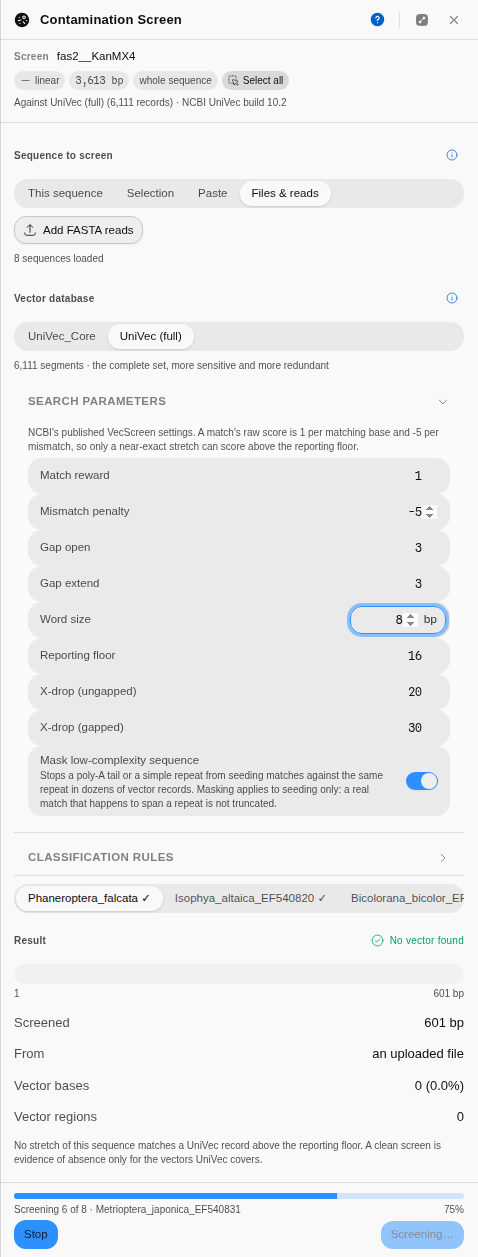
Search parameters — the scoring the match is found with. A matching base scores +1 and a
mismatch −5 by default, which is why only a near-exact stretch can score above the reporting
floor. Gap open and gap extend, the seed word size (smaller finds more marginal matches and runs
slower), and the reporting floor itself are all adjustable. The search runs in BLAST's own stages,
and each has its setting. The ungapped X-drop decides how far a quick gap-free extension of a seed
may fall below its best score before it stops; the gap trigger is the score that extension must
reach before gaps are tried at all. The preliminary X-drop bounds a first, score-only gapped pass
that decides which alignments exist, and the traceback X-drop bounds the second pass that
re-aligns each one and produces the alignment you see; raising it lets an alignment cross a longer
gap. The defaults are BLAST's own, converted from bits for this scoring scheme: 11, 13, 14 and 49. Mask low-complexity sequence stops a
poly-A tail or a simple repeat from seeding matches against the same repeat in dozens of vector
records; it applies to seeding only, so a real match that happens to span a repeat is not cut short.
Classification rules — the category boundaries, with separate ladders for terminal and internal matches, plus how close to an end counts as terminal (25 bases) and how short a stranded stretch has to be to be called suspect (50 bases). All default to NCBI's published values, and a Reset to NCBI VecScreen defaults button appears as soon as you change one, so a modified screen is never mistaken for a standard one.
Each ladder has to stay in order, and a screen that would be graded on one out of order is refused rather than run. The reason is not tidiness: a category is decided by testing Strong first, then Moderate, then Weak, so setting Strong at below Moderate at does not change a grade — it retires the Moderate at boundary, which goes on showing its number and deciding nothing, and every match above the lower bar comes back Strong. The refusal names both numbers and marks the section, so the control that has to move is the one you are looking at.
The same controls under the names the panel gives them:
| Control | Default | What it sets |
|---|---|---|
| Pasted sequence | empty | A sequence typed or pasted instead of the open record |
| Add FASTA reads | — | One file per read, or one multi-record FASTA. Reads sent over from the pileup or the trace editor land here too |
| Match reward · Mismatch penalty | +1 · −5 | The scoring, which is why only a near-exact stretch clears the reporting floor |
| Gap open · Gap extend | 3 · 3 | What a gap costs |
| Word size | 11 bp | The seed. Smaller finds more marginal matches and runs slower |
| Reporting floor | 16 | The score a match must reach to be reported at all |
| X-drop (ungapped) | 11 | How far a gap-free extension may fall below its best score before it stops |
| X-drop (preliminary) | 14 | Bounds the first, score-only gapped pass that decides which alignments exist |
| X-drop (traceback) | 49 | Bounds the second pass that re-aligns each one. Raising it lets an alignment cross a longer gap |
| Strong at · Moderate at · Weak at | 24 · 19 · 16 | The score ladder each match is graded against. It has to stay in order, and a screen graded on one out of order is refused rather than run |
| Terminal within | 25 bp | How close to an end counts as a terminal match |
| Suspect origin under | 50 bp | How short a stranded stretch has to be to be called suspect |
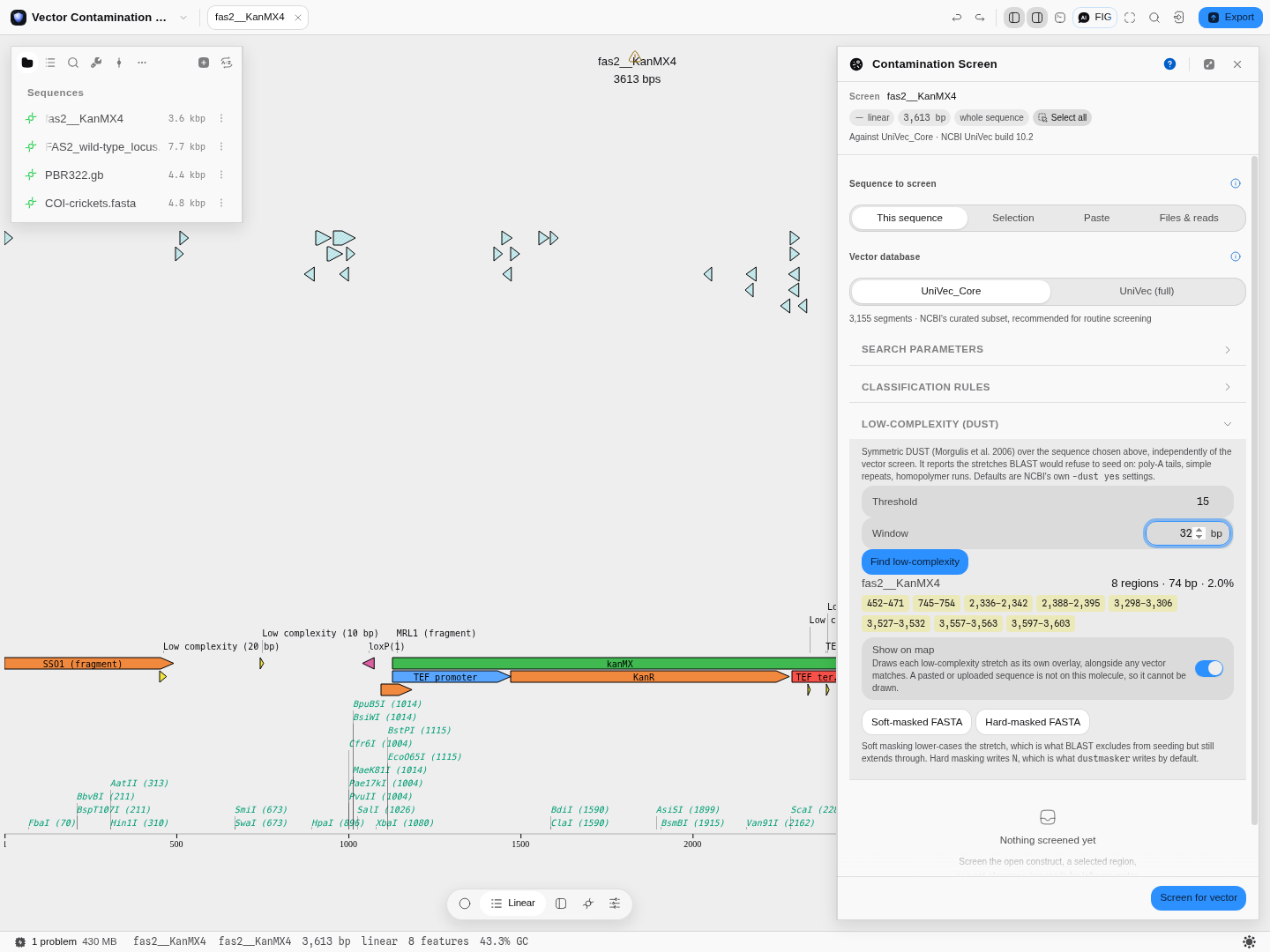
Low-complexity (DUST) — the same masking, run on its own. Vector screening uses DUST internally to stop a poly-A tail seeding against the poly-A in dozens of vector records; this section lets you ask the question directly of any sequence you can put in the panel, without running a screen at all. It reports every stretch symmetric DUST calls low-complexity, how many bases that is and what share of the sequence, and each stretch is a button that selects it on the canvas.
Two knobs, both NCBI's own -dust yes values by default:
- Threshold (DUST's T, default 20) — how dense in repeated triplets a window has to be before it counts. Raise it to mask less. On the yeast FAS2::KanMX4 locus, T = 20 finds 6 stretches totalling 48 bp; T = 15 finds 8 totalling 150 bp; T = 5 masks 61% of the sequence, which is the sign you have gone too far.
- Window (DUST's W, default 64 bp) — the width of the sliding window that gets scored. A narrower window finds short local repeats and misses long diffuse ones.
Changing either clears the previous result rather than leaving numbers computed at other settings on
screen. Show on map draws each stretch alongside any vector matches, so you can see at a glance
whether a reported match seeded on a repeat. Soft-masked FASTA lower-cases the masked bases —
what BLAST excludes from seeding but still extends through — and Hard-masked FASTA writes N,
which is what the standard dustmasker tool writes by default. They answer different questions, so
both are offered.
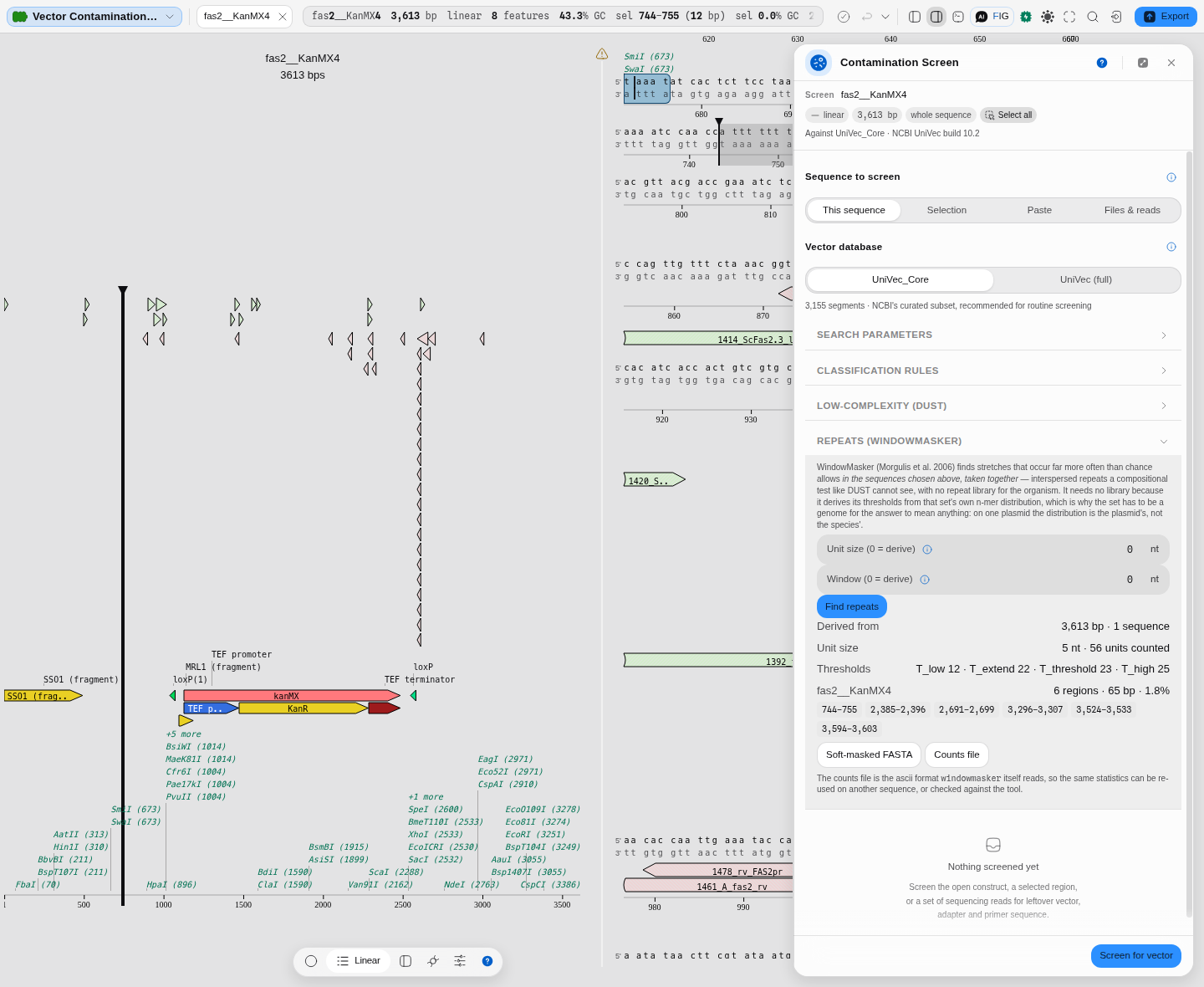
Repeats (WindowMasker) — a different question, and the one DUST cannot answer. DUST asks whether a stretch is compositionally biased, from the stretch alone: poly-A, a homopolymer run, a simple repeat. WindowMasker asks whether a stretch occurs far more often than chance allows in the sequences you chose, taken together — which finds interspersed repeats that are perfectly ordinary in composition and would seed a search against every copy of themselves in the genome.
That difference is why it needs no repeat library for your organism, and why the set of sequences matters. It counts every n-mer across all of them, and takes its four cut-offs from where that count distribution crosses the 90th, 99th, 99.5th and 99.8th percentiles. The set you choose is the "genome" those percentiles describe. On one plasmid the distribution is that plasmid's, not the species', and the panel says so where you run it: a masked stretch there means "unusually repeated for this molecule", which is a narrower claim than it looks.
So the panel shows the whole derivation, not just the answer: how many bases the counts came from, the n-mer length it used and how many distinct units it counted, and all four thresholds by name.
- Unit size — the n-mer counted. Left at 0 it is derived from the length of what you chose, by the rule the reference tool uses: the smallest n for which the sequence holds fewer than five units per possible n-mer. The panel shows what that works out to before you run it.
- Window — the width of the scored window. Left at 0 it uses unit size + 4.
Counts file downloads those statistics in the plain-text format the reference windowmasker
tool itself reads, so the same statistics can be re-used on another sequence — or checked against
the tool. Soft-masked FASTA lower-cases the repetitive bases, as with DUST.
Correctness is checked against NCBI's own windowmasker program over four real sequence sets
bundled with this application, comparing the counted units one by one, all four derived thresholds,
and every masked interval — and running the masking stage on both the reference tool's statistics
and this one's, because two stages can be wrong in ways that cancel out end to end.
Clean up — masked FASTA and trimmed insert, both as downloads. Neither edits the screened sequence.
While it runs. A screen against the full 6,111-segment build takes seconds on a whole construct, so the panel reports where it has got to: first the database being fetched, then the proportion of your sequence that has been searched, and — in a batch — which read of how many. Stop ends the run immediately. The search happens off the main thread, so the editor stays responsive throughout; stopping discards the loaded database, so the next run spends a moment loading it again.
The science
A match is found by local alignment against every record in the database, scoring +1 per matching
base and −5 per mismatch, with gaps costing 3 to open and 3 per base. That scoring is deliberately
harsh on mismatches: at −5 a single mismatch cancels five matching bases, so only a nearly exact
stretch can reach a reportable score. This is what makes the screen specific — it is looking for
sequence that is the vector, not sequence that merely resembles it.
The raw score of the best alignment, together with where it sits, decides the category:
| Terminal match | Internal match | |
|---|---|---|
| Strong | score ≥ 24 | score ≥ 30 |
| Moderate | 19 – 23 | 25 – 29 |
| Weak | 16 – 18 | 23 – 24 |
A match is terminal if it starts within 25 bases of the beginning or ends within 25 bases of the end, or if it touches or lies inside the reach of such a terminal match, which is how a run of vector at an end is followed inward. The two ladders differ because the prior probability differs: vector is overwhelmingly found at the ends of a sequence, where the cloning junction and the sequencing primer are, so a match at an end is believable on less evidence than the same match in the middle. Note the deliberate gap in the internal ladder — an internal match scoring 16 to 22 is not reported at all. The three categories are calibrated by how often a score like that arises between unrelated sequences, quoted against a 350 kb query: roughly 1 chance match in 1,000,000 for Strong, 1 in 1,000 for Moderate and 1 in 40 for Weak.
Every result carries that reasoning where you can read it, rather than leaving you to reconstruct it from a category chip: the panel states its conclusion, then the chain behind it — grade, score, search, database — with each link openable for the detail. The sentences are written from the run in front of you, so a clean sequence is explained by the reporting floor that actually decided it rather than by a grade it never received.
Where matches of different strengths overlap, the stronger one claims the overlap and the weaker keeps only the bases that stick out, so the reported regions never overlap and a single Moderate base can sit beside a Strong run.
Suspect origin is a separate finding. Any stretch of 50 bases or fewer stranded between two vector matches, or between a match and an end, is reported even though it is not itself vector: it is too short to have come from anywhere trustworthy, and NCBI asks for it to be removed along with the vector. It is drawn in a different colour precisely because it is not a point on the Strong-to-Weak scale.
Low-complexity sequence is masked before seeding using symmetric DUST, which finds stretches whose three-base composition is far more repetitive than chance. Without it, a poly-A tail seeds matches against the poly-A present in many vector records and the screen would flag clean sequence — the failure that makes a warning worth ignoring.
Provenance of correctness. The screen is checked end to end against NCBI's own VecScreen
program, over NCBI's own 147-sequence VecScreen test set, against the same UniVec build shipped
here. On that set the two agree on which sequences carry vector for all 147, and report the same
intervals, exact start and end and category, for all 147. The underlying search is separately
checked against NCBI BLAST+ blastn under VecScreen's published parameters: all 720 of its
alignments are reproduced exactly, score, length and identities included, and nothing else is
reported. The low-complexity masking is checked against the reference symmetric DUST implementation,
and the repeat masking against NCBI's own windowmasker, over the entire bundled database rather than a sample of it. The
bundled database is NCBI UniVec build 10.2, released 21 August 2024.
Corrected 2026-09-27. This section previously reported 146 of 147 sequences, 143 of 147 intervals and 717 of 720 alignments, and called the remaining alignment differences better answers than BLAST's. They were not: the search now takes each of BLAST's own steps, and the regions follow the VecScreen program's own merge rather than the wording of its help page, which describes "terminal" more loosely than the program applies it. One visible effect: the M13 reference in the sequencing-verification example used to show four regions over 129 bases, and VecScreen itself reports the two above.
Corrected 2026-09-13. This section previously reported 145 of 147 and said "no sequence NCBI calls contaminated is missed on that set", which was not true: one sequence's Moderate match was grown from the wrong starting point, which stretched it past the score at which the grade applies, and the sequence came back clean. Three fixes in the search — the order alignments are grown in, and the ability to align across an insertion in one step — closed it. Reported here rather than quietly updated, because a screen that misses is the failure this page exists to help you avoid.
Limitations
- A clean screen is evidence of absence only for what UniVec contains. It is broad but finite. A vector, adapter or barcode not represented in it will not be found, and custom or in-house constructs frequently are not represented.
- Some real biology is in UniVec, because it is used as a vector element. The yeast ADH1 promoter, common selection markers and fluorescent-protein coding sequences all appear. A screen of genuine yeast genomic sequence containing ADH1 will report a strong match, and it is correct to do so — the sequence really is in the database. The matched record is always named and linked so you can tell "this is backbone" from "this is my gene, which is also used as a marker".
- Weak matches are frequently coincidence. That is what the category means. Treat a Weak match as something to look at, not as a finding.
- It reports where vector matches, not where the cloning junction is. The two usually coincide at a read's end, but a partially degraded adapter can match a few bases short of the true boundary. Trimming to the match is the standard practice, not a guarantee of the exact junction.
- Screening against the full UniVec build is noticeably slower than the core set and returns many redundant hits covering the same span, because the database is deliberately non-redundant only at the level of segments, not of plasmids. The extra time comes from your sequence, not from the database's size: nearly twice the records costs only about 15% more, because the work is in extending your query's seeds.
- A read set is screened read by read, up to 200 at a time from a pileup. Screening every read of a deep alignment is not what this tool is for; narrow the window to the region you care about, or screen the assembled contig instead.
- It only screens nucleotide sequence, and says so rather than guessing. Vector screening is a nucleotide search, so a protein sequence is refused before any search runs, with the reason stated next to the control that chose the input. The same check catches a sequence shorter than the seed word size, which cannot produce a match at all. An open protein record is refused by what the record is, not by what its letters look like — the editor represents a protein as three bases per residue so that the map and every coordinate work, and those bases are ordinary A/C/G/T, so screening them would produce a confident verdict about a molecule that does not exist. The contamination sample project carries a protein file for exactly this reason: open it and the refusal is the answer.
- Trimmed and masked output is a download, never an edit. Nothing here changes the sequence you screened, so a trim you want to keep has to be saved deliberately.