
Protein → peptides: will mass spectrometry see the region I care about?
The route: read the protein your construct actually encodes → digest it → apply the window your instrument can detect → look at what fell out → change the digest until the region you care about is covered.
Every number below came from running the tools on CVU55762 — the real cloning vector pEGFP-N1,
4,733 bp circular — which the Protein tools starter opens. The protein is its eGFP CDS, 720
bp, 239 residues.
Why this route exists. A digest either puts your region on a detectable peptide or it does not, and that is decided before you touch a sample. The usual failure is not the instrument: it is a peptide that is 4 residues long, or 60, and therefore never appears in the data. You can find that out in two minutes here instead of after a run.
Step 1 — Read the protein, not the plasmid
Tool: Protein Analysis. Where: Tools → Analyze, or right-click the CDS on the map.
Pick Feature → egfp · 720 bp · CDS. The header confirms what will be analysed — egfp (720 bp) → 239 aa — before anything is computed:
| eGFP, from this construct | |
|---|---|
| Length | 239 aa |
| Average mass | 26.94 kDa (26,941.15 g/mol) |
| Monoisotopic mass | 26,924.4834 Da — what MS reports |
| Isoelectric point | 5.58 (Bjellqvist) |
| Instability index | 29.05 — stable (≤40) |
| Aliphatic index | 79.04 |
| GRAVY | −0.467 (Kyte–Doolittle) |
| ε₂₈₀, reduced | 21,890 M⁻¹cm⁻¹ · A280 at 1 g/L = 0.813 |
Two of these decide the next hour of bench work. ε₂₈₀ is how you will quantify the protein before digesting it, and the monoisotopic mass is the one to compare against an intact-mass measurement — the average mass differs by ~17 Da here and by more as proteins get larger.
Check before moving on: the panel reports the translated region. If the frame is wrong you are looking at a different protein, and the panel says so up front — a region that is not a whole number of codons, or one that translates through internal stops, is refused with the count and an offer to use the longest real reading frame instead.
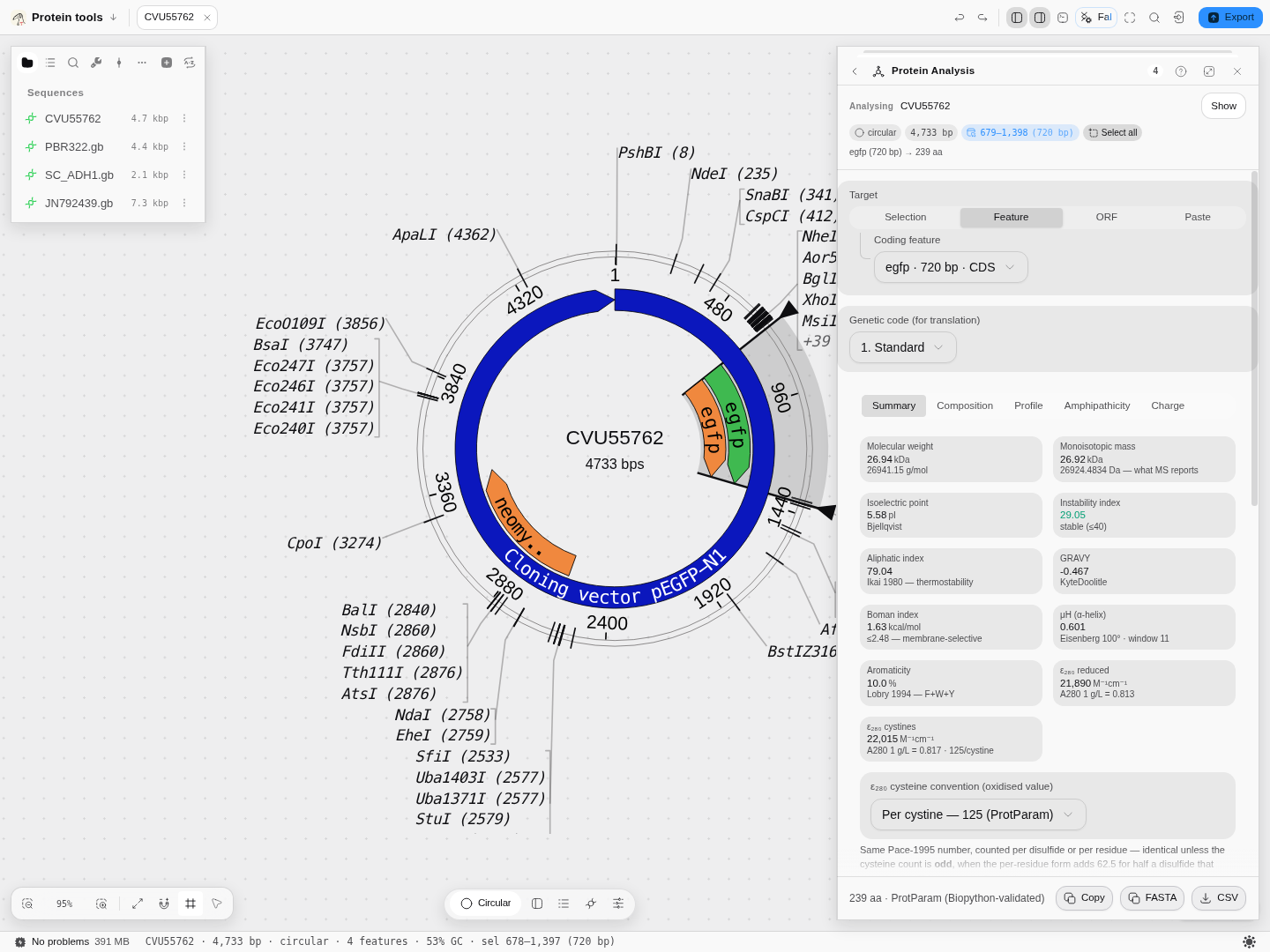
The eGFP CDS analysed in place: the record on the left, the properties on the right, and the header stating the region and its length before any number is shown.
Step 2 — Digest it, and read coverage as the answer
Tool: Protease Digest.
Same target, trypsin, no missed cleavages, Keil's exception rules on, cysteines reduced:
26 peptides · 25 cleavage sites · 100.0 % coverage · 239 aa, all weighable.
| Position | Peptide | Monoisotopic | m/z 1+ | m/z 2+ | m/z 3+ |
|---|---|---|---|---|---|
| 1–4 | MVSK | 463.25 | 464.25 | 232.63 | 155.42 |
| 5–27 | GEELFTGVVPILVELDGDVNGHK | 2436.25 | 2437.26 | 1219.13 | 813.09 |
| 28–42 | FSVSGEGEGDATYGK | 1502.65 | 1503.66 | 752.33 | 501.89 |
| 43–46 | LTLK | 473.32 | 474.33 | 237.67 | 158.78 |
26 peptides from 25 cuts — one more peptide than cuts, always, because the protein's own two termini bound the first and the last.
100 % coverage here is not the good news it looks like. It is coverage by every peptide the enzyme produces, including the ones your instrument will never report. Step 3 is where the real number appears.
Step 3 — Apply the window the instrument actually sees
Switch on Restrict to the detectable range (monoisotopic 500–3000 Da, a typical bottom-up LC-MS/MS window). The same digest, honestly reported:
| Trypsin, all peptides | Trypsin, in the 500–3000 Da window | |
|---|---|---|
| Peptides | 26 | 17 — 9 outside the window, of 26 |
| Coverage | 100.0 % | 73.2 % |
A quarter of the protein just became invisible, and the table says exactly which quarter: MVSK
at 463.25 Da and LTLK at 473.32 Da are both under 500 and both leave the list. The tile does not
merely show the smaller number — it states 9 outside the window, of 26, so the filter can never be
mistaken for the digest.
This is the number to design against. If your mutation, tag or active-site residue sits in that missing 26.8 %, the experiment as planned cannot see it.
Step 4 — Two ways to get the coverage back
4a. Allow missed cleavages
Real digests are incomplete, and a peptide that retains an internal site is longer — which pushes a too-short peptide into the window. With 1 missed cleavage allowed, same window:
| Missed cleavages | Peptides in window | Coverage |
|---|---|---|
| 0 | 17 | 73.2 % |
| 1 | 37 | 82.8 % |
This costs nothing at the bench — it is an allowance in how you search, not a change to the reaction — which is why 1–2 is the usual setting when searching real spectra.
4b. Add a second enzyme, and decide which experiment you are describing
Add Chymotrypsin (high specificity) beside trypsin. Now the Digestion mode control starts to matter, and it is two genuinely different experiments:
| Mode | What it means at the bench | Result on this protein |
|---|---|---|
| Concurrent | Both enzymes in one tube; products are re-digested until nothing changes, so it can cut where neither enzyme cuts the intact chain | 47 cleavage sites · 22 peptides in window · 77.8 % coverage |
| Sequential | Two separate tubes, two independent digests of the intact protein | Trypsin 17 · Chymotrypsin 19, reported side by side |
In sequential mode the panel shows one result at a time and says so — "Separate tubes — 2 independent digests of the intact protein. The table, the map and the stats below show Trypsin; the CSV exports all of them." Nothing is silently merged, because two tubes are not one dataset.
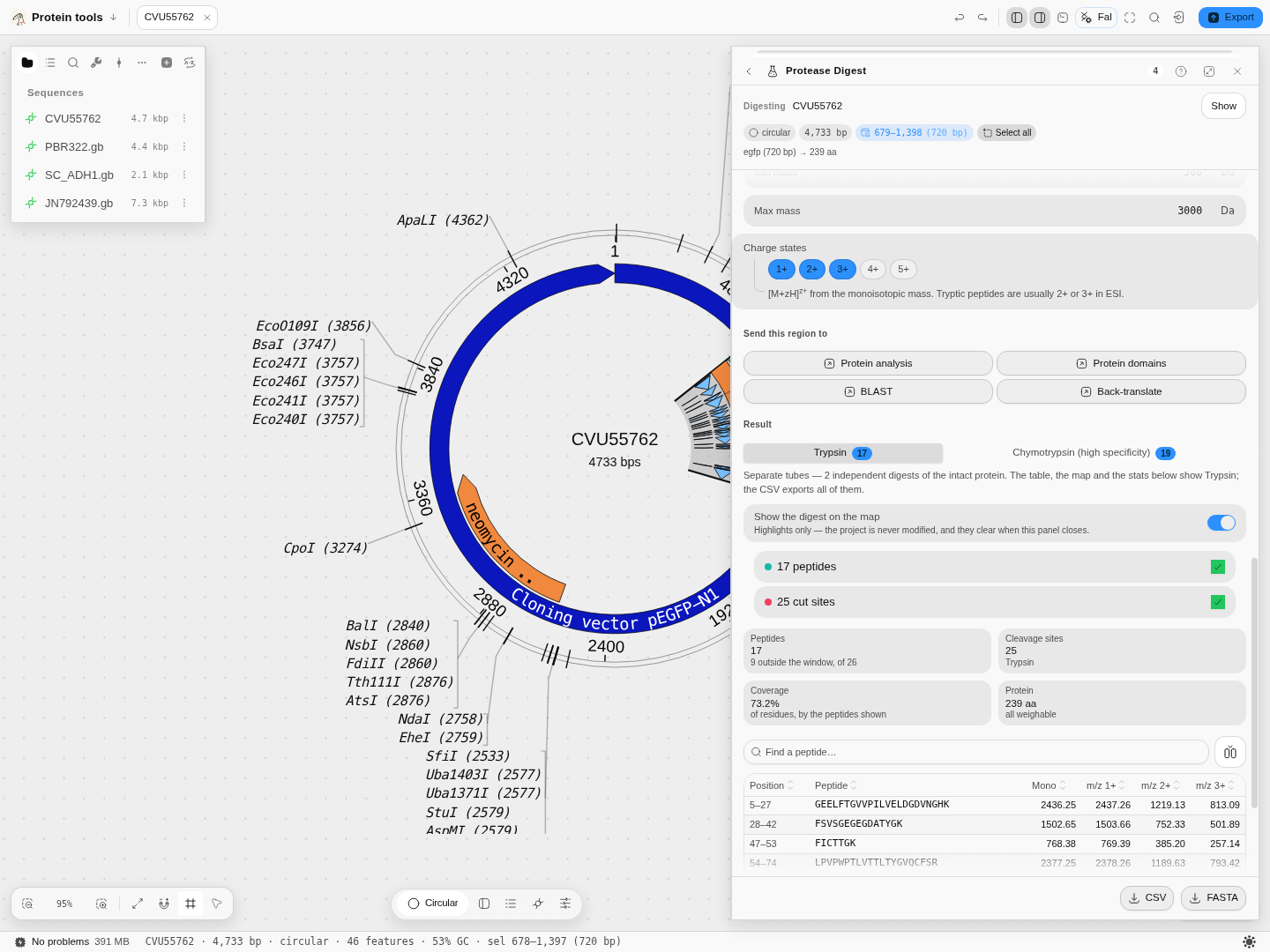
Sequential mode: the two digests as separate results, the window's effect stated as 9 outside the window, of 26, and the peptide list now opening at 5–27 — MVSK has fallen out. The peptides are
drawn on the map at the same time.
Step 5 — Ask the question the table cannot answer
Switch on Show the digest on the map. Coverage becomes spatial: the peptides that survived the window are drawn along the CDS in alternating teals, with a mark on every cleaved P1 residue, and both layers switch independently.
"Is my region covered?" is a map question, not a list question. A table sorted by mass cannot tell you that the gap sits exactly over your epitope; a drawing can, at a glance. The marks are highlights only — the record is never modified and they clear when the panel closes.
Two things worth knowing before you turn it on:
- The layer follows the filtered list, so narrowing the mass window narrows the drawing too. What you see is what the instrument would see.
- On a large protein a full digest is a lot of spans (a 1,577-residue target gives 172 peptides and 172 cut marks). Switch off the cut-site layer, or narrow the mass window, rather than squinting.
Step 6 — Carry the region onward without re-selecting it
The digest hands its exact region to the next tool: Protein analysis, Protein domains, BLAST and Back-translate. Two routes people actually take from here:
- The peptide is not detectable and the construct can change → Back-translate the protein into DNA for a different host, then Optimize a CDS to build something expressible. A tag or a linker moved by a few residues changes which peptides the digest produces.
- The peptide is detectable and you want to know what it is part of → Protein Domains to see whether the covered stretch is the domain you care about.
Those buttons are disabled with the reason shown when the residues were pasted rather than taken from the document — pasted text has no home on the map, so there is nothing to hand over.
What this route does not tell you
- It is a specificity model, not a kinetic one. It says where the enzyme can cut, not which sites will actually be missed in your tube. The missed-cleavage allowance is a combinatorial allowance, not a prediction.
- Detectability is more than mass. A peptide inside the window can still ionise poorly, stick to a column or co-elute with something abundant. The window is a necessary condition, not a sufficient one.
- No modifications beyond the two offered. Cysteine alkylation and methionine oxidation are modelled because they are protocol steps you perform. Phosphorylation, glycosylation and the rest are properties of your sample this route has no way to know about.
- Semi-enzymatic peptides are single-enzyme only. Adding them to a multi-enzyme digest would mean inventing a definition the underlying method does not have, and the panel says so rather than producing a longer list.
Where the numbers come from
Peptide masses and m/z are checked against the reference implementations of the field, and the cleavage specificities are generated from the published tables of ExPASy PeptideCutter — whose rules were deduced from Keil's Specificity of Proteolysis — rather than transcribed by hand. The protein properties are the ProtParam quantities, checked against Biopython. Modification masses are Unimod records, carrying their accessions.
Next: Protease Digest for every control in the panel · Protein Analysis for the rest of the properties · Optimize a CDS if the answer is "change the construct".
Align a set of homologues and build a tree from it
The route: get the sequences in → align them → read the alignment before you trust it → build the tree → put support on it → read what the tree does and does not say.
Check a run's read quality, and settle its encoding
The route: open the reads → read the per-cycle curve → decide where to trim → and before you believe any of it, settle which quality encoding the file is written in.