
Protease Digest
Cut a protein with any of forty-nine proteases and chemicals and read the peptides it would produce, with their masses and m/z, without leaving the construct they came from.
| Reached by | Tools → Protease Digest |
| Formats | CSV FASTA GenBank |
| Sample project | Protein tools |
What it does
Cuts a protein in silico with a protease or chemical of your choosing and reports every peptide the reaction would release: where it starts and ends, its sequence, its average and monoisotopic mass, and the m/z an instrument would see at each charge state you ask for. The protein can be a real CDS in the construct you are working on — the tool translates it for you — a region you highlighted on the map, or residues you paste.
It exists because the peptide list is the thing that decides an experiment. Whether your protein is identifiable by mass spectrometry, whether the tag you added survives the digest, whether the mutation you care about even lands on a detectable peptide — all of that is a property of the digest, not of the protein.
What this computes
Per peptide
- its position in the protein, as the first and last residue number, so a peptide can be found again in a sequence you are reading elsewhere
- its sequence, one-letter
- its monoisotopic mass and its average mass — two different numbers for the same molecule, and which one you want depends on the instrument: monoisotopic for anything that resolves isotopes, average for a mass an intact-protein measurement reports
- its m/z at each charge state you ask for, since that is what appears on a spectrum rather than the neutral mass
- how many missed cleavages it carries — a peptide with an uncut site inside it is a real species in a real digest, and its abundance is what a search engine has to allow for
- whether it has a non-enzymatic end, when semi-enzymatic peptides are enumerated
- no mass at all, stated as blank, for a peptide carrying any residue outside the twenty the
mass tables define: the panel names which residue it was. In practice that is selenocysteine (
U) in a UniProt entry such as selenoprotein P, a stop (*) where a whole record was translated, or an ambiguity code (B,J,X,Z) in a draft sequence. None of them has a single defined residue mass, and a number there would be invented
Per digest
- the cleavage sites, as positions in the protein, and the count of them
- sequence coverage, as the fraction of residues that appear in at least one peptide you are being shown — a mass or length filter lowers it, which is why the two are reported together
- how many peptides the filters removed, against the total the digest produced, so a short list is never mistaken for a protein that resists digestion
- the distinct peptide count beside the fragment count, because a repeat region and semi-enzymatic mode both emit the same sequence at different coordinates, and a search engine sees species rather than rows
The derivation of the result itself, in the panel and specific to the run: which protease or proteases, whether they acted separately or in one tube, whose enumeration of "missed cleavages" is in force, the alkylation and oxidation applied to the sample and the exact mass each adds, and what each filter excluded. A digest run with different settings produces a different chain, because it is read off the result rather than written in advance.
Per protease, the specificity actually applied: the rule, in the form its source publishes it, with the citation. A protease is a claim about where a bond breaks, and the claim is worth reading.
What it does not compute: abundance. Every peptide in the list is equally present, which no digest ever is. Ionisation efficiency, missed-cleavage frequency and losses in sample handling are not modelled, so the list is what the reaction can produce, not what a spectrum will contain.
Where the peptides fall, and which ones span an uncut site. The coverage figure is one number and cannot say which residues are missing, so the peptides are also drawn along the protein: a covered/uncovered rail, then the peptides themselves packed into lanes. A peptide that spans a cleavage site the enzyme did not cut is marked, and the marking is stated on the peptide itself, not only in the colour — it names how many missed cleavages it carries, and a peptide cut at both ends says so. That distinction decides whether a peptide is one you can expect to see: a missed-cleavage peptide only appears if that site is genuinely missed in the tube. The count is reported with the run, and when a digest produces none, the readout says that rather than describing a marking nothing is using.
When you'd use this
Used in: Protein → peptides: will mass spectrometry see the region I care about?
Planning a bottom-up MS experiment. Digest your construct, restrict the list to the mass window your instrument actually detects, and look at coverage: if the region you care about is not on a peptide in range, no amount of sample prep will find it, and the fix is a different enzyme.
Choosing the enzyme. Trypsin is the default because it is what most protocols use, but a proline-rich or lysine-poor protein digests badly with it. Add chymotrypsin or Glu-C, or put two enzymes in the same tube, and compare the coverage and the peptide-length distribution.
Checking a tag or a cleavage site. A His-tag, a TEV site or a fusion junction either survives the digest intact on one peptide or is split across two. The peptide table says which.
Reading a published method. Someone reports "tryptic peptide 145–162". Digest the same protein under the same rules and confirm you are looking at the same peptide before you build on it.
Reach for something else when: you want the whole protein's mass, pI, extinction coefficient or hydropathy — that is Protein Analysis; or you want to know what domains the protein has — that is Protein Domains.
Where it lives
Tools → Protease Digest opens it in the right rail. Right-click on the canvas → Protease digest opens it scoped to the current selection, so a region you have highlighted arrives already loaded and already translated.
It writes back to the canvas as well as reading from it. Show the digest on the map paints two independently switchable layers on the sequence, circular and linear alike: one span per peptide in the list, in alternating teals so adjacent peptides stay distinguishable, and a mark on each cleaved P1 residue. The marks are highlights only — your record is never modified, and they clear when the panel closes. Because the peptide layer follows the list, narrowing the mass window narrows the map too: what you see drawn is what your instrument would see.
Selecting on the map re-scopes the run. Selecting a peptide row selects those residues on the map.
Inputs and outputs
Accepts a coding feature (CDS, gene or ORF) from the open record, a selection on the canvas, or pasted residues. Opened on a DNA record with nothing selected, it starts on the record's longest annotated CDS rather than reading the whole record in frame 1, which on a locus or a multi-gene plasmid is not a protein. A DNA target is translated first, under a genetic code you choose, and the tool is strand-aware: a CDS on the minus strand is read on its coding strand and its peptides map back to the right bases.
Refuses, with the reason next to the control that caused it: a region that is not a whole number of codons (it says how many trailing bases it would ignore); a target that translates through internal stop codons (it says how many, and offers the longest real ORF instead); a hand-off to another tool when the residues were pasted and therefore have no home in the document. An empty table is never the error message.
Produces the peptide table (position, sequence, missed cleavages, average and monoisotopic mass,
m/z at each selected charge), the four summary tiles — peptides, cleavage sites, sequence coverage
and protein length with the count of residues whose mass is undefined — the two map layers, and
CSV or FASTA of the peptides.
Demo
Not recorded yet. The screencast worth making is the mass window: switch on the detectable range and watch peptides leave both the table and the map at the same moment. Nothing is staged in the meantime.
Worked example
eGFP, in its own vector, digested with trypsin. Open the Protein tools sample project, which
loads CVU55762 — the cloning vector pEGFP-N1, 4,733 bp, circular. In Protease Digest choose
Feature → egfp (720 bp); the header confirms 239 aa. Leave trypsin, 0 missed cleavages,
Keil's exceptions on, cysteines reduced and methionines unmodified.
26 peptides · 25 cleavage sites · 100.0 % coverage · 239 aa, all weighable. The list opens on the protein's own N-terminus:
| Position | Peptide | Monoisotopic | m/z 1+ | m/z 2+ | m/z 3+ |
|---|---|---|---|---|---|
| 1–4 | MVSK | 463.25 | 464.25 | 232.63 | 155.42 |
| 5–27 | GEELFTGVVPILVELDGDVNGHK | 2436.25 | 2437.26 | 1219.13 | 813.09 |
| 28–42 | FSVSGEGEGDATYGK | 1502.65 | 1503.66 | 752.33 | 501.89 |
| 43–46 | LTLK | 473.32 | 474.33 | 237.67 | 158.78 |
Two things to notice. 26 peptides from 25 cuts — one more peptide than cuts, always, because the
protein's own two termini bound the first and last. And MVSK at 463.25 Da is below a typical
500–3000 Da bottom-up window: switch on Restrict to the detectable range and it leaves the table
and the map together. That is the number the experiment turns on.
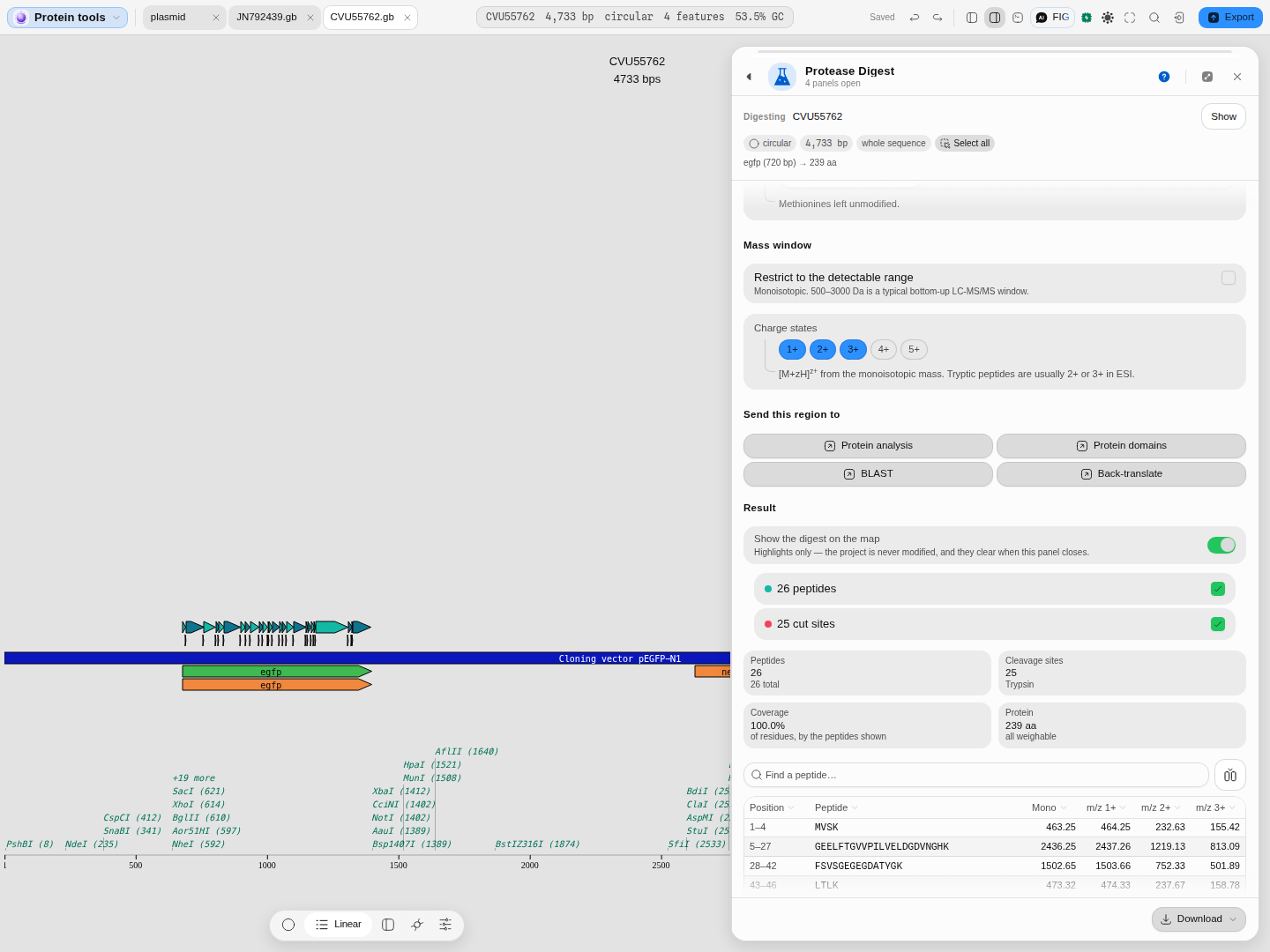
The 26 peptides tiling the eGFP coding sequence, drawn in their own lane above the map with the cleavage sites marked beneath them. The rest of the plasmid is untouched, so the question "does my run see the region I care about" is answered spatially rather than from a table sorted by mass. Hover any peptide for its sequence, mass and missed-cleavage count; a tryptic digest of a long chain runs to hundreds of fragments, so the lane stays readable and the names live in the tooltip.
Now switch the window on. The readout becomes 17 peptides, "9 outside the window, of 26", and coverage falls from 100 % to 73.2 % — a quarter of the protein is no longer observable, and the map thins to match, because the peptides that left the table left the drawing with it.
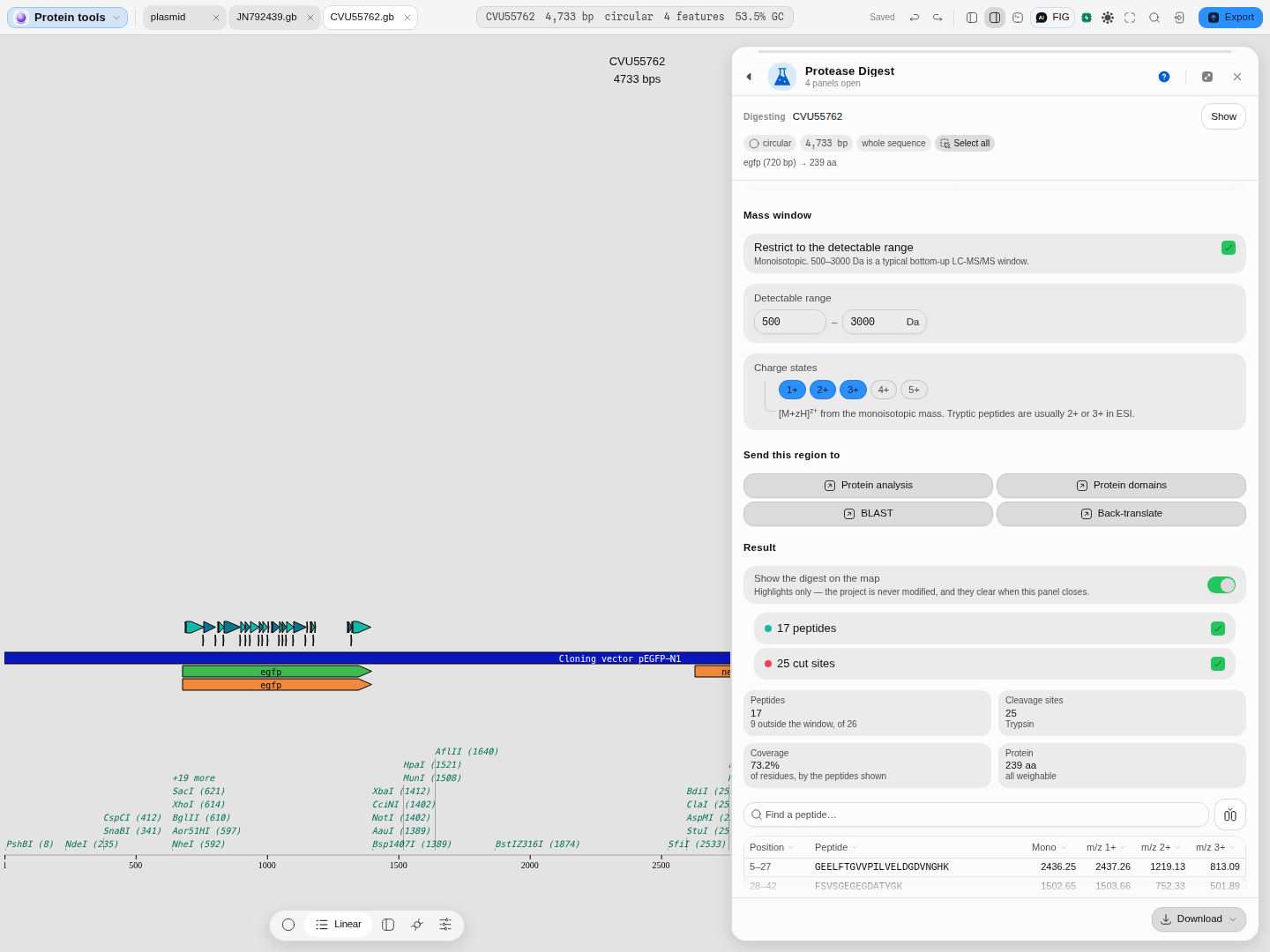
The same digest with a 500–3000 Da window applied — note the range control only appears once the
window is on, so the numbers bounding your result are always on screen. The stat says how many
peptides fell outside it rather than silently showing fewer, and the gaps that open in the peptide
lane are the stretches of eGFP no spectrum would cover. MVSK, the 463.25 Da peptide at the very
start of the table above, is the first to go.
A second example: does my TEV site actually cut?
A His6-TEV fusion tag, digested with TEV protease. The same Protein tools project carries
JN792439 — pNIC-Bio3, an SGC Oxford expression vector, 7,331 bp, circular. Its annotation names an
N-terminal tag; contains His6 and TEV-protease cleavage site, 69 bp. Choose that feature: the
header reads 23 aa. Swap trypsin for TEV protease (Tobacco Etch Virus).
2 peptides · 1 cleavage site · 100.0 % coverage · 23 aa, all weighable.
| Position | Peptide | Monoisotopic | m/z 1+ | m/z 2+ | m/z 3+ |
|---|---|---|---|---|---|
| 1–21 | MHHHHHHSSGVDLGTENLYFQ | 2482.10 | 2483.11 | 1242.06 | 828.37 |
| 22–23 | SM | 236.08 | 237.09 | 119.05 | 79.70 |
That is the answer to the question, and it is readable without trusting any count: TEV cleaves
between the Q and the S of ENLYFQ↓S, so the His6 half comes away as one 2,482 Da peptide and the
protein keeps the serine. A tag that did not cut would be one peptide of 23 residues; a tag that
cut in the wrong place would spell a different sequence in the first row. The peptide is the
evidence, not the number beside it.
Two things worth knowing before you rely on this. The site is a sequence, not a guarantee — TEV
cleaves ENLYFQ↓(G/S) efficiently and other P1′ residues slowly, and nothing here models the rate,
only the specificity. And the digest is of the tag alone because that is the feature that was
selected; run it over the whole coding sequence to see whether the protease has other sites in the
protein you are trying to release, which is the failure this check exists to catch.
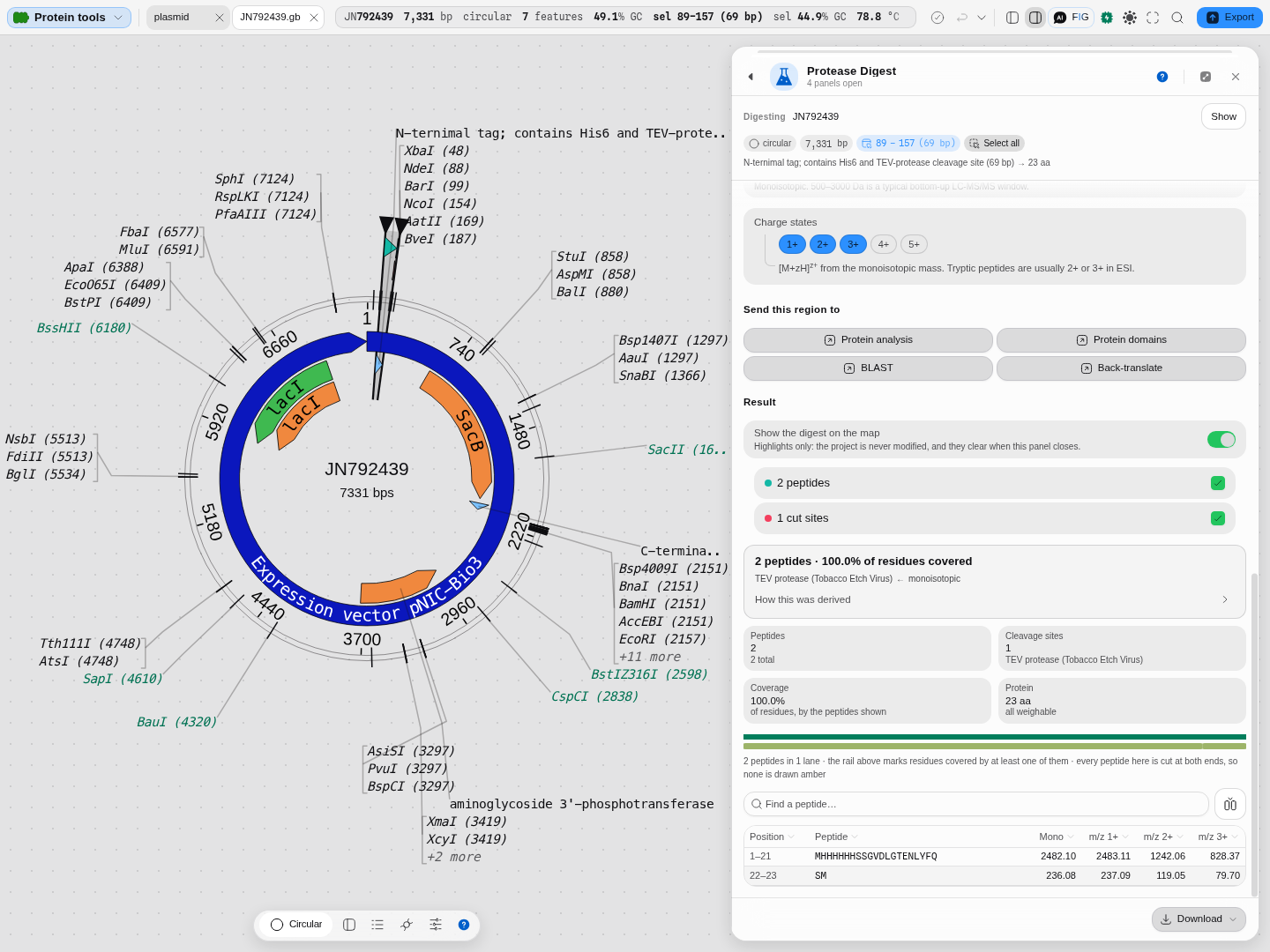
The single cut drawn on the vector: one cleavage mark inside the tag feature at the top of the map, two peptides in the lane above it, and the table beneath. The rest of the 7,331 bp plasmid is untouched, which is the point — the question is about 23 residues, and the map keeps them in the context of the construct they sit in.
Controls
| Control | What it changes |
|---|---|
| Protein residues or coding DNA, with Target — Feature · Selection · Paste | What is digested. A feature is translated under the genetic code below; a selection likewise; pasted text is taken as residues |
| Genetic code | The translation table applied to a DNA target. Shown only when there is DNA to translate |
| Add a protease or chemical | One or more of 49 proteases and chemicals. One enzyme takes the single-enzyme path, which additionally offers semi-enzymatic peptides; two or more enable the digestion mode below |
| Digestion mode — concurrent · sequential | Concurrent puts every enzyme in one tube and re-digests the products until nothing changes, so it can cut where no single enzyme cuts the intact chain. Sequential is N separate experiments and returns N result sets. With one enzyme they are the same experiment, and the control says so instead of pretending to matter |
| Missed cleavages | How many internal sites a peptide may retain. Real digests are incomplete; 1–2 is the usual allowance when searching spectra |
| Min length · Max length | The peptide-length window, applied during the scan |
| Apply Keil's exception rules | Sites trypsin matches but does not cut. On by default, because the authority applies them; turn it off to reproduce a result from a tool that does not |
| Semi-enzymatic peptides | Allows one ragged terminus. Realistic for in-source fragmentation, and it multiplies the list — single-enzyme only |
| Cysteine alkylation | The alkylation you performed before the digest, which changes every cysteine peptide's mass |
| Methionine oxidation | None, all Met oxidised, or both forms listed |
| Restrict to the detectable range and its Detectable range | The monoisotopic mass window your instrument sees; 500 to 3,000 Da is a typical bottom-up window. Filters the table, the map and the coverage number together |
| Charge states | Which m/z columns to compute. Tryptic peptides are usually 2+ or 3+ in ESI |
| Cleavage rule and Notation | Your own specificity, written as RPG rules or as a regex — see below |
| Show the digest on the map | The two canvas layers, switchable independently |
The peptide map
Above the peptide table is the peptide map: every peptide the digest produced, drawn as a bar along the protein, packed into as few lanes as they fit in, over a rail that marks the residues at least one peptide covers.
It exists because a coverage percentage cannot say which part is missing, and that is the part you act on. A digest reported at 67% coverage may be missing a scatter of single residues — a fine result — or one 80-residue block that happens to contain the domain you are studying, which is not a result at all. On the map the difference is immediate: the uncovered stretch is the gap in the rail, and its position tells you what to do about it (a second protease, an extra missed cleavage, a wider mass window).
Amber bars carry a missed cleavage; hovering any bar names the peptide, its residue range and its length; clicking one selects those residues on the sequence, so the map is also how you get from "there is a hole here" to the bases underneath it.
Algorithms you can choose
49 proteases and chemicals, each with the specificity its authority publishes. They are not interchangeable; the enzyme is the experiment.
| Where the rule comes from | How many | What it means for you |
|---|---|---|
| Defined identically by both reference implementations | 31 | The safest ground: two independent projects agree on the specificity |
| Defined by one of them only | 8 | Still authoritative, from ExPASy PeptideCutter's own table |
| Defined only by RPG, with the citation RPG gives | 10 | Mostly the less common enzymes and chemicals; each carries the vendor datasheet or paper it comes from |
Three specificities were corrected against the authority where the two implementations disagreed: pepsin at pH 1.3, pepsin at pH 2.0 and thermolysin. In each case one implementation adds a constraint ExPASy's table does not state — thermolysin, for example, was given a P2′ requirement that the authority does not impose — and it under-cuts as a result. The corrected rule ships; both readings are kept so a silent revert cannot pass unnoticed.
Cysteine and methionine modifications are Unimod records, not typed-in numbers: Carbamidomethyl (iodoacetamide), Carboxymethyl (iodoacetic acid), Pyridylethyl (4-vinylpyridine), Propionamide (acrylamide) and Oxidation (methionine). The reported peptide says which modification was applied and to how many residues, rather than only shifting a mass.
Bring your own enzyme, in either of two notations, and the panel says which does what:
- A regular expression matching at P1, the convention the single-enzyme engine uses. Simple, and single-enzyme only — the multi-enzyme algorithm has no equivalent.
- Schechter–Berger grammar (
(C)()(B)(,A)(D)), the notation RPG uses. It is parsed into the same decision tree a built-in enzyme carries, so a custom enzyme defined this way works in a tube alongside table enzymes and in both digestion modes.
Writing a rule, and checking it against an enzyme you already trust
Each pair of parentheses is one Schechter–Berger position, and the comma is the bond: (,A) cleaves
before A, (A,) cleaves after it. Empty parentheses mean any residue, or gives alternatives,
and an exception repeats the rule it blocks.
The safest way to learn the notation is to write a rule for an enzyme the table already defines and check that the two agree. TEV protease recognises ENLYFQ and cuts between Q and the residue after it, which is G or S. In this grammar that is:
(Q)(,G or S)On the His6-TEV tag above — 23 residues — that rule returns exactly what TEV protease (Tobacco
Etch Virus) returns from the table: one cleavage site, MHHHHHHSSGVDLGTENLYFQ at 2482.10 Da
monoisotopic and SM at 236.08. Once a rule reproduces an enzyme you know, you can trust the same
notation for the one you are actually after.
Two things the panel will tell you rather than let you guess. A rule that is not valid grammar is
refused with the parser's own message and a caret under the offending character — (Q,G or S), with
the comma inside the first group, is refused at position 3 — so a malformed rule never silently
becomes a digest. And a regular expression rule cannot share a tube with table enzymes: the
multi-enzyme modes have no notion of an ad-hoc regex, so the panel refuses the combination and names
the notation switch that fixes it, rather than reporting a digest neither engine performed.
The science
A digest is a specificity rule applied to a sequence. The rule states what must be true at the residues around a peptide bond for the enzyme to cleave it — P1 is the residue donating the carbonyl, P1′ the one accepting — and the scan walks the chain applying it.
Two subtleties carry most of the disagreement between tools:
- Exception rules. Trypsin cleaves after K and R, except in contexts where it does not — a K followed by P being the classic case, and Keil's table lists several more. Whether a tool applies them is a common source of two "tryptic digests" that differ.
- Which mass you are reading. The monoisotopic mass uses the most abundant isotope of each element and is what a resolved isotope envelope reports; the average mass uses natural abundances and is what a low-resolution instrument gives. They diverge as peptides get larger, and both are shown rather than one being chosen for you.
Where the specificities and masses come from. The cleavage rules are generated from the
published tables of ExPASy PeptideCutter (whose rules were deduced from Keil, Specificity of
Proteolysis, 1992), the Bioconductor cleaver package and RPG — no rule was transcribed by hand —
and every one of the 49 is checked, enzyme by enzyme, against those reference implementations
running on the same sequences. The modification masses come from Unimod, the protein-modification
registry for mass spectrometry, retrieved 2026-08-07. Peptide masses and m/z are checked against
pyteomics.
Limitations
- This is a specificity model, not a kinetic one. Real digests are incomplete and sequence-context dependent; the missed-cleavage allowance is the only handle offered on that, and it is a combinatorial allowance rather than a prediction of which sites will actually be missed.
- No post-translational modifications beyond the two offered. Cysteine alkylation and methionine oxidation are modelled because they are protocol steps you perform. Phosphorylation, glycosylation and the rest are not — they are properties of your sample that this tool has no way to know.
- A non-standard residue leaves a mass undefined, and the peptide says so instead of carrying a number computed from a substitute. The protein tile counts how many residues are affected.
- The map draws one span per peptide, and a full digest of a large protein is a lot of spans. On a 1,577-residue target that is 172 peptides and 172 cut marks on one ring. The two layers switch independently and the mass window narrows both, which is the intended way to make it readable. The map carries up to 400 marks in this lane by default (View ▸ Limits ▸ Max Peptides To Show). Past that the peptides are drawn first, and the panel says how many marks it left off rather than counting them as drawn.
- Semi-enzymatic peptides are single-enzyme only, because the multi-enzyme algorithm does not define them.
Compared with other tools
No rows yet. Every comparison on this site carries a first-party, dated source, and none of the competitor material on file says anything about in-silico proteolysis. An unsourced row is worse than an absent section, so this one stays empty until there is something citable to put in it.
Export
CSV — the peptide table as shown, including the m/z columns for the charge states you selected and the modifications applied. FASTA — the peptides as records, for feeding a search engine or a synthesis order. Both follow the filters, so what you export is what you are looking at.
The digest also hands its region on: Protein analysis, Protein domains, BLAST and Back-translate take the same residues without re-selecting them. Those buttons are disabled, with the reason stated, when the residues were pasted and so have no region in the document.
API
The digest is available headlessly, so the same peptides can be produced without the panel: the single-enzyme and multi-enzyme paths, the modification table and the coverage calculation are each callable on their own.
Separately, the editor's Python and R consoles see the open record — melad.seq, the selection and
the project's files are bound in both languages — so a digest written with Biopython or a CRAN
package can be run against exactly what is on screen and its output saved back into the project.
Automation
Available as the protein_digest workflow node, so a digest can sit in a DAG — fan it out over
several constructs, feed the peptides into the next step, and save each run's output as a timestamped
project file. The node takes one enzyme or several, the digestion mode, the missed-cleavage
allowance, the length and mass windows and the charge states, and it accepts a custom enzyme in
either notation — the Schechter–Berger grammar, or a regular expression matching at P1 — exactly
as the panel does, refusing the same combinations the panel refuses. The scientific copilot can call
it by the same name.
Provenance
Every result carries its own derivation, in the panel beside it: which enzyme cut, at how many sites in this protein, whose meaning of a missed cleavage is in force, which alkylation was applied and with what mass shift, and what each filter removed against the total. A clause appears only when that run earned it, so a digest with no missed cleavages and no mass window says neither — the explanation is of the result in front of you and not a description of the tool. When the enzyme is one you defined, the derivation quotes your rule, in the notation you wrote it in, because for a custom specificity the rule is the model.
A run records what it digested (the region, the strand, the genetic code), the enzymes and mode, the missed-cleavage allowance and length window, the modifications applied, and the filters in force. Citing the method in a paper means naming the specificity source — ExPASy PeptideCutter after Keil (1992) for the classical enzymes, or the reference RPG gives for the others — the modification accessions from Unimod, and whether Keil's exception rules were applied.
Screenshots
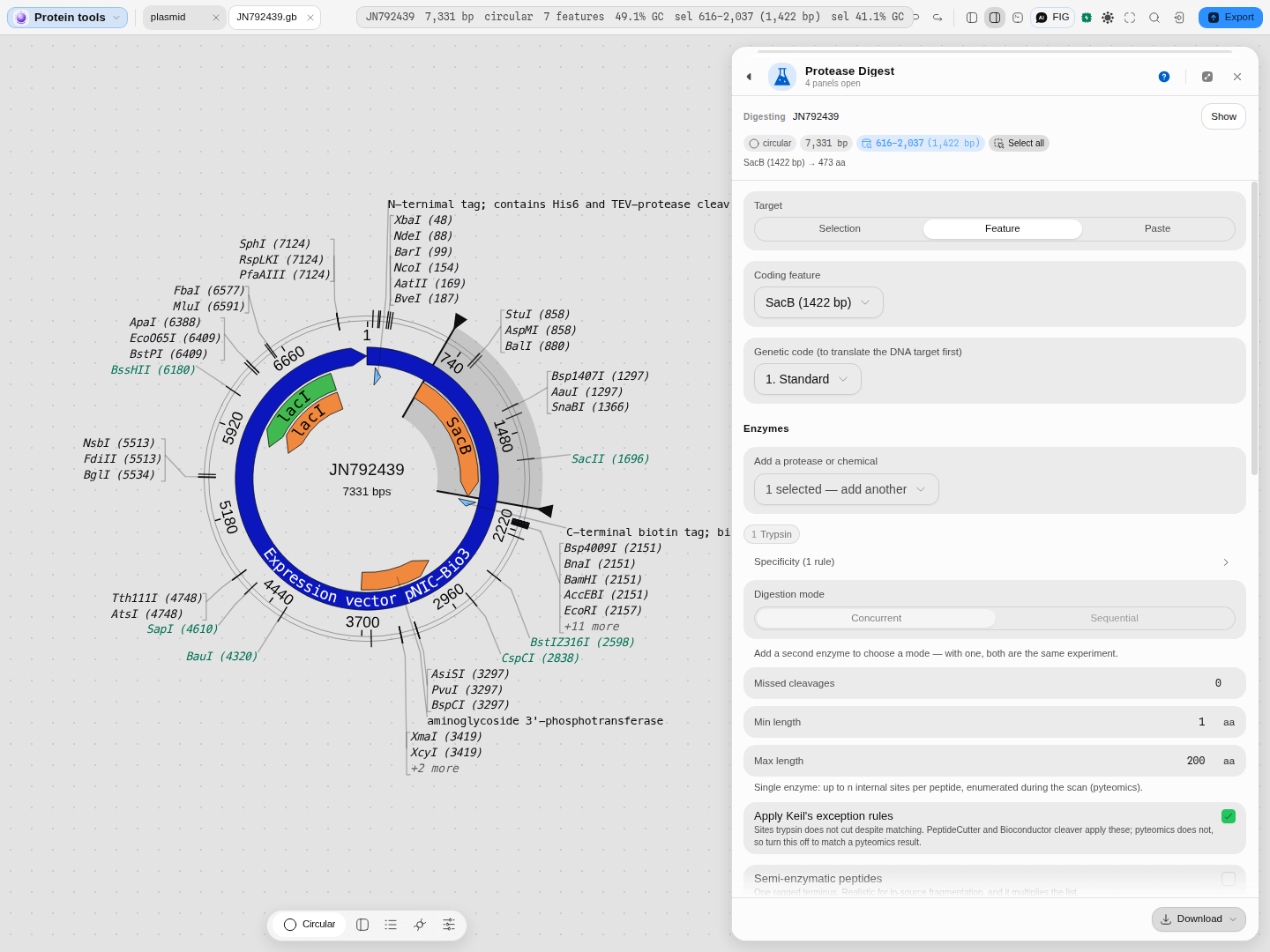
Opened on the SacB coding sequence of a His6-TEV expression vector: the header states what is being digested and how long it is in residues (1,422 bp → 473 aa), and the region is selected on the map so you can see what you are about to cut before you cut it.
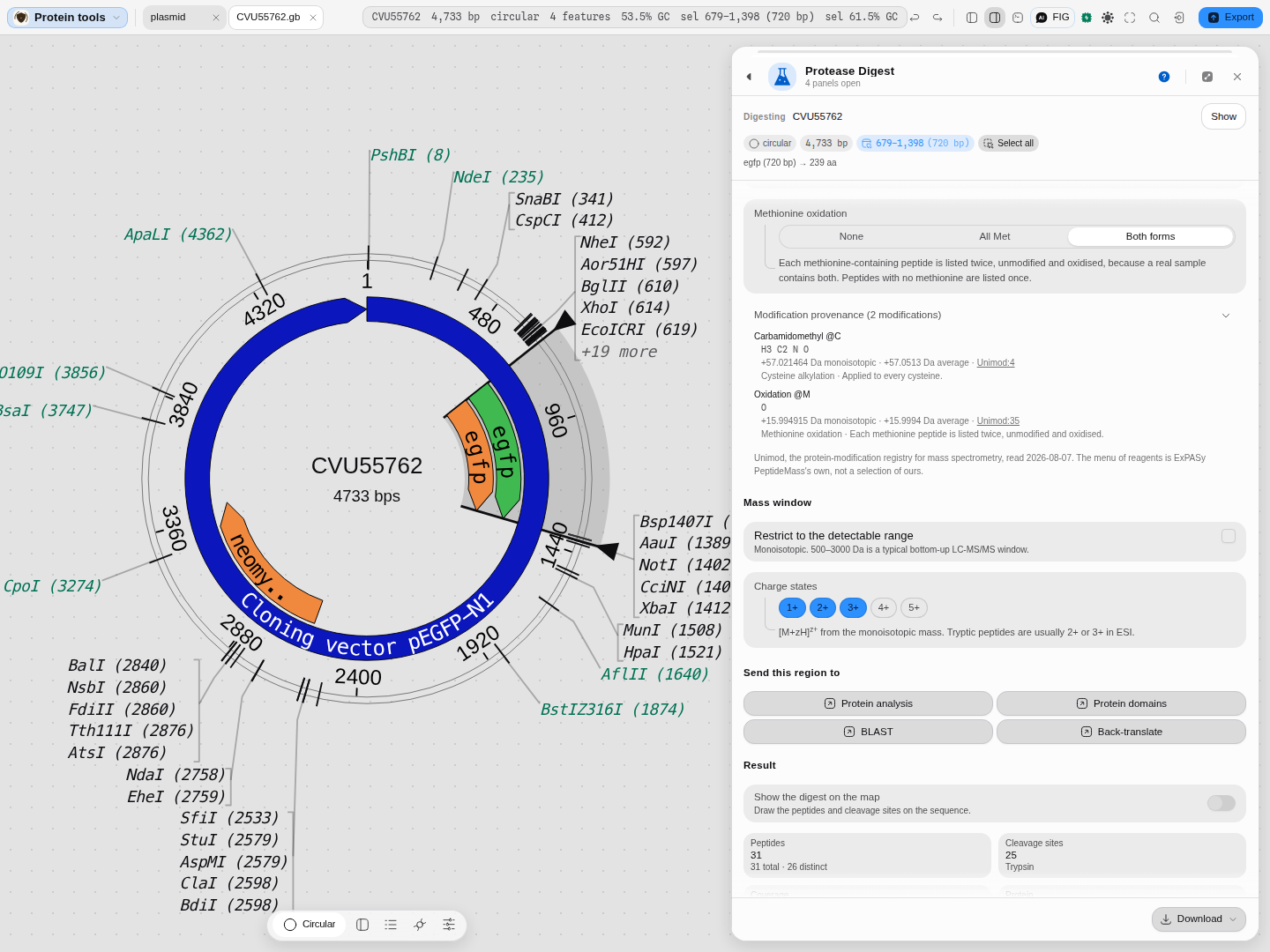
Sample preparation, with the record behind each number. Choosing iodoacetamide adds Carbamidomethyl at every cysteine — +57.021464 Da monoisotopic, +57.0513 Da average, composition H3 C2 N O — and the readout links the Unimod accession you would cite. The reagent menu is ExPASy PeptideMass's own.
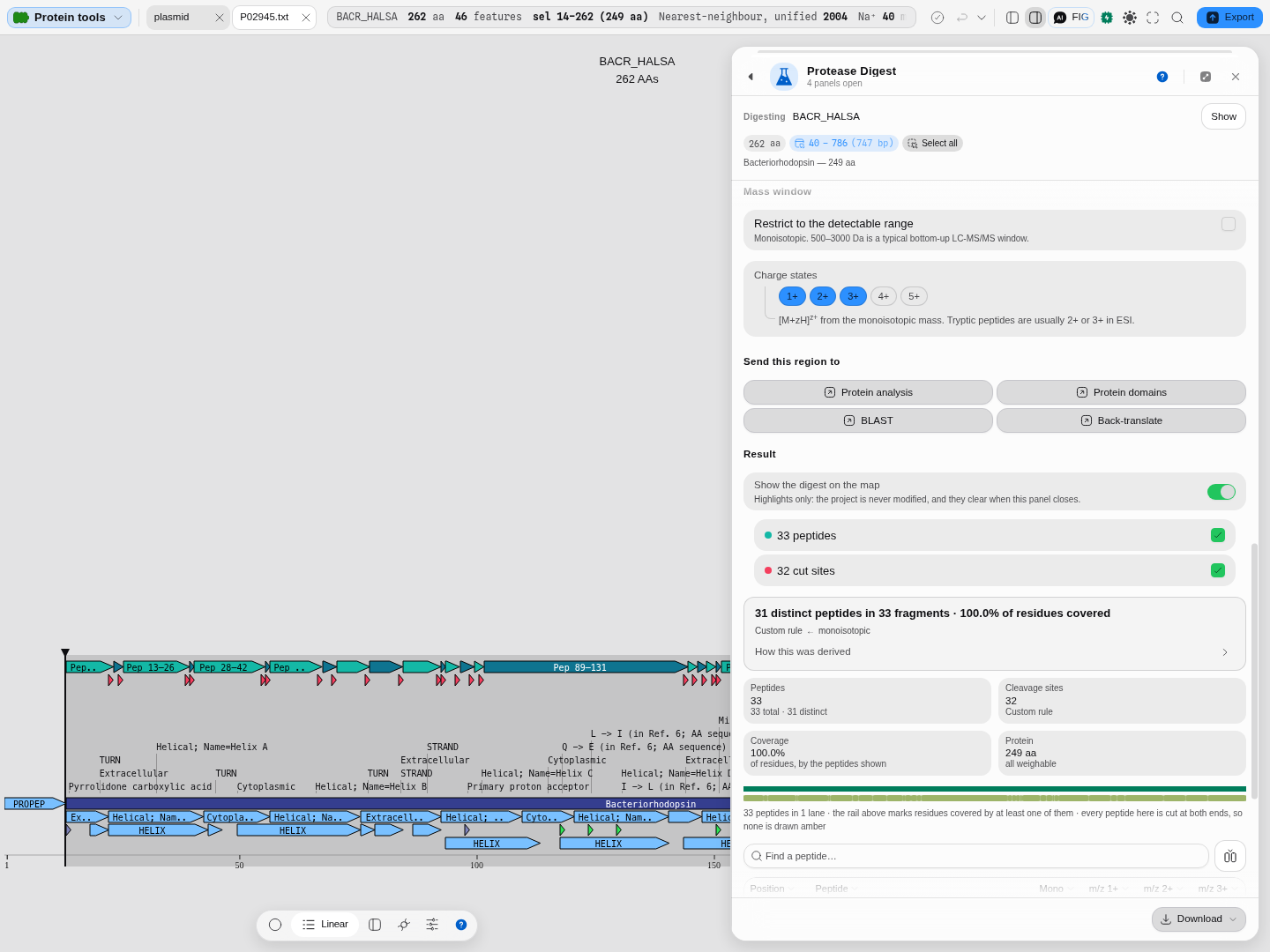
The other notation, on bacteriorhodopsin: [FWY] — cleave after any aromatic residue — gives 33
fragments at 32 sites covering 100% of the 249 residues, and the panel draws them on the sequence
beside the table. A regular expression runs on its own rather than in a mixed tube, which is a
property of the single-enzyme algorithm and is stated at the control rather than discovered by a
refusal.
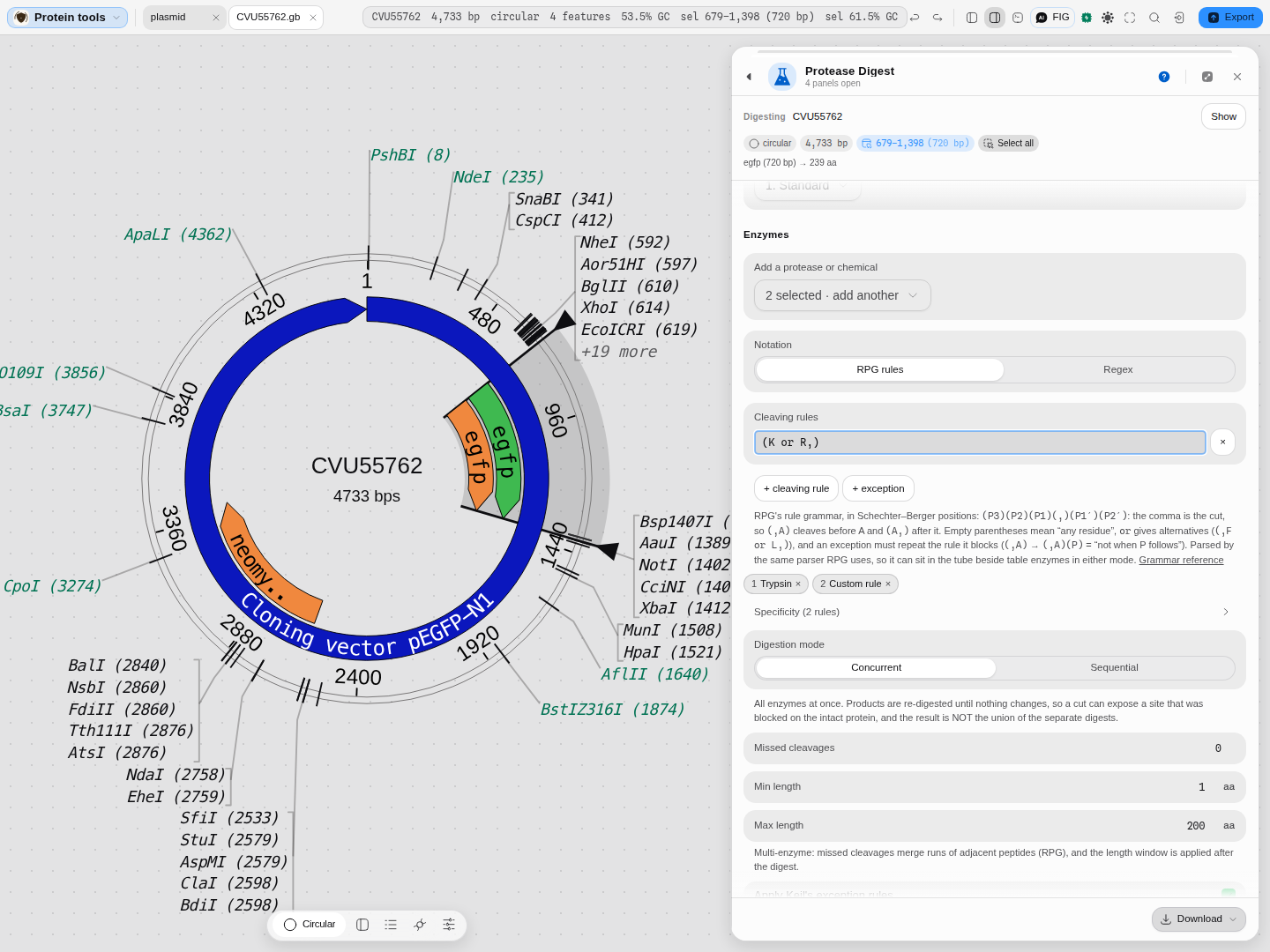
A rule written in Schechter–Berger positions — (K or R,), cleave after K or R — sitting in the
tube beside trypsin in a concurrent digest. Peptides carrying an oxidised methionine are listed
separately from their unmodified form, so a real sample's two species are both searchable.
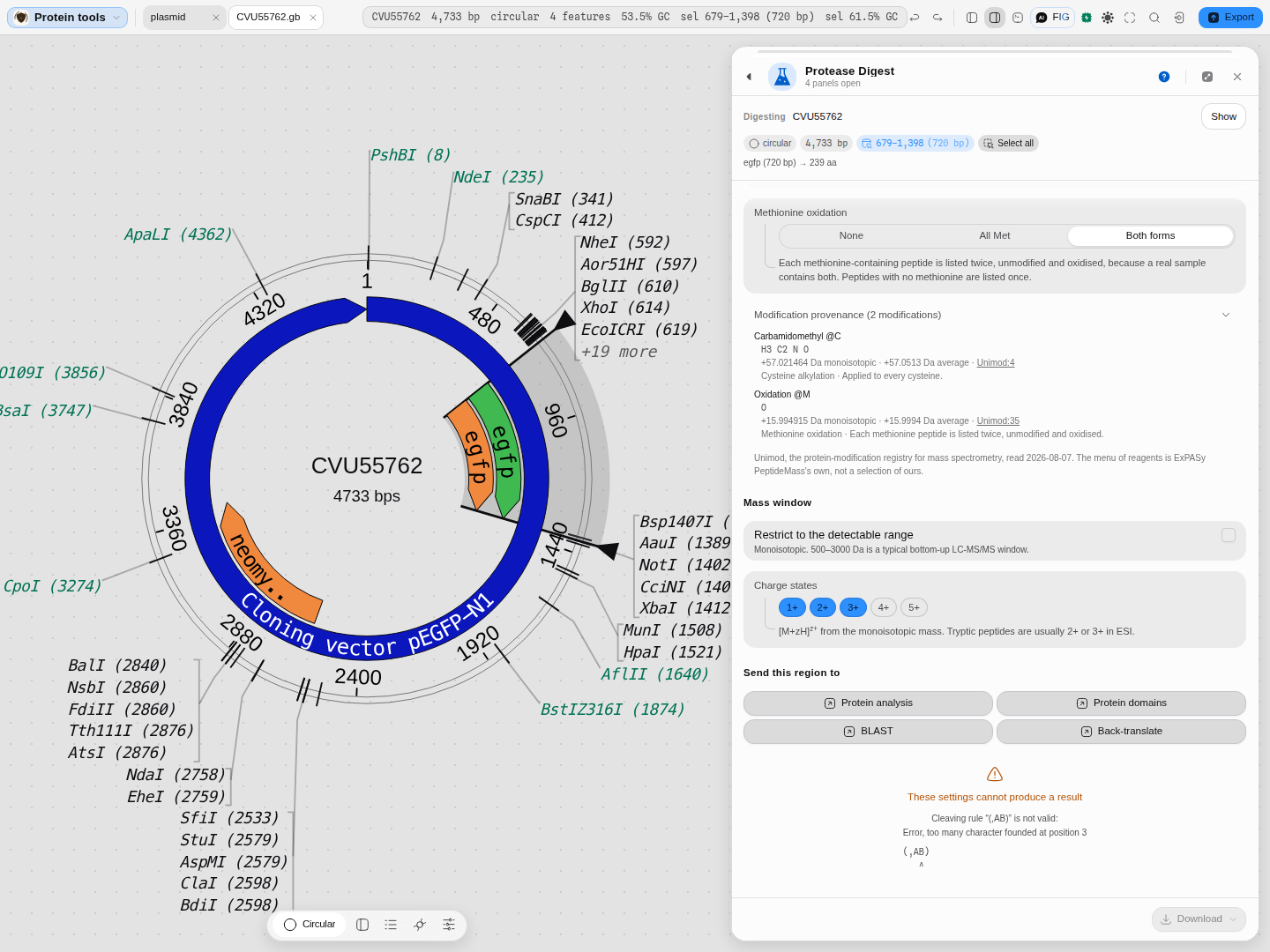
An invalid rule is refused before anything runs, with the parser's own message and a caret under the character that broke it — never an empty peptide table left for you to interpret.
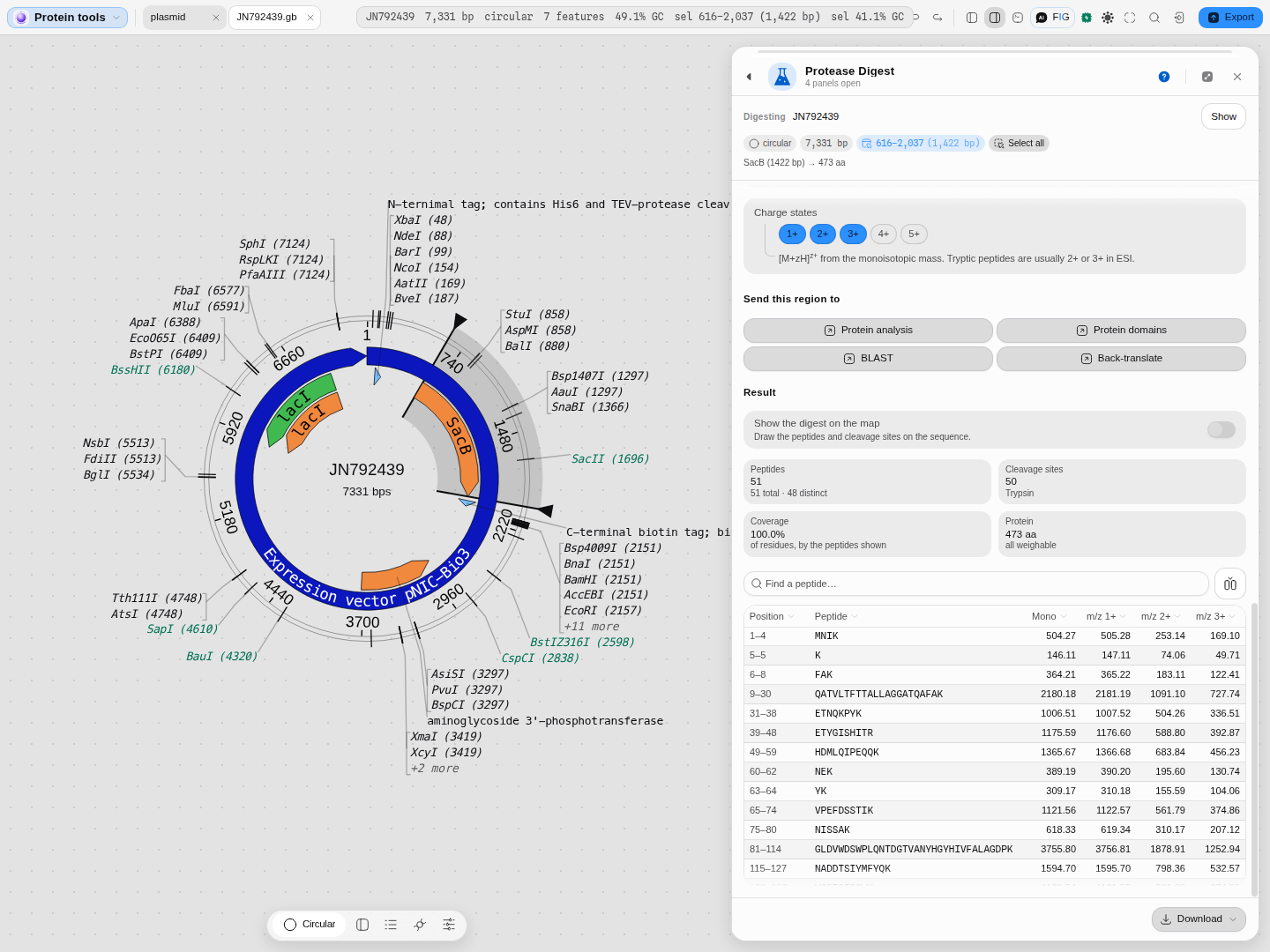
The result for that SacB digest: 51 peptides from 50 cleavage sites, covering 100 % of the 473 residues, all of them weighable. Every peptide carries its monoisotopic mass and the m/z it would appear at in each charge state you have switched on — tryptic peptides are usually 2+ or 3+ in electrospray, so those are on by default and 4+ and 5+ are a click away. The counts above the table are what you check first: peptides against cleavage sites tells you the digest completed, and coverage tells you how much of the protein your run can actually see.
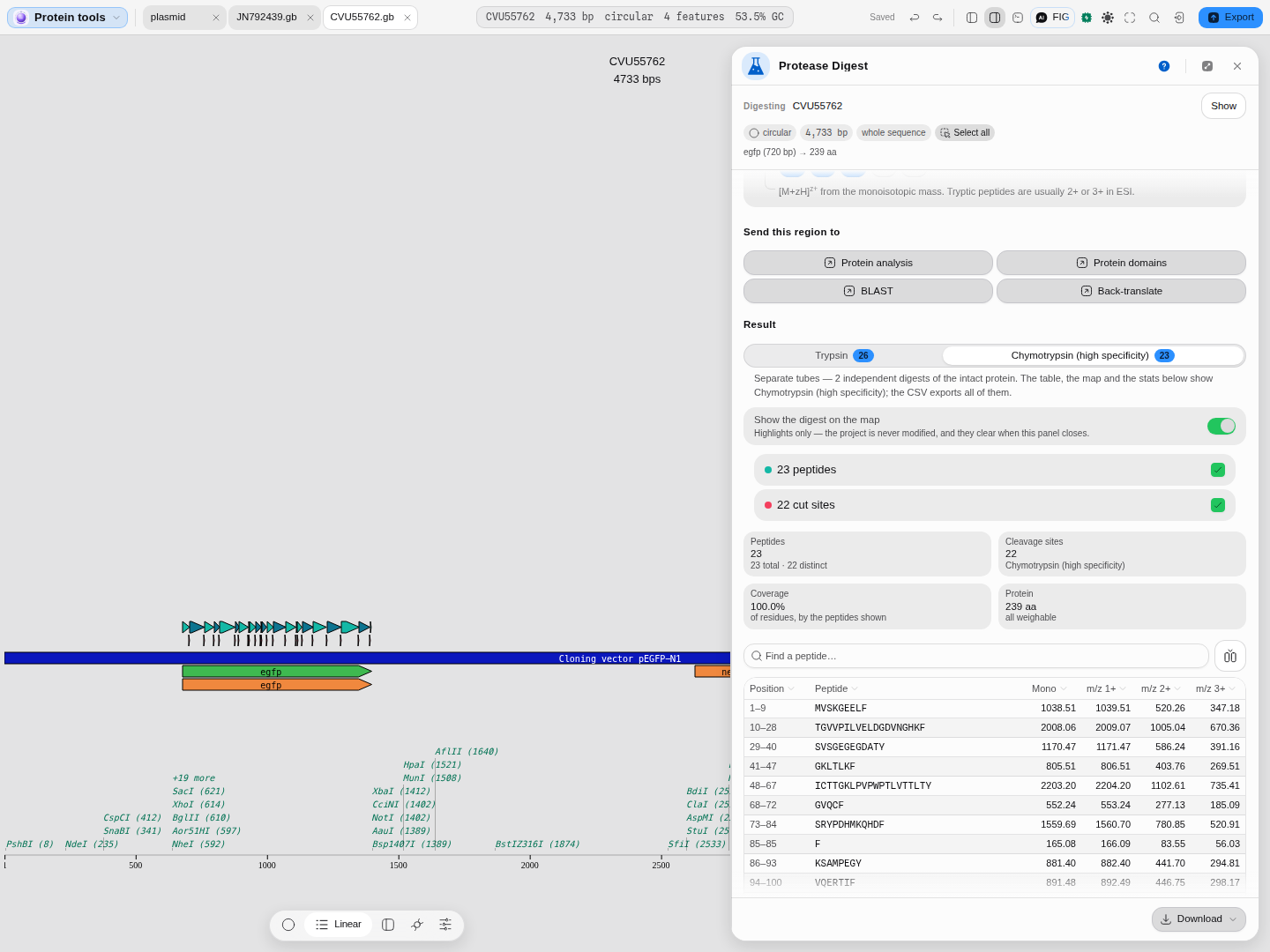
Adding a second protease makes the digestion mode a real choice. Sequential is two separate tubes: each enzyme meets the intact protein on its own, and you get one result per enzyme, shown here as a strip you switch between — trypsin gives 26 peptides on eGFP, chymotrypsin 23, and the table, the statistics and the peptide lane on the map all follow whichever you have selected. Concurrent is one tube with both enzymes in it, with the products re-digested until nothing changes; that can open a site neither enzyme could reach on the intact chain, and can close one whose context an earlier cut removed, so the answer is not the union of the two separate digests. Either way the exported table carries all of them.
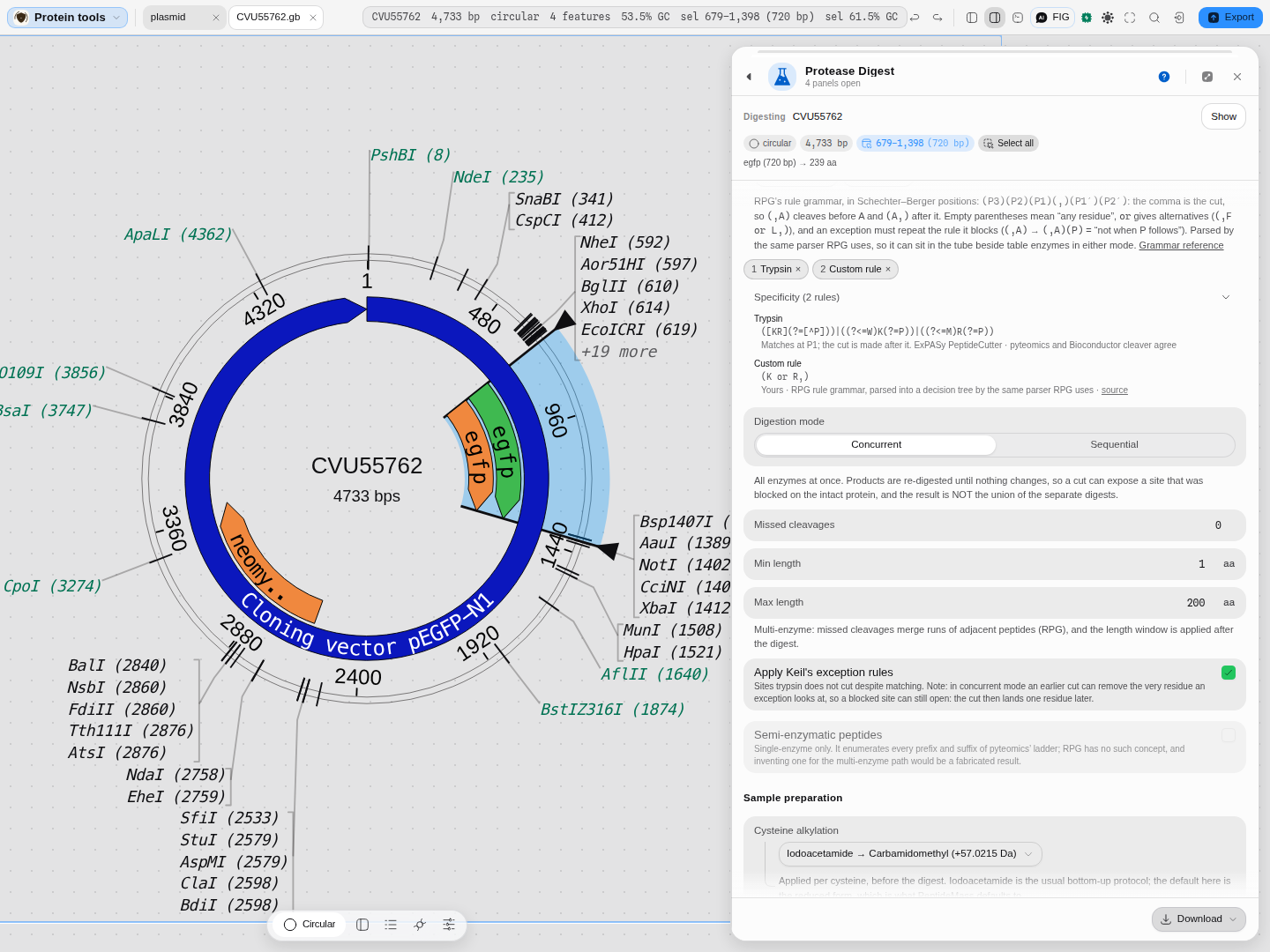
Every rule in the tube, written out, over the authority it came from. Trypsin is three patterns, not one: the basic K/R rule plus the exceptions Keil documented, which is why a trypsin result here can differ from a tool that applies the simple rule alone. A rule you wrote yourself is labelled as yours. The disabled control is worth reading too: semi-enzymatic peptides are offered for a single-enzyme digest and refused for a multi-enzyme one, with the reason given, because the published multi-enzyme algorithm has no such concept and inventing one would put fabricated peptides in your search list.
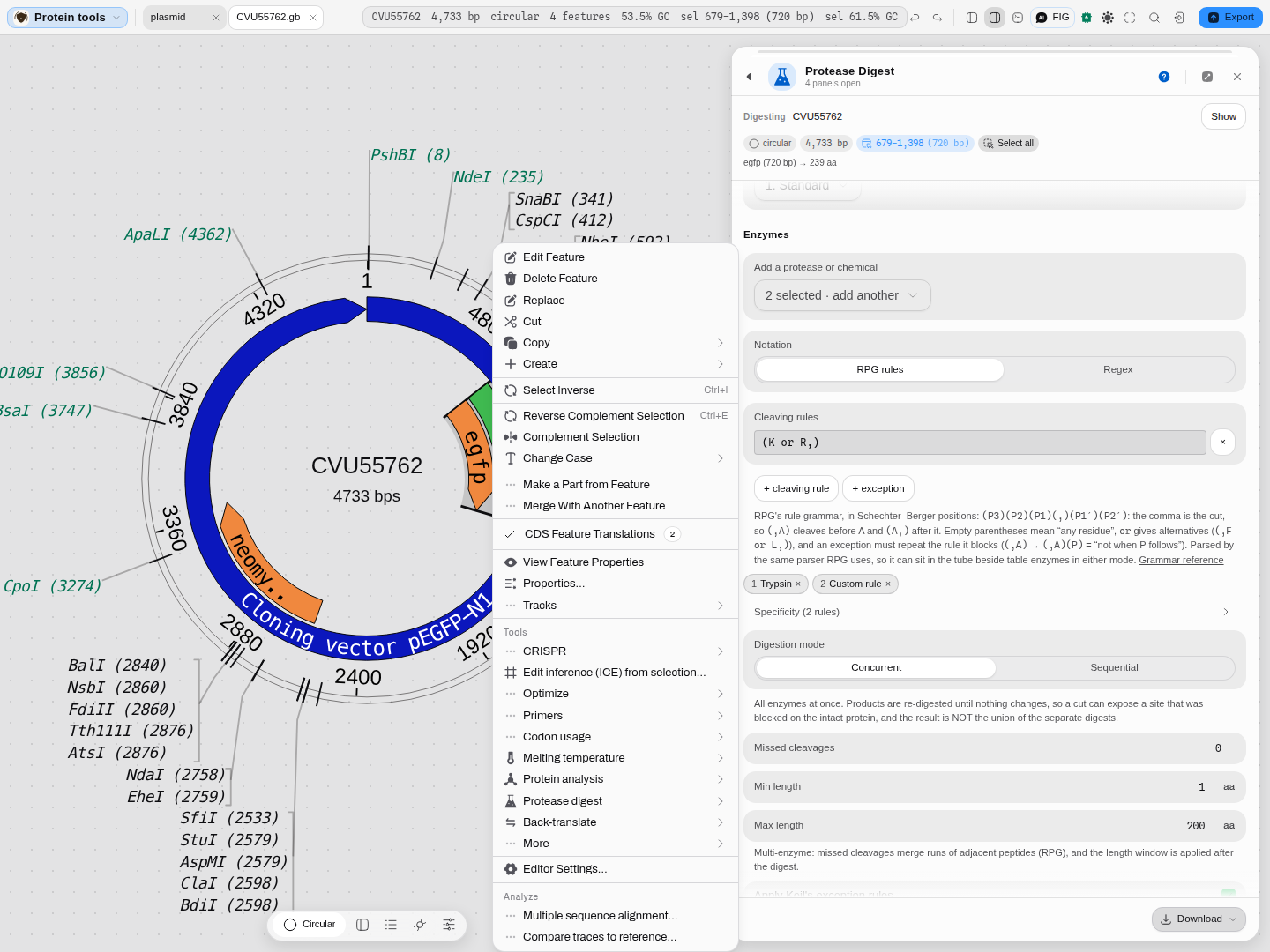
You do not have to go looking for the tool. Right-click any coding feature on the map and Protease Digest is in the menu, next to the other protein tools; the region you clicked arrives already translated and already loaded, so the tool opens on the thing you were pointing at.
Related
Feeds it: any coding feature or selection on the canvas, and
Protein Analysis, which hands over the same residues with its
Send this region to grid.
Follows it: Protein Domains, to ask whether a covered stretch is the domain you care about · BLAST Search, to identify the protein a peptide came from · Back-translate, when the answer is "change the construct".
An alternative to it: nothing in the editor — this is the only in-silico proteolysis surface. For the nucleic-acid equivalent, cutting DNA with restriction enzymes, see Restriction Digest; the two panels are deliberately the same shape.
Walked end to end: Protein → peptides.
Protein Analysis
Read the physicochemical properties of a protein the way ExPASy ProtParam does, without leaving the editor or pasting a sequence into a form.
Antibody Numbering
Find the antibody and T-cell-receptor variable domains in a protein, number them under IMGT, Kabat, Chothia, Martin, AHo or Wolfguy, assign their closest germline genes, and scan them for sequence liabilities.