
Properties
Everything drawn on the map, read as a table instead.
| Reached by | View → Properties |
| Formats | GenBank view of the open record |
| Sample project | Feature files |
What it does
Two things. It states what the molecule is — its length, topology, mass, base or residue composition — and it shows everything annotated on it as sortable tables instead of as shapes on a map, one tab per kind of thing, each carrying a live count. A map is the right picture for "where is this"; a table is the right picture for "how many, which is longest, and is that one on the wrong strand".
It is the same data the map draws, read from the same live record — edit an annotation here and the map redraws; select one on the map and the table highlights and scrolls to it.
When you'd use this
Used in: Optimize a coding sequence for expression in another host · Read a variant call set at a locus
- Auditing an inherited plasmid. Someone hands you a GenBank file with forty features. The map is unreadable at that density; the Features table sorted by position is not.
- Checking a strand or a frame. Strand and reading frame are hard to read off an arc and trivial to read off a column.
- Finding the duplicate. Two features with the same name at different positions are invisible on a map and obvious in a sorted list.
- Reading the raw record. The GenBank tab is the file's own text, which is where you look when a qualifier did not survive an import.
What this computes
Most of this panel is a readout: the annotation tabs show what the record already contains. The General tab is the exception, and it computes five things about the molecule itself.
On the General tab, for a nucleic acid:
- Molecular weight, under the record's own topology and strand count. A circular molecule has no
ends, so it carries no terminal water; a duplex weighs both strands. The label says which
molecule was weighed —
MW (circular dsDNA),MW (single strand)— because the two answers differ by about a factor of two and a mass with no strand count attached cannot be checked. - GC content and AT content, over the resolved A, C, G and T bases only. They therefore complement each other exactly. Ambiguity codes are not folded into either figure; they are listed underneath with their counts and no share, so a record with a lot of N tells you so instead of quietly diluting its own GC.
- Base composition — the count and share of each base, over that same denominator.
On the General tab, for a protein:
- Molecular weight in daltons. A residue with no defined mass —
X,B,Z, a gap, a stop — is named rather than skipped, so a partial mass is labelled partial. - Isoelectric point, and the molar extinction coefficient at 280 nm under both cystine conventions (all cysteines reduced, and cystines formed).
- Residue composition — all twenty, with counts and shares.
Every one of these carries a How these are derived note written from the run itself: the denominator with its actual total, how many symbols were excluded and which, the strand count, the topology, and the exact mass. Change the topology and the note changes with the number.
What it exposes per tab, with a live count on each:
- General — the record's name, length, topology (circular or linear), and the composition above
- Features — every annotation with its name, type, start, end, strand and length
- Parts — the synthetic-biology parts defined on the record, separately from features, because a part is a different object with a different lifecycle
- Primers — the primer annotations on the record, with their spans
- Translations — every translated region, with its frame
- Cut Sites — where the enzymes in your active collection cut, with cut positions
- ORFs — open reading frames found on the record, with frame, strand and length
- GenBank — the record as GenBank text, which is the ground truth behind every other tab
Scope follows your selection. With nothing selected the tables are file-wide; select a region on the map and the tables narrow to what is inside it. That is what makes this a companion to the map rather than a separate view of the same file.
Where it lives
View → Properties, docked in the right rail beside the map, so the table and the picture are on screen together. It can be detached into a floating card or its own always-on-top window when you want it beside a different tab.
Inputs and outputs
Accepts whatever record the editor has open — there is nothing to load and nothing to run.
Produces no new data. Edits made here are edits to the record and go through the same history as an edit made on the map, so they can be undone.
An empty tab means the record has none of that thing, and the count says zero rather than the tab disappearing — a missing tab would be indistinguishable from a tab you had not noticed.
Demo
There is no screencast. Open any sample project with annotations — Feature files is the one built for this — and the tables are populated immediately.
Worked example
Open the Feature files sample project and look at the Features tab. Sort by length: the longest feature is usually the backbone element or the insert, and anything unexpectedly long is usually an import artefact where a qualifier became a span.
Now select a region on the map covering one gene. Every tab narrows to that region, and the Cut Sites tab becomes the answer to "what can I cut inside this gene without touching the rest" — which is the question you would otherwise take to the Digest panel.
Controls
| Control | What it does |
|---|---|
| Tabs | switch between the annotation kinds; the count badge on each is live |
| Column sort | reorders the table; position and length are the two that answer most questions |
| Row selection | selects that annotation on the map and scrolls it into view |
| Inline edit | changes the annotation on the record, undoably |
There is no filter box here beyond sorting. The selection is the filter: narrow on the map and the tables follow.
Algorithms you can choose
None to pick from a list. What the General tab computes is decided by the record rather than by a setting: whether it is a protein or a nucleic acid, whether it is circular or linear, and whether it is double-stranded. The Circular/Linear control on the same tab is the one knob that moves a number here, and it moves the mass, correctly.
Two annotation tabs depend on a setting made elsewhere: Cut Sites reflects your active enzyme collection, and ORFs reflects the minimum-length and genetic-code settings the editor is using. Change either and these tables change with it, which is worth knowing before you read a cut-site count as a property of the molecule.
The science
Which bases the percentages are over. GC and AT are reported over the resolved A/C/G/T bases,
which is the convention Biopython's gc_fraction uses by default: an ambiguity code could be either
a G/C or an A/T, so counting it in the denominator of both figures makes them stop summing to 100
and makes a run of Ns look like a real drop in GC. The ambiguous bases are not hidden — they are
counted beside the shares. On a record with no ambiguity codes, which is most of them, this is the
same number either way.
Which molecule the mass is for. A plasmid is a duplex, so its mass is both strands; an oligo and an RNA are one strand. A circular molecule has no ends and so carries no terminal water — on a 2,240 bp record that is a difference of about 36 g/mol, far too small to matter at the bench and large enough that a readout which ignored it would be contradicting its own topology switch.
The other convention worth stating explicitly is coordinates. Positions here are the editor's positions, and an origin-spanning feature on a circular record has an end before its start — that is not a corruption, it is what wrapping past the origin looks like in a linear coordinate system. A feature's length accounts for the wrap.
Strand is shown as forward or reverse relative to the record as stored, not relative to any gene.
Limitations
- It reads what the record holds, not what is true. A feature annotated in the wrong place is shown in the wrong place. This tool audits a file; it does not validate one against a database.
- Qualifiers beyond the common ones are visible only in the GenBank tab. The Features table shows the fields it has columns for; the full qualifier set lives in the raw record.
- Cut sites and ORFs are settings-dependent, as above.
- Large records make long tables. There is no windowing here as there is in the file-backed data tables, so a record with thousands of features is better read after narrowing with a selection.
Compared with other tools
Every plasmid editor has a feature list. What is different here is that this one is the same live record as the map, scoped by the same selection, rather than a dialog that opens over the map with its own copy — so there is no version of the list that can be out of date, and no closing it to get back to your work.
Export
There is no export from this panel, because the record is what would be exported and the Export panel already writes it in every format. The GenBank tab is the copyable text form.
API
The composition half of this panel is available programmatically as record composition: give it a record and it returns the molecular weight with the strand count it was taken over, GC and AT over the resolved bases, the per-symbol census, and — for a protein — the isoelectric point and both extinction coefficients. It takes one option, whether to weigh both strands or one.
The annotation tabs have no separate call behind them: they are a view of the record, so the programmatic equivalent is reading the record itself.
Automation
Record composition is a workflow node, so a pipeline can read a molecule's mass and composition without opening a panel: point it at the record a previous step produced and wire its outputs onward. Every figure the General tab shows is one of its outputs, under the same names.
The annotation facts reach a pipeline through the record itself: a node taking a record input has the annotations this panel lists.
Provenance
Molecular weight and base composition are checked against Biopython, base for base and
digit for digit, in all four combinations of single/double-stranded and linear/circular. The GC and
AT denominator is the one Biopython's own gc_fraction uses by default.
Protein mass, isoelectric point and both extinction coefficients are checked against ExPASy ProtParam, whose stated conventions they follow — including which cysteines count toward absorbance at 280 nm.
Where cut sites are shown, the enzyme recognition sequences and cut positions come from REBASE, through the active enzyme collection.
Screenshots
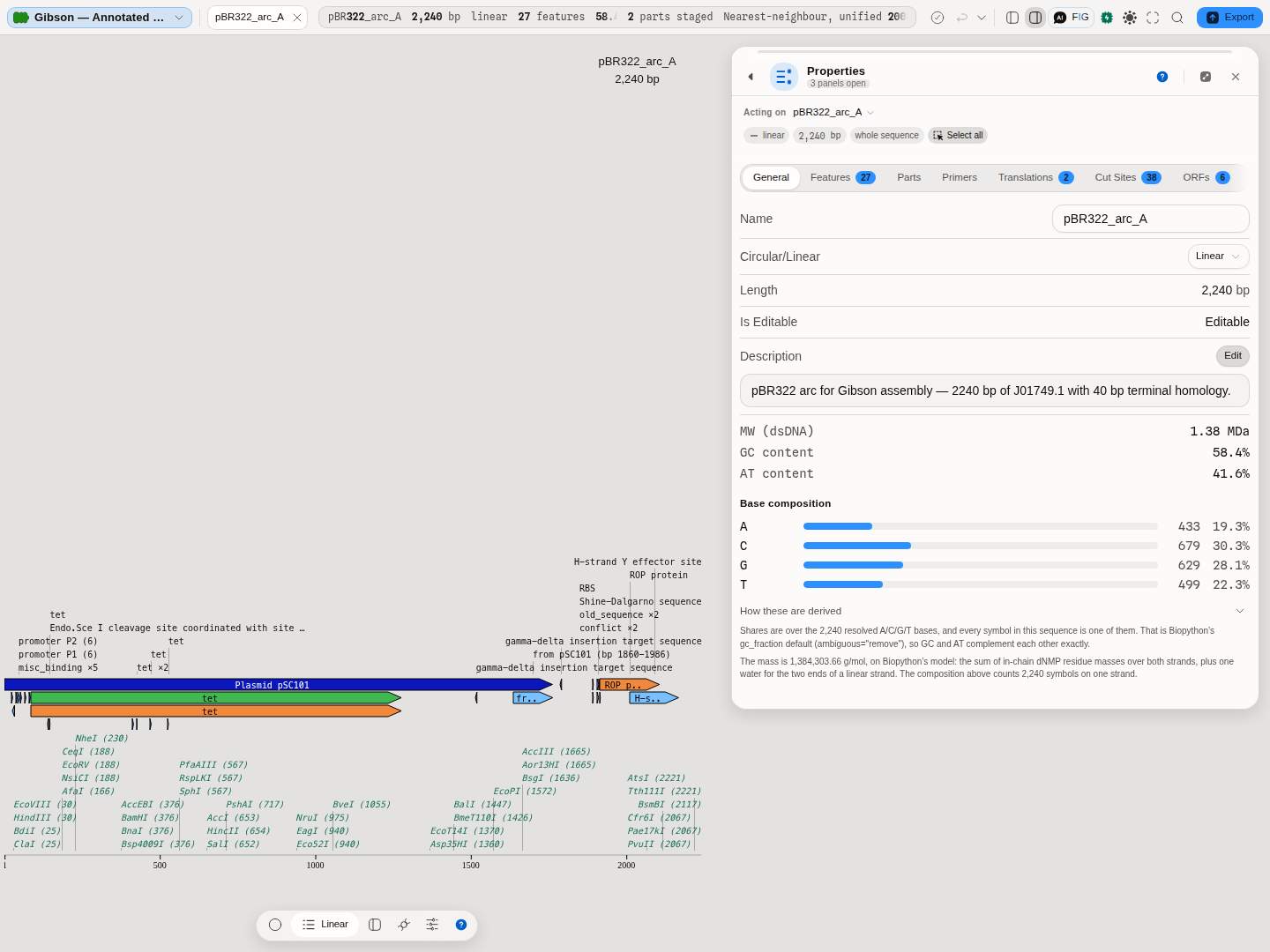
pBR322_arc_A, a 2,240 bp linear arc. Under the record's name, topology and description: the mass
of the duplex, GC and AT over the resolved bases (58.4% and 41.6%, which sum to 100), and the base
composition with each count and share. The open note beneath is written from this run — it names the
2,240 bases the shares are over, says every symbol in this sequence is one of them, and states the
mass to the gram along with the model it came from and the water it added for the two ends of a
linear strand. Switch the record to circular and both the number and that clause change.
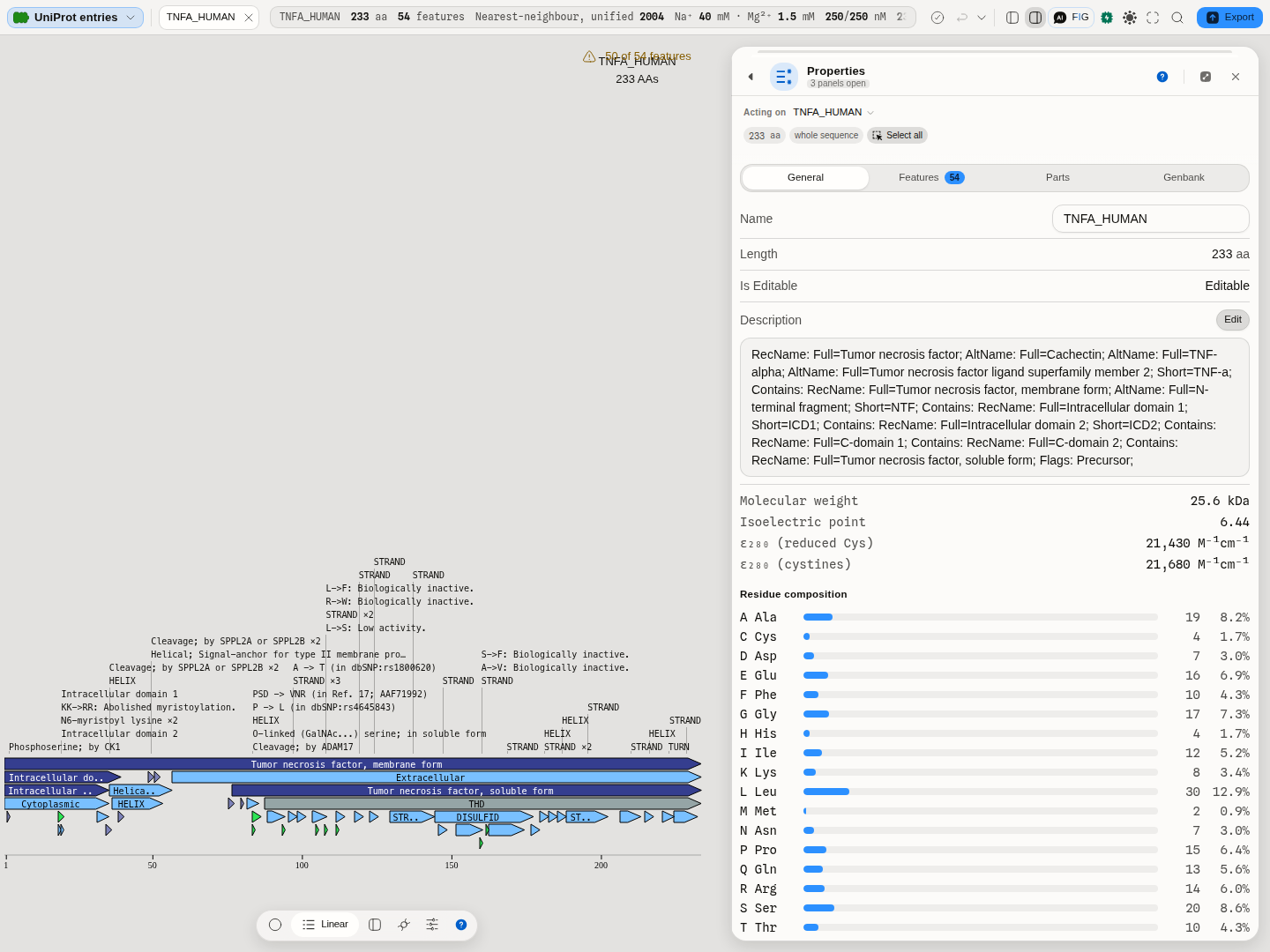
TNFA_HUMAN from the UniProt entries project: 233 residues, so the panel reports residues and not
bases, offers no circular/linear control, and answers with mass, isoelectric point and both
extinction coefficients at 280 nm rather than with GC. The residue composition below runs to all
twenty. There is no GC content on this tab, and that absence is deliberate: a protein in this editor
is drawn on a degenerate back-translation, so a GC figure over it would be a fact about the drawing
rather than about the molecule.
Related
The map this is the table form of. Digest for cut sites you want to act on rather than count. Export, for writing the record out. Auto-annotate, when the tables are emptier than they should be.