
Protein Domains
Take a CDS from the construct you have open, scan it against the InterPro member databases, and put the domains back on the map at DNA coordinates.
| Reached by | Tools → Protein Domains |
| Sample project | Protein tools |
What it does
You have a plasmid open. One of its coding sequences makes a protein, and you want to know what that protein is: which folds it contains, where they sit, whether it carries a signal peptide or transmembrane helices, and which curated family it belongs to.
This panel takes that CDS, translates it, and sends the protein to EMBL-EBI's InterProScan, the service that runs a query against every major domain database at once and reconciles the answers into InterPro entries. What comes back is a set of matches: each one a member database's opinion that some stretch of your protein looks like a known domain, family, repeat, site, signal peptide, coiled coil, disordered region or transmembrane helix.
The part that makes it a workbench tool rather than a website is the last step: every match is converted back to DNA coordinates on the molecule you have open, drawn on the map, and — if you want it — written into the record as real annotations that travel with the file.
When you'd use this
Used in: Protein → peptides: will mass spectrometry see the region I care about?
- You have inherited a construct and its CDS is called
orf1or nothing at all. Scan it and the answer arrives as a family name and a fold, not a BLAST hit list you still have to interpret. - You are designing a truncation or a fusion and need to cut between domains rather than through one. The domain boundaries drawn on the map are the thing you cut around; select a domain from the panel and the sequence selection is already on the right codons.
- You are checking a synthetic design. A codon-optimised gene should still have the same domain architecture as the parent. Scan both, compare the diagrams.
- You want to know whether a protein is secreted or membrane-bound before committing to a purification strategy. Signal peptide and transmembrane calls come back in the same run.
- You are annotating for a deposit. Annotate shown writes the domains into the record so the GenBank file you submit carries them.
Where the work happens
Nothing, locally — this is the one tool that leaves the machine. It submits the sequence you choose to InterProScan at EMBL-EBI when you press Scan, never on its own, and what it reports is what the service returned, at the granularity the service returns it.
Per signature match
- the member database that made the call, and its version — Pfam, PROSITE, SMART, PANTHER and the rest are separate methods with separate error modes, and a hit is only as good as the method behind it
- the signature accession and its name, so the call can be looked up at its source
- where it lies on the protein, as residue coordinates
- the E-value and the score the method assigned, which is the number that decides whether you believe the hit
- the InterPro entry it integrates into, and that entry's type — family, domain, repeat, site — when the signature is integrated, and plainly nothing when it is not
- GO terms and pathway cross-references, when you ask for them
Per protein
- the domain architecture, drawn in order along the sequence, which is the readout that answers "is this the protein I think it is" faster than any table
- matched structures, when the sequence corresponds to a known entry, with the match stated as exact or as an earlier sequence version rather than silently equated
Written back: any returned domain can become a real feature on the map at DNA coordinates, so a scan result stops being a report and becomes an annotation you can keep.
What it does not compute: the calls themselves. Every number here is EMBL-EBI's, and this tool adds no scoring, no filtering by default and no interpretation of its own. If the service is unreachable, the panel says so rather than showing an empty result.
Where it lives
Tools → Protein Domains, or right-click a CDS on the map and choose Protein domains → Scan "" for domains — which opens the panel with that CDS already chosen. Right-clicking a plain selection offers Scan this selection for domains instead.
Once a scan has run, its domains are drawn on the map as their own track: a ring on the circular view, a lane on the linear and sequence views. Right-clicking a drawn domain gives you that domain's own menu — open it at InterPro, copy its accession, select it on the sequence.
Inputs and outputs
It accepts a protein, however you can name one:
| Route | What it means |
|---|---|
| A CDS feature | The panel lists every CDS on the open molecule and pre-selects the one you came from. This is the normal path. |
| The current selection | Any span. If its length is not a multiple of 3 the panel says so before you press Scan and tells you the trailing bases will be ignored, rather than quietly reading the wrong frame. |
| Whole sequence (frame 1) | For a molecule with no CDS annotation at all. |
| ORFs (six frames) | Switch on Include ORFs and every open reading frame becomes a target, longest first. |
| A UniProt accession | Fetches the protein directly. |
| Pasted FASTA | For a sequence that is not in the project. |
| Batch | Several targets in one submission, which is also how the service prefers to receive them. |
What it produces: the match table, the architecture diagram, the map track, optional record annotations, a TSV of the filtered view, and the service's own raw outputs (see Export).
What it refuses, and how it says so. EMBL-EBI requires a contact address on every submission, so Scan without one answers "EBI requires a contact email on every submission." If the service cannot be reached, the panel names it and tells you where to look rather than showing a bare network error: "Could not reach EMBL-EBI. The service may be down, or this browser may have no route to it. If the job was submitted before the connection dropped, its id is under Past jobs: re-fetch it rather than re-running." And if the scan completes with nothing found, the panel says that is a real answer, not an error, and suggests enabling more member databases.
Worked example
The Protein tools starter opens FAS2_wild-type_locus — yeast fatty acid synthase subunit beta, the multi-domain enzyme this tool exists for. Every number below is from a real run you can reproduce.
1. Pick the target. The panel offers FAS2 · 1887 aa. Choosing it shows 1887 aa from 1001–6661 (+ strand) underneath, and the canvas selection moves to 1,001–6,661 (5,661 bp) — 5,661 bases, which is 1,887 residues plus the stop codon. If those two numbers disagree, the target is not what you think it is.
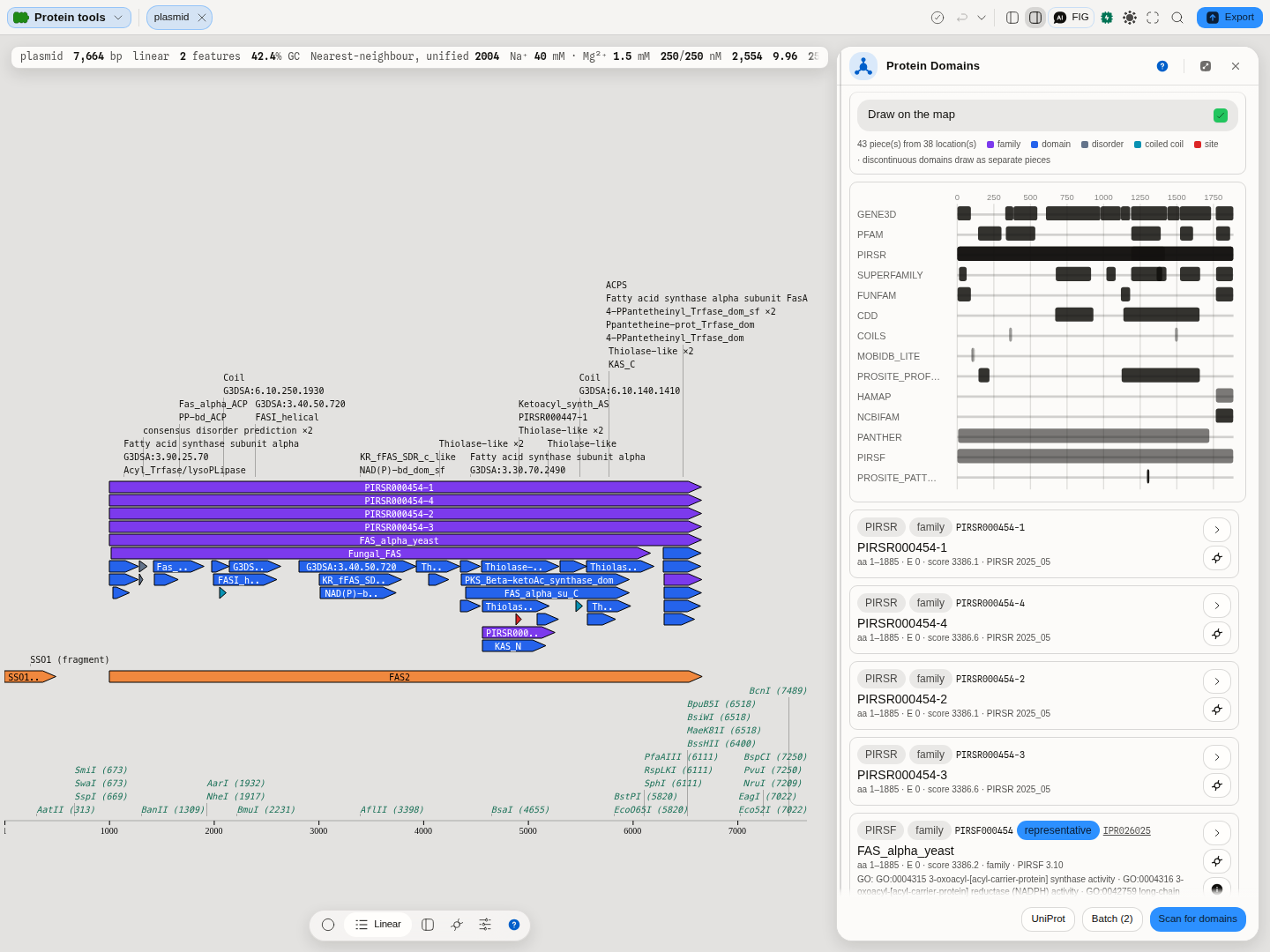
Target seeded from the record you have open, and the result: 38 locations · 38 matches, over InterProScan 5.78-109.0. The map below carries the whole architecture — acyl-carrier, ketoacyl synthase, thiolase-like and NAD(P)-binding domains in series along the CDS.
2. Choose what to run. Leave the member databases unselected to run the service's default set, or pick specific ones. GO terms and pathways are on by default.
3. Press Scan. Nothing of yours has left the machine before this point. The job takes seconds to minutes; the panel shows its live state and its job id, and Cancel really cancels.
4. Read the header and the read-back. The header reports 38 locations · 38 matches — here they happen to be equal, because none of these signatures was reported at more than one place. The read-back under Draw on the map is the more interesting number: 43 piece(s) from 38 location(s) · 43 on the map. Forty-three pieces from thirty-eight locations means five of these domains are discontinuous, and the last figure is read back from the document after drawing rather than the first one repeated.
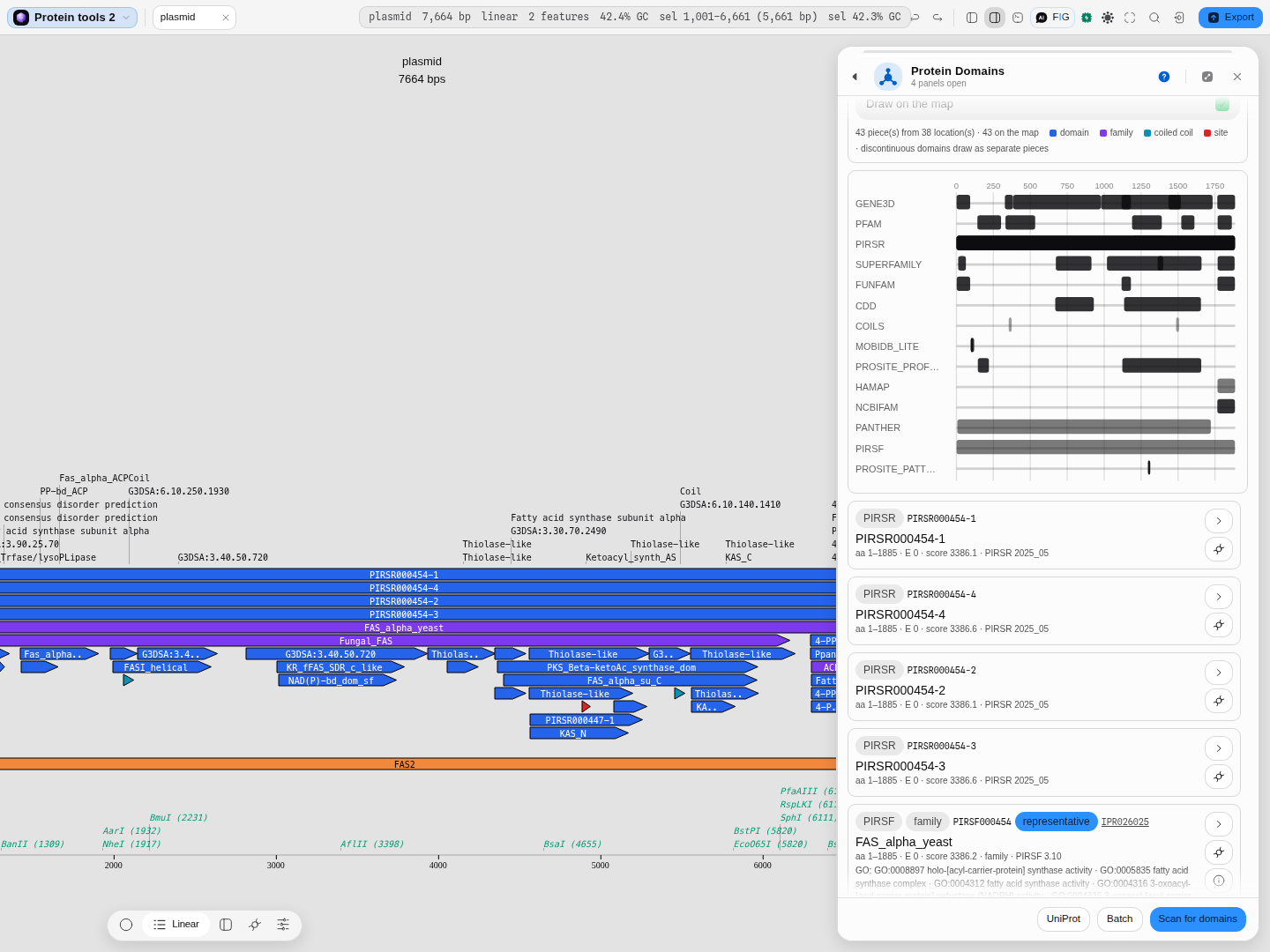
Fourteen lanes over a 0–1,887 residue ruler — GENE3D, PFAM, PIRSR, SUPERFAMILY, FUNFAM, CDD, COILS, MOBIDB-lite, PROSITE profiles and patterns, HAMAP, NCBIfam, PANTHER, PIRSF. Reading down a column shows how many independent databases call the same residues; reading across a lane shows one database's account of the whole protein. The legend carries five kinds here — family, domain, disorder, coiled coil, site — and says that discontinuous domains draw as separate pieces. It said four until September 2026, with disorder missing, and that was not a matter of this protein: the scan's two spellings of MobiDB-lite disagreed, so every disordered region was being counted as a folded domain. It matters most for the globular-domain filter below, which must not treat disorder as a fold.
5. Find the discontinuous domains. This is the case that quietly gives wrong answers everywhere else, and FAS2 has several. Switch on Representative only to cut 38 rows to the 9 the service itself considers the condensed reading, and the structure is easy to see:
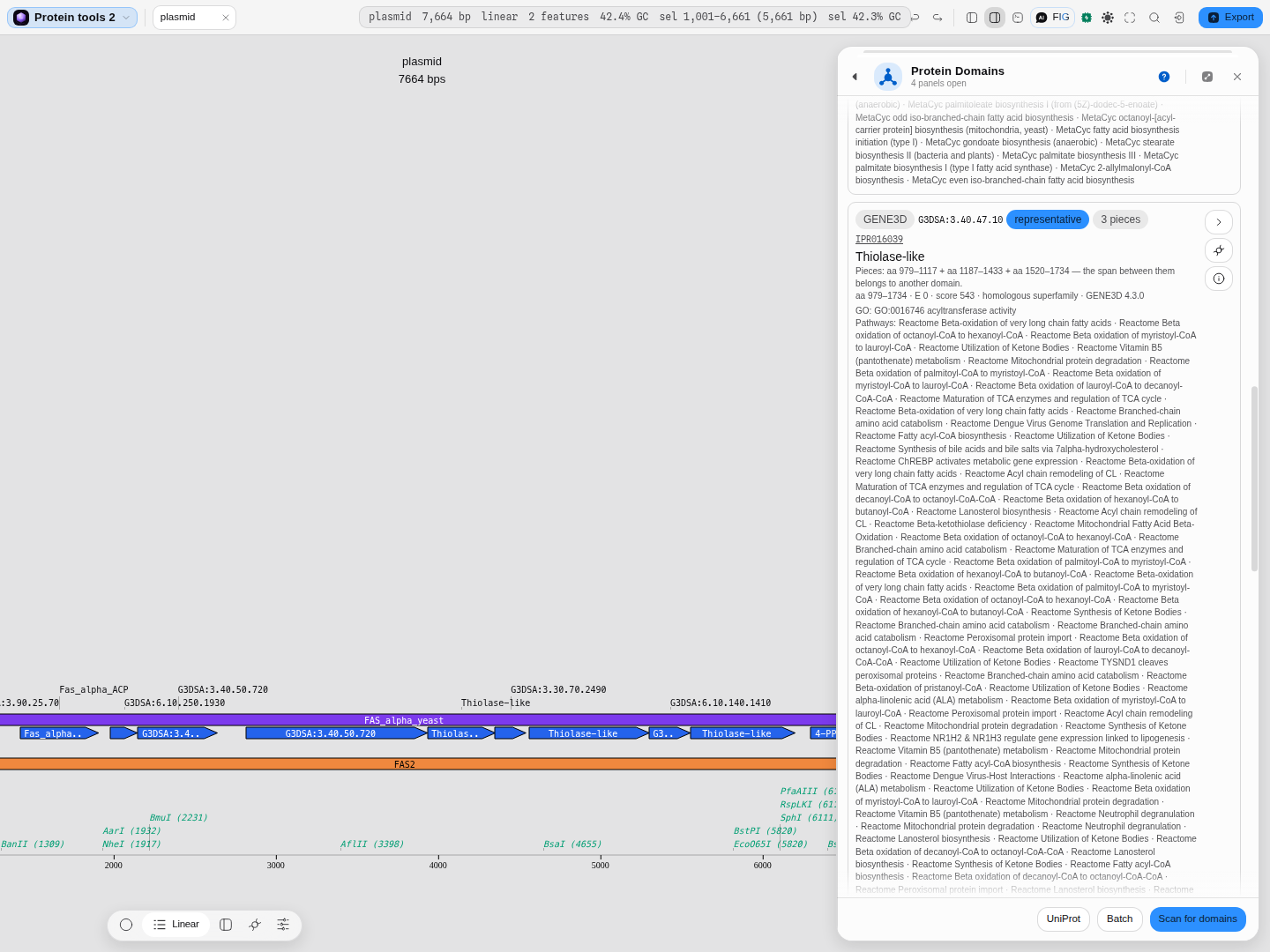
GENE3D G3DSA:3.40.47.10, badged representative and 3 pieces: Thiolase-like, reported over aa 979–1734 but occupying aa 979–1117 + aa 1187–1433 + aa 1520–1734 — and the row says why in words: "the span between them belongs to another domain." Drawing that as one box from 979 to 1734 would put this domain on top of two others and write a wrong annotation on commit. The track draws one box per piece instead, which is what the Thiolase-like boxes on the map behind it are.
6. Commit what you want to keep. Annotate shown writes the filtered set as real features — one per piece, so the three-piece domain above writes three features, suffixed (1/3), (2/3), (3/3), rather than one wrong feature spanning the gaps. It is a single undo step.
Controls
Choosing what to scan
- Target — every CDS, the current selection, whole sequence in frame 1, and (optionally) the six-frame ORFs. Validated before the run, with the reason shown next to the control.
- Include ORFs (6 frames) and a minimum ORF length, for molecules with no CDS annotations.
Choosing what to run
- Member databases — the panel asks the service which ones it currently offers and lists exactly those, so the list is never a stale hardcoded set. Leave them all unticked to accept the service's default set.
- GO terms — attach Gene Ontology terms to the matches that carry them.
- Pathways — attach pathway cross-references (Reactome, MetaCyc, KEGG) where the entry has them.
- Contact email — required by EMBL-EBI as an abuse contact, not a login. Stored locally and sent only to them.
- Reuse cached — reuse a stored result for an unchanged protein and the same parameters. Saves minutes and spares the service's fair-use budget; the readout says how many scans are cached, how large they are, and which InterProScan version produced them.
RPS-BLAST against CDD, and the same scan run locally:
| Control | Default | What it sets |
|---|---|---|
| Database | CDD | Which conserved-domain collection the search runs against |
| Mask low-complexity regions | off | Stops a simple repeat from seeding matches |
| Database copy | Bundled (same file as NCBI's) | Use the bundled profile library, or read it from NCBI now |
| Composition-based statistics | On (BLAST default) | Whether scores are corrected for the query's own composition |
| Genetic code | Table 1 | The translation table a coding target is read under |
| Domain inclusion E-value | 0.05 | The E-value a domain must reach to be reported |
| Word threshold | 11 | The score a seed word must reach to start an extension |
| Drop motifs buried in a folded domain | off | ELM's globular-domain filter, which needs a domain scan first |
| Minimum ORF length | 60 aa | How long a six-frame open reading frame must be to be scanned |
Reading the result (all of these filter the view; none re-runs the job)
- E ≤ — hide matches weaker than an E-value you choose.
- InterPro-integrated only — keep only signatures that have been curated into an InterPro entry.
- Representative only — InterProScan's own per-protein selection: the overlapping signatures that together cover the most residues. It is the condensed reading of the table, not a better one, which is why it is off by default.
- Library facets — show or hide individual member databases.
- Sort — by length, position, E-value or library.
- Draw on the map and annotate as — whether domains are drawn, and which feature type they take when written into the record.
What this computes
Every readout this panel can put on screen, in the words you would search for.
From the domain scan. Signature match (member database, accession, name and its own description) · the InterPro entry a signature integrates into, and that entry's type — family, domain, repeat, site, homologous superfamily · match coordinates in residues and the DNA coordinates they map to · E-value and bit score where the member database reports them · InterProScan's own representative selection for the protein · discontinuous-domain pieces and their continuity status · residue-level site annotations — the individual catalytic, substrate-binding, metal-binding and interface positions a member database calls out inside a domain, each with the amino acid and its position · signal-peptide, transmembrane, coiled-coil and disorder calls · GO terms and pathway cross-references carried by the entry · the exact service version and job id that produced the result.
From the RPS-BLAST search against CDD. Every conserved-domain model the protein hits, with its hit type (a specific hit scores above the model's curated threshold, a non-specific hit clears only the E-value, a superfamily row names the cluster the model belongs to, a multi-domain row a model spanning several domains) · the model's accession and short name · its residue span and the DNA span it maps to · E-value and bit score · the superfamily cluster · whether the alignment stops short of the model's N-terminal or C-terminal end (a truncated protein, a split domain or a wrong start codon) · and the collection, search mode, E-value cutoff, hit limit, composition correction and low-complexity filter the search ran with, with NCBI's search id so the run can be reopened in NCBI's own viewer.
From the local SMART search. Every SMART model hit, with its accession, short name and description · the query span (residues, or bases and reading frame for DNA) and the DNA span it selects · the model span and the model's length, so a partial hit shows · raw score, bit score and E-value (Spouge's finite-size correction) · identities, positives and gaps · the aligned residues. For DELTA-BLAST, each matching protein with its span, percent identity, E-value and bits, plus how the profile was built: the domains used, the query columns they cover and the mean number of independent observations per covered column. Every run states the gapped and ungapped λ and K, the length adjustment and the database size it used.
From the linear-motif scan. Motif class identifier and accession · the functional site it belongs to (cleavage site, degron, docking site, ligand binding, modification site, targeting signal) · the matched residues and their coordinates · the class's chance probability per residue · how many experimentally supported instances of the class are annotated in ELM · which classes were scanned, which were excluded by the expect cutoff, which motifs were dropped as buried inside a folded domain, and which were dropped as belonging to another cell compartment · the ELM release the scan ran against, with its date.
From the local profile scan. The profile's own identity and size — its name and how many match states it models · the Forward bit score, summed over every alignment of the model to the sequence, and the Viterbi bit score of the single most probable alignment · the E-value, where the model carries the statistics to compute one, and an explicit statement that it does not when the model is uncalibrated · the family's published gathering cutoff and noise cutoff, and the membership verdict relative to them — above the gathering cutoff, between the two, below the noise cutoff, or no published cutoff at all · the length of the sequence scored · and the fact that the scan ran on your machine, with nothing submitted.
From the structural context. Relative solvent accessibility per residue, computed from a real three-dimensional structure by the Shrake-Rupley rolling-ball method and normalised by the Gly-Xaa-Gly maximum accessibility of that residue type · the accessibility score Qacc for each motif match, averaged over the positions its pattern actually constrains and ignoring the wildcard positions, which is how ELM itself defines it · the absolute accessible surface area in square Angstroms behind that ratio · which structure the numbers came from, and whether it is a predicted model or an experimental entry — with, for an experimental entry, its sequence identity to your protein and the chain that was mapped · how many residues were scored, and how many the reference scale does not name.
Why it is worth having beside a motif list: a short linear motif works by being reachable, so a match buried inside a folded domain is far less likely to be a real functional site than the same match sitting on an exposed loop. Provenance of correctness, since it is a computed number rather than a fetched one: the accessibility is validated against the field's reference implementation of Shrake and Rupley's method, residue for residue, and the maximum-accessibility scale is the published one (Miller and co-workers, 1987) that the motif resource itself normalises by.
The verdict, when the structure can support one. Choose an experimental entry and each motif is also scored on the secondary structure it sits in — helix, 3-10 helix, strand or loop, in the eight-state vocabulary the classic DSSP analysis assigns — and the two scores are summed and placed in one of three bands the motif resource calibrated on 158 experimentally supported motifs against 22,058 random matches: sparse, neutral or enriched context. Read it as evidence and not as a ruling: a sparse context means the match sits buried or tightly structured where a working short motif would normally be exposed and flexible, which is a reason to doubt it, not proof it is wrong. Bacteriorhodopsin is the honest illustration — a seven-helix membrane bundle, where almost every matched motif lands in a sparse context precisely because almost the whole protein is helix.
When the verdict is withheld, and why that is not the same as a bad score. A predicted model has no secondary-structure analysis published alongside it, and the verdict is a function of both halves. Rather than show a band built on one of its two inputs, the tool shows the accessibility, says the secondary-structure half is missing, and points at the experimental entries that would supply it. The accessibility itself also changes source with the structure: for an experimental entry it is the value the DSSP analysis itself reports, which is the input the motif resource's filter is actually defined on; for a predicted model it is computed from the coordinates. The tool names which one produced the number rather than letting them look interchangeable, and a predicted model's own per-residue confidence is reported beside it.
About the residue-level sites. They are numbered against a specific protein sequence, so they are shown only when the protein you scanned is character-for-character a known entry. When your sequence is an earlier revision of that entry — the ordinary case for a construct built from an older sequence record, where a strain difference or a later correction changes a residue or two — they are withheld and the panel says so, because a catalytic position taken from a different revision can land on the wrong amino acid. On yeast alcohol dehydrogenase, for example, the annotated set is the catalytic zinc ligands Cys44, His67 and Cys154, a second structural zinc site, the NAD-binding residues, the substrate pocket and the tetramer interface; a one-residue shift would move every one of them.
Uncertainty, stated rather than implied. A linear-motif match is unscored by construction — a regular expression either matches or it does not — so the honest quantities beside a motif are its chance probability and its instance count, both shown on every row. A domain match carries its member database's own E-value where one exists, and nothing invented where one does not.
Algorithms you can choose
The algorithms are the member databases themselves, and they are genuinely different questions rather than one method with a flag — which is why the panel lets you pick them individually instead of hiding them behind a "sensitivity" slider:
| Family | What it answers |
|---|---|
| Pfam · PANTHER · PIRSF · SMART · PRINTS · Hamap | "Which curated family does this belong to?" — profile-HMM and fingerprint models over aligned families. |
| Gene3D · FunFam · SUPERFAMILY · CDD | "Which structural fold is this?" — models built from solved structures (CATH, SCOP, NCBI's conserved-domain database). |
| PROSITE patterns · PROSITE profiles | "Does it carry this exact short signature?" — regular-expression patterns and weighted profiles for functional motifs. |
| SignalP · Phobius · TMHMM | "Is it secreted or membrane-bound?" — signal-peptide and transmembrane-topology predictors. |
| Coils · MobiDBLite | "Which parts are coiled coil, and which are intrinsically disordered?" |
| NCBIfam · SFLD · AntiFam · PIRSR | Specialist sets: prokaryotic families, structure–function linked enzyme families, spurious-ORF detection, and site rules. |
Overlapping calls from different databases are shown as separate lanes, never merged. Two databases calling the same region are two independent opinions, and flattening them into one row would imply an agreement that is not in the data.
The science
InterPro is a consortium resource: each member database builds its own models, and InterPro curates
the ones that describe the same thing into a single entry with a stable IPR accession.
InterProScan is the pipeline that runs your sequence against all of them and reports both the raw
signature matches and the InterPro entries they integrate into.
Two conventions matter when you read a result:
- Coordinates are residues, 1-based and inclusive. The panel converts them to DNA coordinates on your molecule: residues a…b of the protein become the codons that encode them, counted from the CDS start on a forward CDS and from the CDS end on a reverse one, so the marks land on the right bases in either orientation rather than being mirrored onto the wrong strand.
- A match may be discontinuous. InterProScan reports both an outer envelope and the pieces the domain actually occupies, and for a domain wrapped around an insertion those differ substantially. Everything here draws the pieces.
Provenance of correctness: results come from EMBL-EBI's own InterProScan service — the panel
shows the exact version that produced each result (InterProScan 5.78-109.0 at the time of writing)
alongside the job id, and every one of the service's own output formats is one click away, so any
number on screen can be checked against the authority that produced it.
RPS-BLAST against CDD
RPS-BLAST (reverse position-specific BLAST) turns the usual search around: instead of comparing your protein with other sequences, it compares it with position-specific scoring matrices, one per curated domain model in NCBI's Conserved Domain Database. The search runs at NCBI through Batch CD-Search, CDD's own service, so the protein is sent to NCBI.
The section offers what that service offers. Search mode: automatic returns NCBI's precomputed answer where it has one and searches otherwise, precomputed never searches, and live always does. Only a live search lets you choose the collection (all of CDD, NCBI-curated models, Pfam, SMART, COG, KOG, PRK or TIGR; the list and its model counts are read from NCBI each time), the E-value cutoff and the most hits. The other two modes use NCBI's fixed 0.01 and 500. Composition correction adjusts scores for a protein whose amino-acid composition is unusual, and the low-complexity filter masks repetitive stretches before the search. Hits chooses between the concise list (the best hit per region), the standard list (the best per source collection per region) and the full list.
Read the hit type before the E-value. A specific hit is the confident family assignment. A non-specific hit says the protein resembles the model, not that it belongs to that family. An alignment that misses one end of its model is worth a second look at the protein's ends.
InterProScan, above, also runs CDD. For the same protein the two agree on the model, its span and its E-value. CD-Search adds the hit type, the superfamily cluster and the truncation flags, and it can search one collection on its own.
CD-Search takes protein, so a coding sequence is translated first, as it is for the InterProScan half. To search DNA against all of CDD, choose DNA, six frames: the six reading frames are sent as six proteins and each hit names its frame. This is a per-frame CD-Search, not RPS-TBLASTN: each E-value is computed for its own frame, not over a six-frame search space. RPS-TBLASTN itself runs on this machine, below.
Conserved domains on this machine (SMART)
The same RPS-BLAST family, run here against NCBI's SMART collection of CDD (1,011 domain models), so nothing is sent anywhere. Three programs:
- Protein (rpsblast): the target's protein against every SMART model.
- DNA, six frames (rpstblastn): the DNA of the target's span, translated in all six frames with the genetic code you choose, and scored over the six-frame search space. Use it on a selection or the whole sequence when you do not yet know where the genes are.
- DELTA-BLAST: the conserved domains found in the protein (at the domain inclusion E-value) are turned into a position-specific scoring matrix from each domain's own residue statistics, and that matrix searches the record's other proteins and any you paste. It finds distant homologs plain BLASTP misses, because conserved positions score by what the domain family tolerates.
Results are checked against the NCBI BLAST+ 2.17.0 programs of the same names on every protein and record bundled with the app, and are identical: the same hits, alignments, scores and E-values. The database is a copy of NCBI's own file, or read from NCBI when you ask for its copy.
Short linear motifs
A domain scan will not find a degron. The reason is structural, not technical: profile-HMM models describe a fold conserved over a hundred residues or more, while the sites that control where a protein goes, when it is degraded and which enzyme acts on it are three to eleven residues long, sit in disordered regions, and are conserved only in the few positions that make contact. They are called short linear motifs, or SLiMs, and the resource that curates them is ELM, the Eukaryotic Linear Motif resource.
Press Find motifs and the panel scans the target protein against every ELM class — cleavage sites, degrons, docking sites, ligand-binding motifs, modification sites and targeting signals — and draws the hits on the map beside the domains, in their own colour.
Nothing about your protein leaves the machine. This is the difference between the two halves of this panel: a domain scan sends the sequence to EMBL-EBI, while a motif scan pulls ELM's class definitions down and matches them here. The only request that goes out is for the class table itself.
Scanning without sending anything: a local profile HMM
The domain scan at the top of this panel sends your protein to EMBL-EBI. The Local profile scan
does not. It scores the protein against a profile hidden Markov model — a HMMER3 .hmm file —
on your own machine, and nothing about the sequence leaves it.
A profile HMM is what a protein family is, written down as a model. Rather than one consensus sequence, it carries a per-position picture of the family: which residues are tolerated at each column, how often the family accepts an insertion there, how often a deletion. That is why it finds relatives a pairwise search misses — a position that is invariant across the family counts heavily, and one that varies counts for almost nothing.
What it reports, in the words a scientist searches for:
- Bit score — how much better the family's model explains this sequence than the background model of ordinary protein composition does. Two scores are computed: the Forward score, which sums over every way the model could have produced the sequence, and the Viterbi score, which takes only the single most probable alignment. Forward is the more sensitive of the two and is the one reported first; both are shown, because a large gap between them means the match is spread over several plausible alignments rather than one confident path.
- E-value — how many sequences scoring this well you would expect to see by chance in a search of this size. Small is good. It is present only when the model carries the statistics needed to calculate it; a profile you built yourself without calibration has none, and the panel says so rather than printing a number it cannot justify.
- The membership verdict — whether this counts as a member of the family. This is not our judgement and not a threshold chosen here. Pfam publishes a gathering cutoff with each family: the bit score its curators use to decide inclusion, set per family by people who know it. The panel reads that cutoff off the model and reports the score relative to it. Where a family also publishes a noise cutoff, a score between the two is reported as exactly that — the curators would neither include nor discard it without looking. A model that publishes no cutoff gets no verdict, only its score, because inventing a threshold would be inventing the answer.
Reading a negative
Scoring yeast fatty acid synthase against Pfam's protein kinase family (PF00069) returns −1.9 bits, below the noise cutoff. That is the scan working. A negative bit score means the family's model explains the sequence worse than ordinary protein composition does, and the verdict cites the family's own 31.7-bit cutoff rather than leaving you to judge −1.9 on its own. This matters more than it sounds: a scan that only ever shows you hits cannot tell you when the answer is no.
What it will and will not do
It scans against the profiles you have — one family at a time, whichever .hmm files are in
your project. It is not a search of all of Pfam: that library is a 400 MB download, and scanning
against a single family you have chosen is a different question from asking which of twenty thousand
families a protein belongs to. For the second question, use the InterProScan half at the top of this
panel, which asks EMBL-EBI exactly that.
The two halves also see different things, and neither replaces the other. A profile HMM finds domains — folded units of a hundred residues or more, conserved across a family. The linear-motif scan below finds short motifs of three to eleven residues that carry no such conservation. A profile HMM cannot see those, and a motif scan cannot see a domain.
Reading a motif result honestly
ELM says it plainly on their own help page, and it is the single most important thing to know about this method: most matches are more likely to be false positives than real sites. A five-residue pattern occurs by chance in almost any protein of a few hundred residues. So the panel puts the numbers that qualify a hit next to it, on every row, and gives you the two filters ELM's own pipeline uses:
-
The expect cutoff is a filter on classes, not on hits. Each ELM class carries a probability of occurring by chance per residue, and a class more common than the cutoff is not scanned at all. The default, 0.01, is ELM's own; 0.001 is the strict reading and All is the unfiltered listing. The panel reports how many classes each setting excluded, so the number you see is never a bare total.
-
The globular-domain filter drops motifs that fall entirely inside a folded domain, on the grounds that a site buried in a fold is not available to the partner that would read it. It uses the domains from the InterProScan half of this panel, so it needs a domain scan first — and it counts only domains, never disordered or low-complexity regions, because disorder is exactly where real motifs live. That last clause was the intent and not the behaviour until September 2026, and the failure is worth knowing because of how it looked: disordered regions and whole-protein family rules were both being counted as folds, which on a 1,887-residue protein covered all but one residue of it, so switching the filter on returned no motifs at all — an empty list that reads exactly like the true answer "none of them is accessible". If you ran this filter before then and got nothing, run it again.
-
The cell-compartment filter drops motifs whose class is only ever seen in compartments your protein does not reach. Name the compartments it occupies — nucleus, cytosol, extracellular, mitochondrion and ten more — and a class annotated only for somewhere else goes. A class annotated for no compartment at all is kept: absence of evidence is not exclusion. The compartment list and the per-class annotations are ELM's own.
All three filters are settings the scan runs WITH, not a view over a result already on screen. Change a cutoff, a family, a compartment or the domain filter and the list below does not move until you press Find motifs again — so the panel says, above the list, that the counts predate the change and names the control you moved. Read that line before you read the number.
One further filter exists in ELM's pipeline and is not applied here: the taxonomic filter, which checks the motif's known taxonomic range against your organism. ELM publishes no bulk form of the per-class taxonomic range, so applying it would mean substituting a different quantity for the one ELM means, and its absence is stated rather than papered over. The structural filter is available, as Structural context: it scores each match's accessibility in a real structure — predicted or experimental — over the positions ELM itself averages. A motif list here should still be read as candidates to test, not as annotation.
Reading the accounting, not just the count
Every motif result opens with a line like 343 of 353 ELM classes scanned · 10 skipped above the 0.01 chance cutoff · 444 matches · ELM release 1.4, 2026-09-01, and the first number is the one to read first. A match count on its own cannot be interpreted: 444 matches out of 343 classes scanned and 444 out of 12 are different results about different questions, and only the denominator separates them.
Each clause names the reason a class did not run, so the number is actionable rather than merely accounted for:
- skipped above the chance cutoff — the class's pattern is common enough that matches to it are mostly coincidence at this stringency. Loosen the cutoff to include them and the hit count will rise faster than the evidence does.
- outside the selected families — you restricted the scan to some of
CLV·DEG·DOC·LIG·MOD·TRG, so the rest were never asked. - dropped as buried in a folded domain — the pattern matched, but the residues sit inside a globular domain, where a linear motif is not normally available to bind. This clause appears only when a domain scan has been run, because the filter needs those domains to know where the folded regions are.
- dropped as belonging to another compartment — the class is annotated for compartments your protein is not in, so a match to it is not a candidate you would follow up.
A clause is absent when the run did not earn it. Nothing reads "0 skipped", because a zero there is not a finding.
On a long protein the map shows fewer marks than the table lists, and both surfaces say so: yeast FAS2 (1,887 residues) returns 444 motifs and the map draws 200 of them, keeping the longest — so the marks that drop out are the short ones. Narrow the filters, or raise the drawing limit, and the two counts converge.
What a motif row tells you
| Column | What it means |
|---|---|
| Class | ELM's identifier, e.g. DEG_SCF_FBW7_1. The prefix is the functional family: CLV cleavage, DEG degron, DOC docking, LIG ligand binding, MOD modification, TRG targeting. |
| Position | Residues, 1-based and inclusive, mapped onto your molecule's DNA coordinates for the map. |
| Matched | The residues that matched, so the call can be checked by eye against the sequence. |
| p | The class's chance probability per residue. Larger means more common, and more likely to be coincidence. |
| inst. | How many experimentally supported instances of this class ELM has annotated. A class with many instances is well studied; one with few is a hypothesis. |
Provenance of correctness: the class definitions are ELM's own, fetched live, and the panel states the release and date every result was scanned against. The scan itself is checked against ELM's own prediction service, and re-checked each time this page's claim is renewed: on 2026-09-15, over six proteins (human p53, SRC, tau and epsin-1, plus yeast alcohol dehydrogenase 1 and fatty acid synthase subunit alpha), every one of the 353 classes agreed on every protein — 2,118 class comparisons — and all 1,021 predicted motif occurrences matched the resource's own output exactly, position for position. The compartment filter is checked the same way — asked to keep only nuclear classes on p53, it removes exactly the 21 classes ELM's own pipeline removes, with none missed and none added.
Please cite ELM when you publish work that used these calls: ELM — the Eukaryotic Linear Motif resource — 2024 update (PMID 37962385).
Scanning every protein in a record at once
Batch submits every annotated protein in the open record as one multi-FASTA job, which is what EMBL-EBI's fair-use policy asks for: one job of N sequences, never N jobs. The button says how many will go, and its tooltip names anything it is leaving out, before you press it.
Two things are deliberately left out of an automatic batch:
- A protein already in the batch. Records routinely annotate the same gene twice, as a
geneand as aCDSfeature. Both translate to the same protein, and sending it twice costs you minutes and the service a slot without producing a single new match. Duplicates are named in the tooltip so you can see the batch understood your record correctly. - The whole-sequence reading frame and the current selection, when the record has annotated proteins. Both are legitimate things to scan deliberately on a record with no CDS annotations, and neither is a protein: on a 4.4 kb plasmid the whole-sequence frame is a read-through of coding and non-coding DNA in equal measure. Pick either from the target list to scan it on its own.
Every row in a batch result carries the name of the protein it came from, and the architecture diagram draws one picture per protein, each on its own residue axis. Sharing an axis would put three molecules in one coordinate space, where residue 20 of one is drawn exactly where residue 20 of another is.
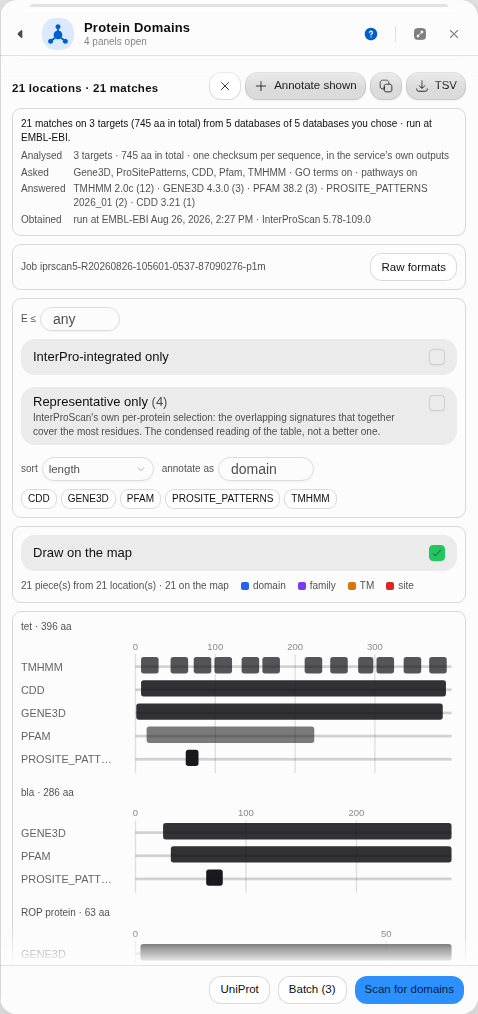 One job, three proteins: the tetracycline resistance protein with the twelve transmembrane helices
TMHMM found, beta-lactamase, and the 63-residue ROP protein, each drawn against its own length.
One job, three proteins: the tetracycline resistance protein with the twelve transmembrane helices
TMHMM found, beta-lactamase, and the 63-residue ROP protein, each drawn against its own length.
Spliced and frameshifted coding sequences
A CDS annotated as a join is translated from its pieces, in transcript order, not from the span that encloses them. That matters more than it sounds: SARS-CoV-2's ORF1ab is a join whose two pieces overlap by a single base, which is the −1 ribosomal frameshift itself, and reading it as one stretch gives a 7,096-residue sequence carrying 172 stop codons rather than the 7,097-residue polyprotein.
Because the pieces are real, a domain that straddles a junction is drawn on the map as two marks, one per exon, and never as one box painted across the intron between them. The same is true of what Annotate shown writes into your record.
A CDS that crosses the origin of a circular molecule is read the same way, from where it starts round to where it ends. The one shape still refused is that wrap on a linear molecule, where it cannot mean anything.
A target that cannot be one coding sequence says so before you press Scan, with the count: a reading full of internal stop codons is usually a feature that is spliced, or on the other strand, or simply not coding. The warning does not block the run, because you may know something the annotation does not.
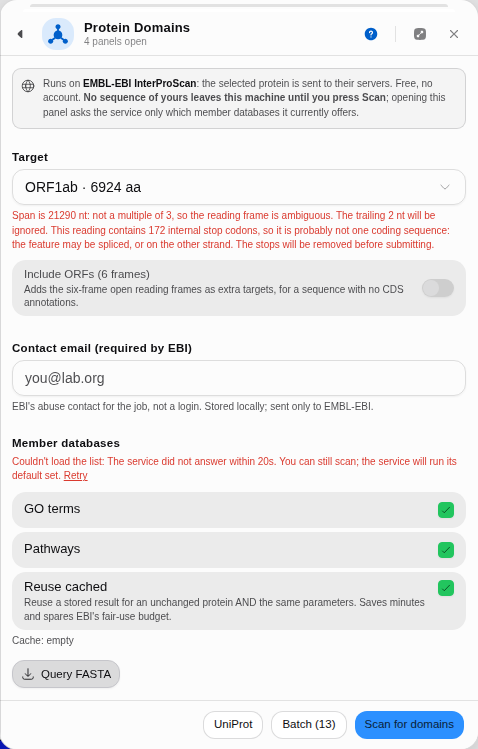 Both problems with this target, stated together, before anything is sent.
Checking what produced a result
Every finished scan carries its own account of where the numbers came from, above the table. Read it before you read the matches, because it answers the three questions a domain call has to survive.
What was analysed. The target's name and length, plus the MD5 checksum InterProScan itself computed for the sequence it read. That checksum is the thing to compare when you re-run a scan weeks later and want to know whether the protein changed: identical MD5, identical input, and any difference in the calls is the databases moving rather than your construct.
What was asked, and what answered. The chain names the databases you selected (or says the
service ran its own default set), then lists the ones that actually returned something with the
release that produced it — PFAM 38.2, GENE3D 4.3.0, CDD 3.21. Two scans a month apart can
disagree simply because a member database was re-released, and this is where you see it.
What found nothing. A database you asked for that returned no match is named explicitly, because silence is a result. Scanning yeast ADH1 with TMHMM included and being told "1 returned nothing: TMHMM" is a positive statement that a transmembrane predictor looked and found no helices, which is exactly what you want to be able to say about a cytosolic enzyme. A table alone cannot tell you whether TMHMM ran and was silent or was never asked.
Where these rows came from. Live from the service, reused from this browser's cache without sending anything, or re-fetched from a job the service still holds. A re-fetched job reports its parameters as not recorded: the service returns the matches without the settings they were run with, and the panel will not guess them.
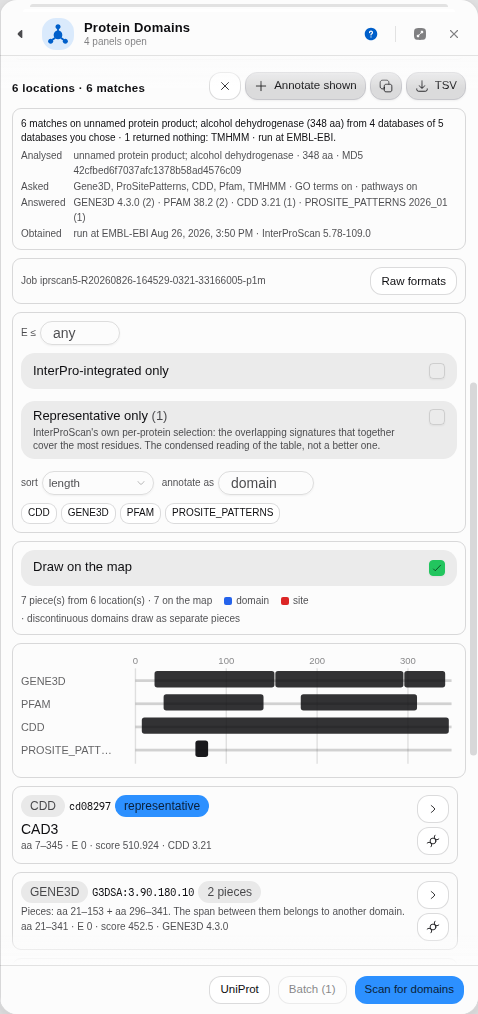 Five databases asked, four answered with their releases, TMHMM silent, and the checksum of the
exact sequence the service read. Pathway cross-references are grouped by name with their counts,
because Reactome lists one pathway under one id per species: this entry's 61 references carry 18
distinct names.
Five databases asked, four answered with their releases, TMHMM silent, and the checksum of the
exact sequence the service read. Pathway cross-references are grouped by name with their counts,
because Reactome lists one pathway under one id per species: this entry's 61 references carry 18
distinct names.
Matching your protein to a UniProt entry
UniProt looks up the entry that holds this exact sequence, and it does so by checksum, which is the index built for that question: the digest of your protein is what UniParc stores for every sequence UniProt has ever held. Only an exact match is used, because an approximate one would attach another protein's curated sites to yours.
Real constructs usually are not the curated entry, and the answer says so precisely:
- Exact match. The accession, whether it is reviewed (Swiss-Prot, curated) or unreviewed (TrEMBL, automatic), how many curated features it carries, and how many other entries hold the identical sequence. Its curated sites, active sites and binding residues are then shown beside the domain calls, marked as experimental rather than predicted.
- An earlier version of an entry. UniProt revises sequences: your record can hold the revision it published in 1998 while the current entry holds a correction. The panel names the entry and the version you have, and deliberately does not show curated sites, because those describe the revision UniProt holds now. Yeast ADH1 is the standard example: the classic GenBank record V01292 is P00330 at sequence version 4, and it differs from the current entry at residue 21.
- Nothing at all. No entry has ever held this sequence, which is the normal answer for anything you designed. Near matches are a different question, so the panel hands the protein to BLAST with the span already selected.
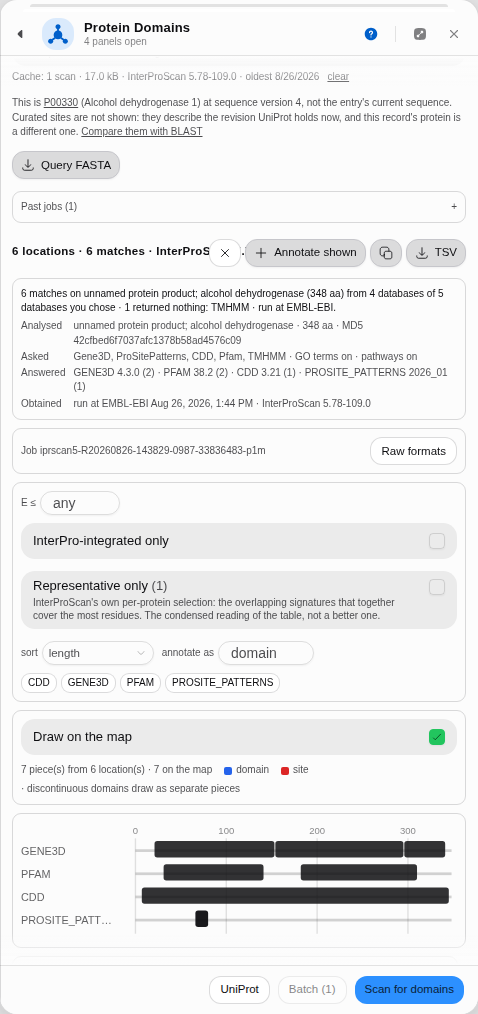 The honest answer on a real construct: which entry, which version, why curated sites are withheld,
and where to go next.
The honest answer on a real construct: which entry, which version, why curated sites are withheld,
and where to go next.
Limitations
- Residue-level site annotations are not currently returned. Some member databases (PIRSR, CDD, SFLD, NCBIfam) can in principle report individual catalytic or binding residues. Measured against the live service on three proteins chosen because they should carry site rules, they come back empty: human PKA Cα returned 73 matches and zero sites, bovine trypsin returned 15 matches with an empty site list on 14 of its 15 locations, and E. coli GroEL returned one match carrying no site list at all. The service exposes no parameter to request them. The panel can draw sites the moment they appear in a result; until then, the honest statement is that domains are what you get.
- It needs the network. The scan runs on EMBL-EBI's servers. Nothing leaves your machine until you press Scan, and the panel says so before you press it — but there is no offline mode, because an offline scan would mean shipping the profile-HMM libraries themselves.
- It is a prediction. A domain call is a model saying your sequence resembles a family. The E-value column is there to be read.
A scan that finds nothing is an answer. If the databases you chose return no signature, the panel says which ones looked and found nothing rather than showing an empty table: a transmembrane predictor reporting no helices in a soluble protein is a real result about that protein.
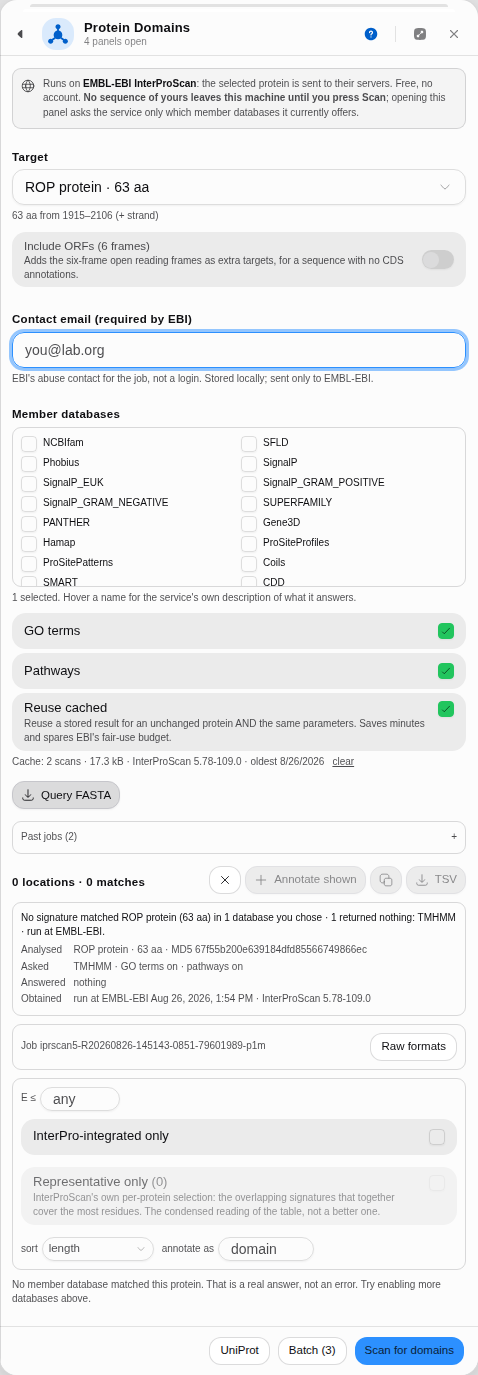 pBR322's 63-residue ROP protein scanned against TMHMM alone. The run happened, TMHMM answered,
and the answer is no helices.
pBR322's 63-residue ROP protein scanned against TMHMM alone. The run happened, TMHMM answered,
and the answer is no helices.
Export
- TSV of the shown rows — this panel's filtered view, with its columns.
- Annotate shown writes the domains into the record itself, so they leave with the GenBank file.
- The service's own raw outputs, listed from the job rather than assumed:
out,log,tsv,xml,gff, the inputsequenceas the pipeline read it,json, thesubmissionparameters, and the whole run as azip. The GFF3 is what a genome browser wants; the XML is what a parser wants; neither is this panel's filtered view. - Past jobs keeps every submission's id, so a result can be re-fetched for as long as EMBL-EBI keeps it (days), without re-running the scan.
Screenshots
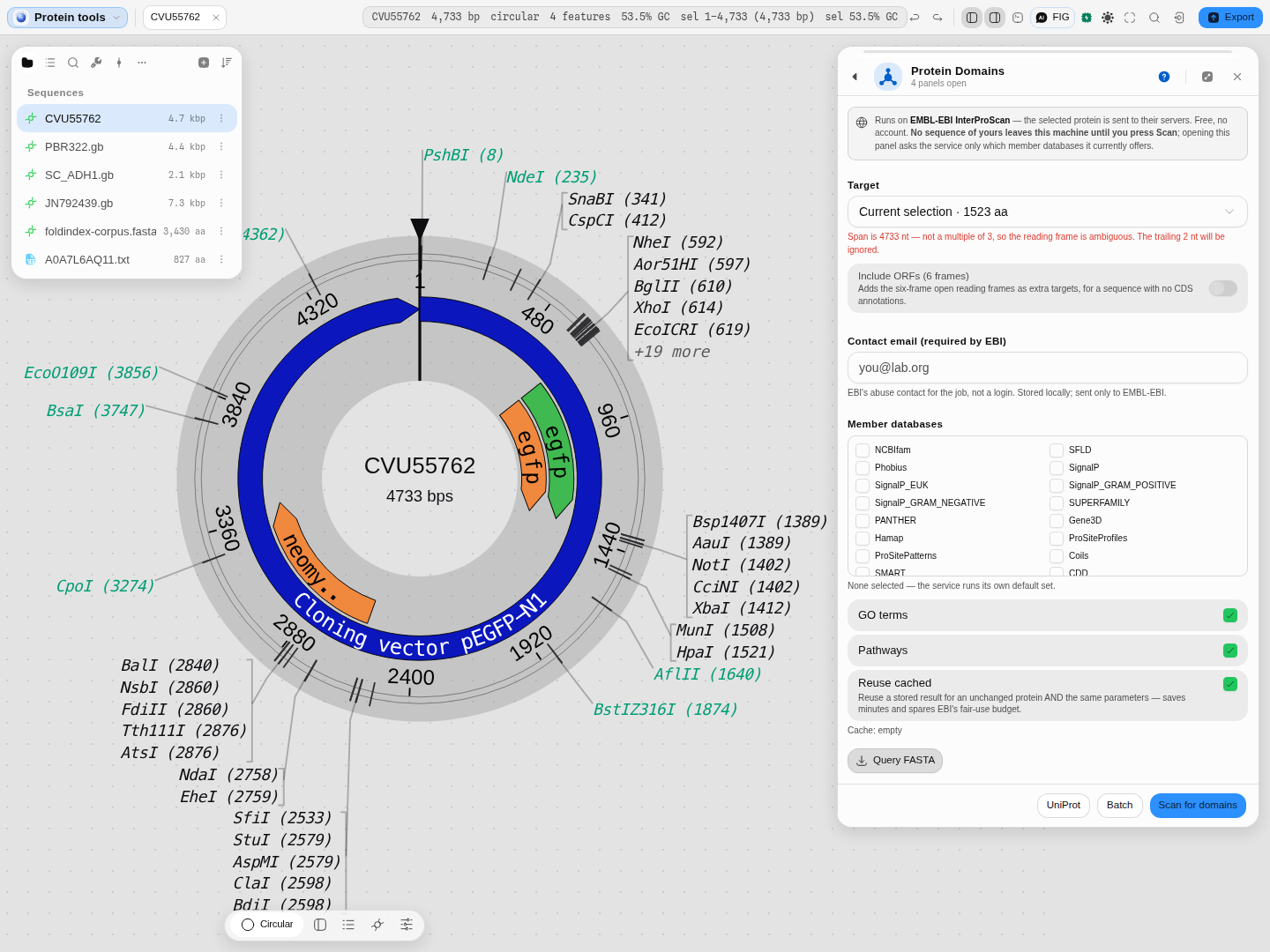 As it opens: the target auto-seeded from the open construct, the member databases the service
currently offers, and the disclosure of what is sent — stated before anything is sent.
As it opens: the target auto-seeded from the open construct, the member databases the service
currently offers, and the disclosure of what is sent — stated before anything is sent.
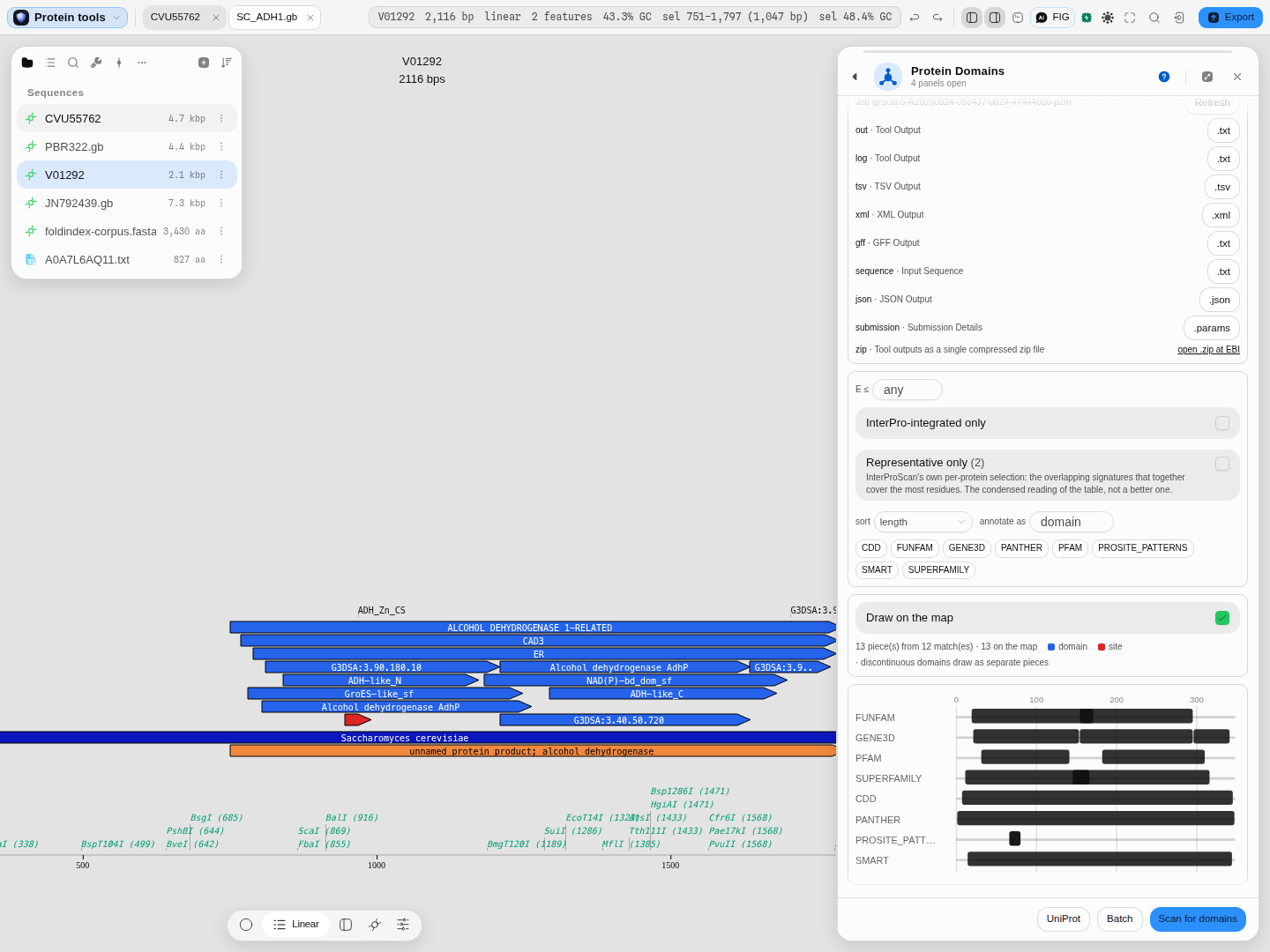
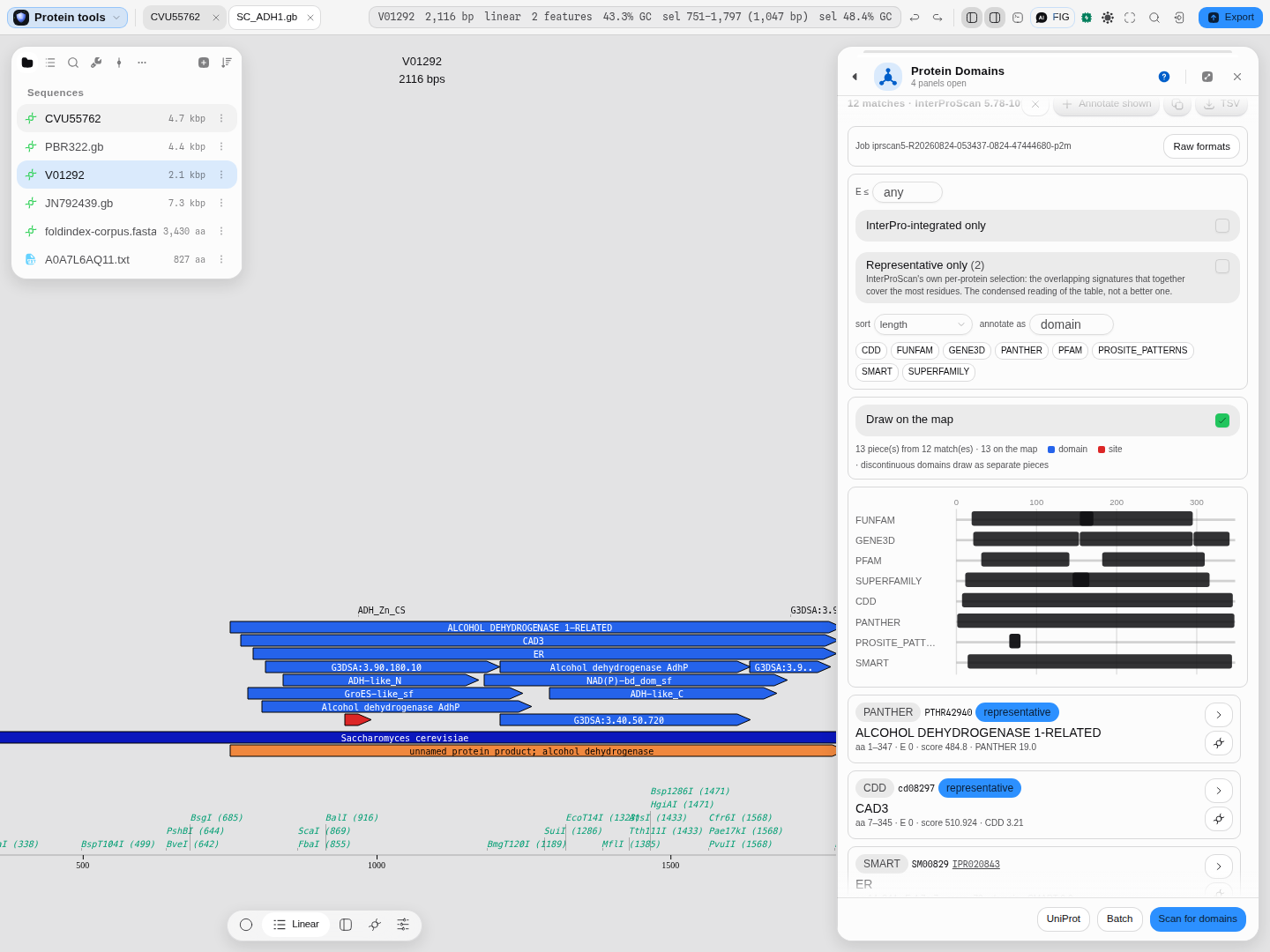 A finished scan on yeast ADH1. The Gene3D lane shows the catalytic domain as two pieces with the
Rossmann fold between them, and the same 13 pieces are drawn on the molecule at DNA coordinates.
A finished scan on yeast ADH1. The Gene3D lane shows the catalytic domain as two pieces with the
Rossmann fold between them, and the same 13 pieces are drawn on the molecule at DNA coordinates.
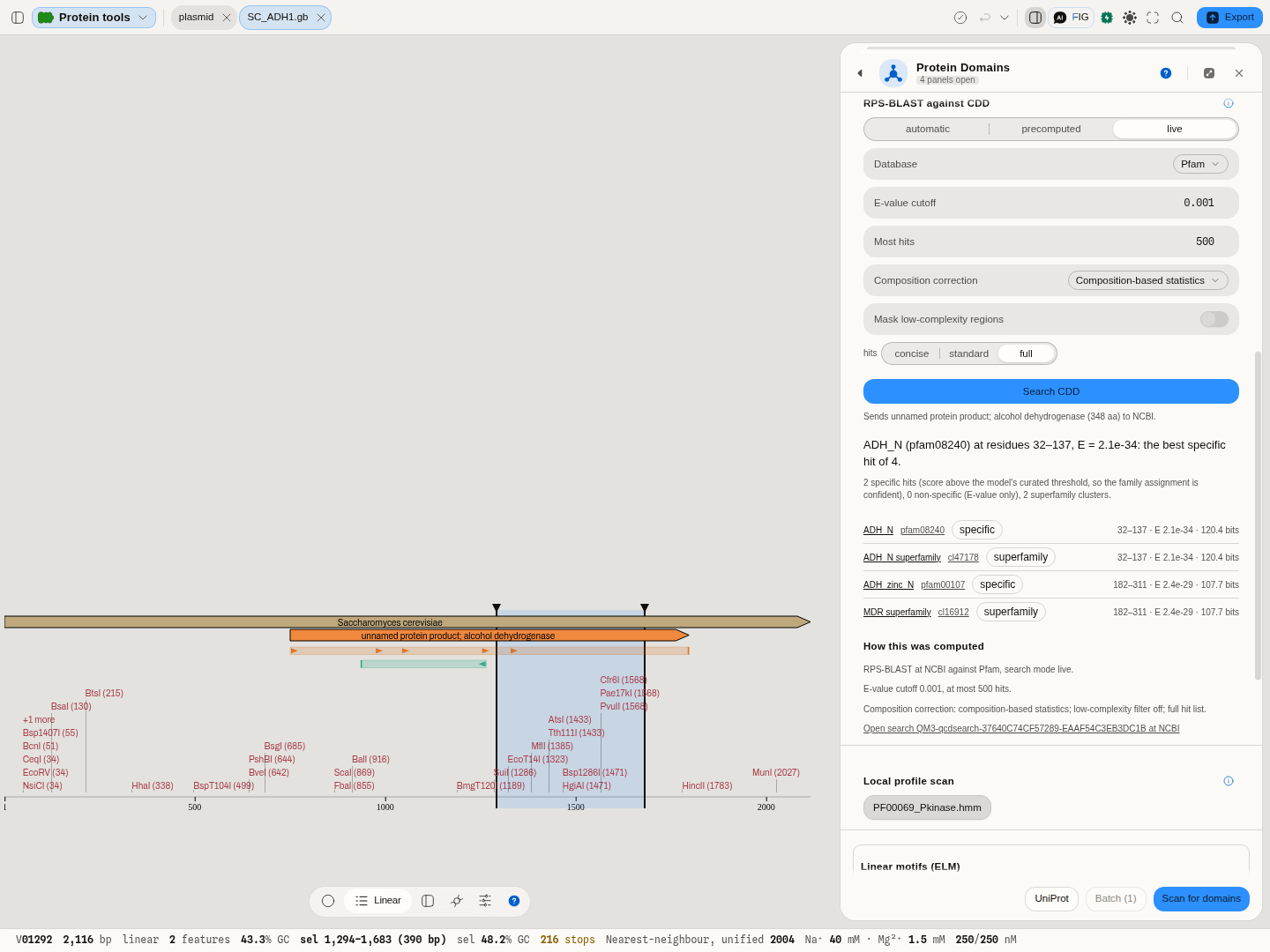 RPS-BLAST of yeast ADH1 against Pfam alone: the GroES-like N-terminal domain and the zinc-binding
domain, each a specific hit with its superfamily cluster. Clicking ADH_zinc_N selected residues
182–311 on the map, bases 1,294–1,683.
RPS-BLAST of yeast ADH1 against Pfam alone: the GroES-like N-terminal domain and the zinc-binding
domain, each a specific hit with its superfamily cluster. Clicking ADH_zinc_N selected residues
182–311 on the map, bases 1,294–1,683.
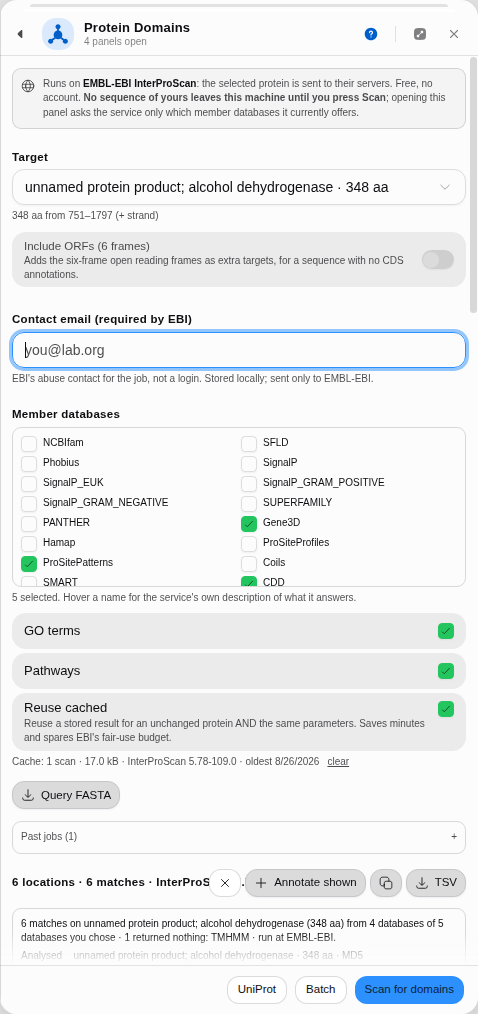 Choosing what to run: the 24 databases the service currently offers, under its own names, with its
own description of each behind a hover. Leave them unticked and the service runs its default set.
Choosing what to run: the 24 databases the service currently offers, under its own names, with its
own description of each behind a hover. Leave them unticked and the service runs its default set.
 The service's own outputs for this job, asked for rather than assumed.
Related
Feeds it: Protein Analysis hands a target straight over, as does a right-click on any CDS.
Follows it: Protease Digest (does my domain of interest survive trypsin?) · BLAST Search (what else has this domain?) · Back-translate.
In this group: Properties · BLAST Search · Search Databases · EMBL-EBI Services · Protein Analysis · Protease Digest · Antibody Numbering · Mass spectrometry: peptide masses, b ladders, isotopes, spectrum scoring, q-values, protein inference · Codon Usage Analysis · Site avoidance: restriction sites a genome avoids or favors · Codon outliers: genes whose codon usage departs from their own genome · Tree incongruence: genes whose own alignment rejects the species tree · Reference stability: reference genes against genes of their own abundance · Annotation contradictions: UniProt features a predictor scores unlike confirmed ones · Hypothesis ledger: pre-register a hypothesis, attach runs, decide with e-BH · Reagent audit: does each annotated CDS code for what the map says, and are its cryptic promoters, splice sites and repeats worse than chance · Assay decay: does a published assay still match current genomes, and is the mismatch at the 3′ end · Gene incongruence: which loci of a multi-locus alignment have a different history · Target validation: test "gene G drives phenotype P" against gene-level evidence tables · Codon Tables · Enzyme Collections · Virtual Gel Bench · Phylogenetics · Dot Plot · Table · NumPy Array · Structure · PDF · Molecule · Image