
Alignment viewer
| Document kind | msa |
| Drawn from | a file — it can also be previewed in the file manager |
| Formats that open here | CLUSTAL · Stockholm · PHYLIP · GCG MSF · Aligned FASTA · ACE assembly · Vector NTI AlignX |
| Refuses to draw below | 280px wide |
What it draws
A multiple sequence alignment: one row per sequence, columns of homologous positions, gaps where a sequence has nothing at that column. A consensus row sits at the top and is the template every other row is compared against, so match, mismatch and gap are drawn as layers on the rows rather than left for you to spot.
Optionally a sequence logo above the alignment, where the height of a stack is how conserved the column is and the height of each letter is how much of that conservation it accounts for.
What opens in it
CLUSTAL, Stockholm, PHYLIP, GCG MSF and aligned FASTA — an alignment someone else computed, opened as it is.
And .ace assemblies, which are not something anyone aligned. A phrap or CAP3 assembly is a
consensus with the sequencing reads that built it laid out underneath, each at the position the
assembler placed it — which is an alignment in every sense that matters here, so it opens in this
canvas rather than in one of its own. The consensus is the first row; every other row is a read.
Two things read differently on an assembly and are worth knowing:
- A
*is the assembler's own alignment pad, inserted into the consensus and the reads alike so that everything lines up. A-is this canvas saying the read does not reach that column. They are different facts and are drawn differently. - A read's gap count is mostly its distance from the ends of the contig, not missing data. A 600-base read on a 1,475-base contig is padded out to the full width, so it reports ~875 gaps and 100% coverage of the part it does span.
It is also where an alignment computed here lands: sequences sent from a project, from the trace viewer's "align all reads" hand-off, or from any tool that produces a set of related sequences.
The distinction matters and the canvas keeps it. An imported alignment is somebody else's result, so the alignment knobs are hidden on it rather than shown and disabled: touching one would re-run our aligner over the sequences and quietly replace the alignment the file gave you, while the label still named the original.
What this computes
An imported alignment is somebody else's result and its columns are taken as given. Everything below is computed here, from those columns.
- The consensus row, the template every other row is drawn against, so match, mismatch and gap are layers on the rows rather than differences you have to spot. It is a reading aid, not a sequence that exists, and changing what is in the alignment changes the highlighting of every row.
- Per-column conservation, as a sequence logo in the sense of Schneider & Stephens (Nucleic Acids Research 18): stack height is the column's information content and each letter's height is the share it accounts for. WebLogo 3's Dirichlet small-sample correction is applied by default, because the uncorrected value overstates conservation when there are few sequences — a column of one letter in two sequences is not evidence of conservation — and the switch sits beside the logo, where the drawing it changes is.
- Gap and pad as different facts. On a phrap or CAP3 assembly a
*is the assembler's own alignment pad, inserted into consensus and reads alike so everything lines up; a-is this canvas saying the read does not reach that column. They are drawn differently because they mean different things. - Per-row coverage of the alignment width, which is why a read's gap count is mostly its distance from the ends of the contig rather than missing data: a 600-base read on a 1,475-base contig is padded to full width, reporting roughly 875 gaps and 100 % coverage of the part it does span.
- Row order, on demand — and sorting never re-aligns. Row order is a display choice; the columns do not move.
What it does not compute, deliberately: the alignment itself, when the alignment came from a file. The aligner's knobs are hidden on an imported alignment rather than shown and disabled, because touching one would re-run our aligner over the sequences and quietly replace the alignment the file gave you while the label still named the original.
Reading it
- Columns are the claim. An alignment asserts that the residues in a column are homologous. That assertion is the aligner's, not the data's, and it is least reliable in gap-rich, low-identity regions — which is exactly where an interesting-looking difference usually turns out to be an alignment artefact.
- The consensus is a template for reading, not a sequence that exists. Differences are drawn against it, so changing what is in the alignment changes the highlighting of every row.
- Sorting never re-aligns. Row order is a display choice; the columns do not move.
- A logo's information content is per column — a tall stack is a conserved column, and a column of one letter in two sequences is not evidence of conservation. The correction for small sample sizes sits next to the logo, where the drawing it changes is.
Controls
| Control | What it does |
|---|---|
| Global / Local | Whether the aligner aligns the sequences end to end or finds their best-matching regions. Absent on an imported alignment, for the reason above. |
| Sort | Input order · % identity · name · tree order. Tree order arranges rows the way the phylogenetic tree draws its tips, so sister taxa sit together; with no tree built, the option renames itself to say so rather than sitting there doing nothing when picked. |
| Logo | The sequence logo above the alignment. Disabled in a short preview box, with the reason — the logo needs about 100px of its own, which would leave the alignment almost nothing. |
| Zoom | Column width, so you can go from whole-alignment shape to individual residues. |
| Add sequences | Brings more sequences into the alignment and re-runs it. |
| Export | The alignment in the standard formats, and to the analysis consoles. |
Where it appears
As a stage tab — its own editor pane, which is where it is worked in — and in the file manager preview, which draws the same alignment read-only.
The alignment itself is computed by the workbench's own partial-order alignment engine, whose output is checked against the original implementation byte for byte.
Performance and limits
- The alignment is recomputed when its inputs change, so adding a sequence to a large set is not free.
- In a preview box the logo is suppressed, as above; open the file to see it.
- It refuses to draw below 280px wide. A squeezed alignment is a band of colour, and a cramped one looks exactly like a broken one.
- Reading frames and translations are not shown here. This canvas aligns residues; the sequence map is where a region becomes a feature and a protein.
Screenshots
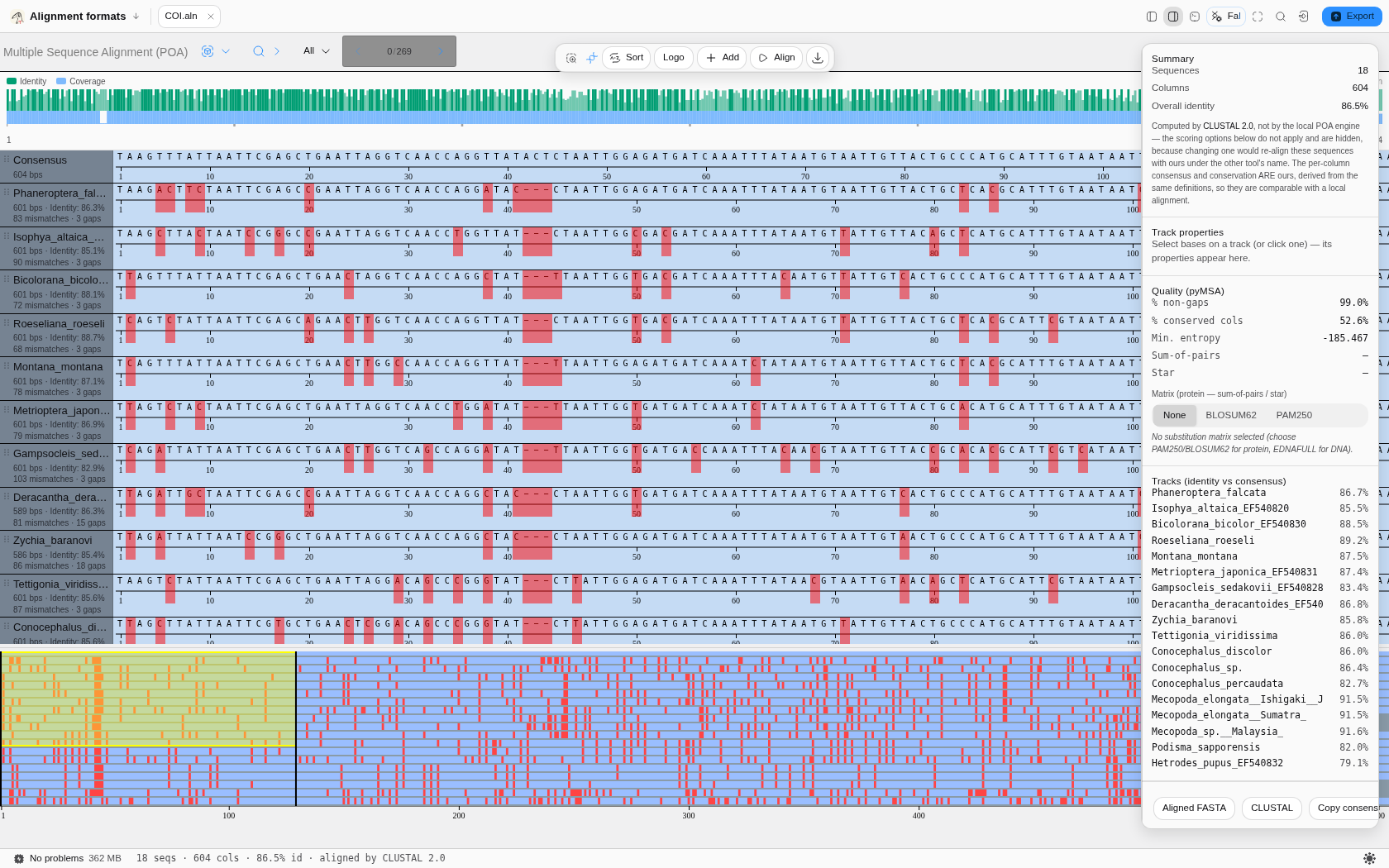
COI.aln from the Alignment formats starter: 18 sequences · 604 columns · 86.5% overall identity,
aligned by CLUSTAL 2.0. Each row is captioned with its own length, identity against the consensus,
mismatch count and gap count; the identity and coverage bars sit above the rows and the whole-file
overview below them. The summary states plainly that the alignment was computed by CLUSTAL, not by
the local engine, and hides the scoring options that would not apply — while keeping the consensus
and conservation, which are ours and therefore comparable.
Related
An alignment is the input to a tree — build one in the Phylogenetics tool and the result opens in the tree canvas, after which Tree order here becomes meaningful. Sanger reads arrive here through the chromatogram panel's "align all reads" hand-off, which is the usual way to compare several reads of one clone.