
Sequence map
The plasmid and sequence canvas — the surface most of the workbench draws on, and the one where a misreading is easiest to make and hardest to notice.
| Document kind | sequence-map |
| Drawn from | a file — it can also be previewed in the file manager |
| Formats that open here | GenBank · GenPept · FASTA · SnapGene · Serial Cloner · Swiss-Prot / UniProt · GFF3 · EMBL · SBOL · XML (SBOL/JBEI) · JBEI · Geneious · JSON |
| Refuses to draw below | 200px wide |
What it draws
A sequence, and everything anyone has said about it. Four views of one document, switched without reloading anything:
| View | What it is for |
|---|---|
| Circular | A plasmid. Features as arcs, the origin at the top, everything relative to a closed loop |
| Linear | The same layers on a straight rail — for anything that is not a closed molecule, and for comparing two regions far apart |
| Row | The actual bases, wrapped, with annotation lanes, translations and cut sites under them |
| Sequence | Text-first editing |
The layers on top, each independently toggleable: features · parts · primers · cut sites · ORFs · translations · CRISPR guides on their own concentric ring · six graph tracks — GC content, GC skew, cumulative GC skew, sequence complexity, CpG observed/expected and start/stop-codon markers, each as a ring here and a lane in the row view · the caret and selection · the axis.
They are the same layers in every view because they are the same document. A feature you add in the row view appears on the circular map instantly, not because anything syncs but because there is one record and four drawings of it.
What opens in it
Every sequence-bearing format in the app routes here — the table above is generated from the importer's own routing, so it cannot drift from what the app accepts.
Two things a reader expects here and will not find, both on purpose:
- A FASTQ opens in the Read quality viewer, not here. FASTQ parses as a sequence, and drawing only its bases is the one thing that must not happen: the per-read quality is the half that matters, and a clean-looking map over unusable reads implies it was inspected.
- A VCF opens in the Variant table. It describes positions on a sequence rather than being one.
A GFF3 without FASTA opens here on an unknown (N) sequence spanning the annotations. The features are real and the bases are not; the map draws exactly what the file contained. A BED opens on the region list and a GTF on gene models instead, because neither is a molecule.
What is dropped on the way in is per format and stated by the importer, not guessed at here. The audited read/write matrix lives in the repo's format documentation.
What this computes
Most of what is drawn here is read from the record. These are the quantities the canvas computes itself, over the sequence in front of you, and each is a ring in the circular view and a lane in the row view.
Six graph tracks, each windowed along the molecule:
- GC content — the proportion of G and C in a sliding window.
- GC skew — (G − C) / (G + C), whose sign flips at the replication origin and terminus in most bacterial genomes, which is what makes it worth drawing rather than GC content alone.
- Cumulative GC skew — the running sum, where those switch points read as a maximum and a minimum rather than as noise you have to squint through.
- Sequence complexity — low-complexity and repetitive stretches, the regions where a primer or a guide will misbehave.
- CpG observed/expected — the ratio that identifies CpG islands, which is the observed CpG count against what the base composition alone predicts, not a raw CpG count.
- Start and stop codon markers in each frame.
And, on the sequence itself:
- Open reading frames, in all six frames, above a length floor you set.
- Translations of features and of arbitrary selections, under the genetic code in force — a choice, stated, not a constant.
- Reading-frame rows — every translation is assigned to one of the six frames (three per strand), and a coding sequence that lies wholly inside another translation in the same frame is folded into that row as a named bracket rather than drawn as a second copy of the same residues.
- Residue numbers along each translation row, counted from that translation's own first codon.
- Restriction cut sites, from the enzyme collections you have enabled, positioned on the molecule and aware of whether it is circular, so a site spanning the origin is found rather than lost at the sequence's arbitrary start. The default set is unique 6+ cutters: enzymes that cut the molecule exactly once with a recognition site of at least six defined bases, one name per site — where several isoschizomers cut at the same place, REBASE's prototype enzyme stands for them.
- The scheme numbering of an antibody variable domain (IMGT, Kabat or Chothia), when you show an antibody analysis on the map: a ruler of scheme positions over the residues they number, with the framework and CDR regions as a band.
- Primer binding positions, for primers in the record.
- Selection readouts — length, coordinates and composition of whatever is selected — which is the quantity most often read off this canvas.
Circularity is computed into all of it, not decorated on top. A feature, an ORF, a cut site or a graph window that crosses the origin is handled as crossing it; the origin is a coordinate, not an edge.
Reading it
The conventions that decide whether a number on this canvas means what you think:
-
Displayed coordinates are 1-based and inclusive, matching GenBank and every biologist's expectation — so position 1 is the first base, and a feature listed as 100–200 includes both ends and is 101 bases long.
-
A feature whose
endis less than itsstartspans the origin of a circular molecule. It is not corrupt and it is deliberately not split into two features — splitting would double it in every count and every export. -
Strand is not decoration. A reverse-strand CDS is translated from the complement; the arrow direction is the whole difference between two different proteins.
-
The shape of a mark says what kind of claim it is:
Mark Means A full arrow with a flared head and a notched tail a feature with a direction — a coding sequence, gene or origin — pointing 5′ to 3′ A thin arrow a promoter or primer site: it points at what it drives without hiding it A short box pointed at one end a signal or binding site (terminator, polyA signal, RBS, operator); the point is its 3′ end, so its strand still reads A small symbol instead of a band a feature too short to draw as a band at the current zoom, shown as its SBOL Visual glyph so you can still tell what it is; zoom in and it becomes a band A hairline from a dot to a square an open reading frame: a prediction from the sequence, not an annotation anyone made. The dot is the start codon, the square the stop, and ticks across the line are further in-frame starts A tick with a dot on it a restriction cut site -
On a translation row, the dot and the square are the start and the stop. They replace the
Mand the stop letter on a coding sequence or open reading frame that begins and ends within the row, and the head at the end of the row marks its 3′ end. -
One row per reading frame. The name at the left of a row is the frame (
ORF +2,Frame −1) or the coding sequence it holds. A bracket over a translation row is a coding sequence folded into that frame: its residues are the row's residues, so the bracket marks where it starts and stops rather than repeating them on a row of its own. -
Residue numbers count from the start of that translation, not from base 1 of the record, so residue 1 is the translation's first codon. Switch them off under the display settings when you only need the residues.
-
An antibody shown on the map adds a numbering ruler and a region band. The ruler prints every tenth scheme position and every insertion code (
111A), with a tick on each residue, and hovering a tick names its position. The band paints the frameworks in grey and each CDR in its own colour. -
Feature colour comes from feature type — unless the file says otherwise. By default two features sharing a colour share a type, which is why a promoter looks like a promoter across every construct you open. But a record that states its own colours keeps them. GenBank has no standard colour qualifier, so the tools that draw maps invented their own: ApE and SnapGene write
ApEinfo_fwdcolorandApEinfo_revcoloron every feature, QUEEN writes its own on the fragments it assembles, and a file may carry both, one, or neither. All of them are read and drawn. The file's own colouring wins, because it is a deliberate statement by whoever built the construct — so a plasmid you coloured by hand three years ago opens looking the way you left it.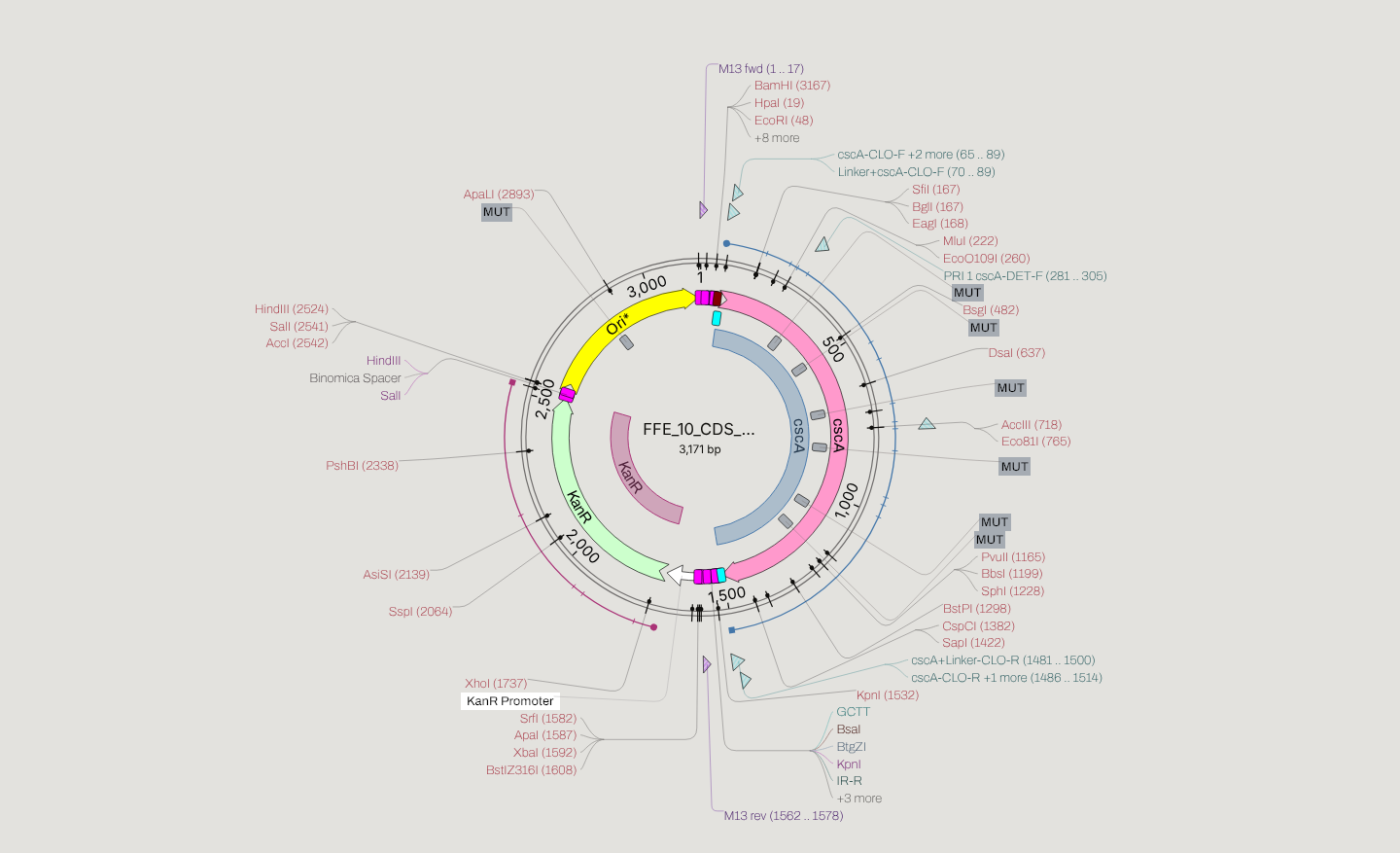 A Level-0 part opened straight from its GenBank: the coding sequence, the resistance marker and the origin are drawn in the colours saved in the file, not repainted from the type palette.
Why ApE writes two colours and not one: a feature on the reverse strand takes the reverse colour. In a typical primer set that is what separates the forward primers from the reverse ones at a glance — a detail worth knowing, because a viewer that ignores it draws them all the same and looks perfectly correct while doing so.
A record that states nothing keeps the type palette, so a plain NCBI download is unaffected, and export keeps whatever the record came in with — this is not a one-way conversion.
-
By default only unique 6+ cutters are drawn, so a plain plasmid shows the sites you can open it with rather than every enzyme in the catalogue. Widen the enzyme filter to see two- and three-cutters, which is when the colours below begin to differ.
-
Cut-site marks are enzyme recognition sites, drawn where the enzyme cuts — which for many enzymes is not the middle of the site, and for Type-IIS enzymes is outside it entirely.
-
A cut-site label's colour tells you how many times that enzyme cuts this molecule, which is usually the first thing you want to know about it:
Colour Meaning What it is good for Red cuts once linearising the plasmid, or opening it to insert something Blue cuts twice excising the fragment that lies between the two sites Muted grey cuts three or more times rarely what you want on its own The default red and blue are a reasoned choice that has not been tested for colour-blind readers. If you need that guarantee, the Colorblind colour preset in Settings switches the map to Okabe and Ito's palette, the one designed and tested to stay distinguishable under all three common forms of colour blindness (Wong, Nature Methods 8, 441, 2011). The same code is used on the circular map and in the row view, so switching between them does not change what the molecule appears to say. The number in brackets after the name is where this site cuts, and a small superscript after the name, on an enzyme that cuts more than once, is how many sites it has in total. A label keeps its colour when it joins a stack of labels, so a single cutter crowded in among its neighbours still reads as one.
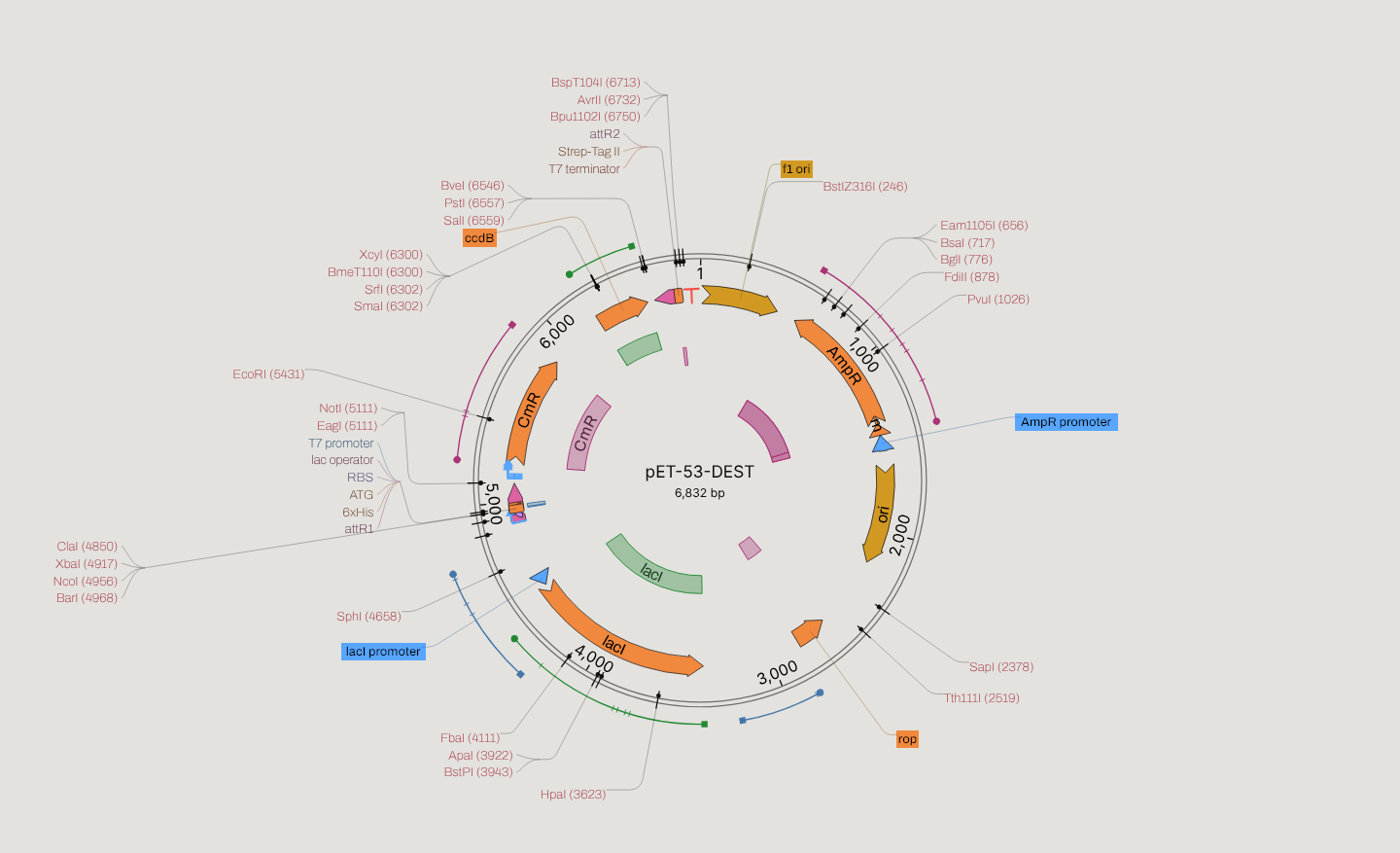
pET-53-DEST, a 6,832 bp Gateway destination vector, with the filter widened from the default to All so every class appears.
NotI (5111),SapI (2378)andBsaI (717)are red: each cuts this plasmid exactly once, so any one of them opens it cleanly.Van91I²is blue at 4550 and 5663, the pair that would excise the fragment between them. The grey labels, such asMboII¹⁵, cut in many places and would fragment it. -
The GC rings are windowed, so their resolution is the window, not the base. A GC spike narrower than the window is averaged away — that is the plot working as specified, not a rendering artefact.
-
Grouping the bases in threes is a claim about reading frame, so it follows the translations rather than counting from base 1. The row view can put a gap between every three bases, and that gap can mean two quite different things. The control offers both, separately, because there is no honest way to offer one:
Setting What the gaps mean Off The bases are drawn continuously. Every 3 bases A reading ruler: a tick every three characters, counted from base 1 of the record. Useful for counting bases by eye, and it asserts nothing about coding sequence — it does not read a CDS, an ORF, /codon_startor the strand, so a group of three lines up with a real codon only when a gene happens to begin at a position divisible by three.Follow translations A gap appears only where a codon really begins, in the windows the canvas is already drawing amino acids over — CDS features, open reading frames, explicit /translationfeatures and any reading frame you switch on.Where each window's codons begin comes from the record, on the strand the feature is on. A forward feature's first codon opens at its start; a reverse feature's opens at its end, because the 5′ end of a minus-strand feature is its higher coordinate. GenBank's
/codon_startshifts that opening by one or two bases for a feature whose first codon is incomplete, and it is measured from the same 5′ end — so on acomplement(...)CDS the untranslated bases come off the high coordinate. This is the INSDC Feature Table's definition of the qualifier ("the offset at which the first complete codon of a coding feature can be found, relative to the first base of that feature"), and the Sequence Ontology's GFF3 specification states the strand half explicitly: "the 5′ end for CDS features on the plus strand is the feature's start and the 5′ end for CDS features on the minus strand is the feature's end."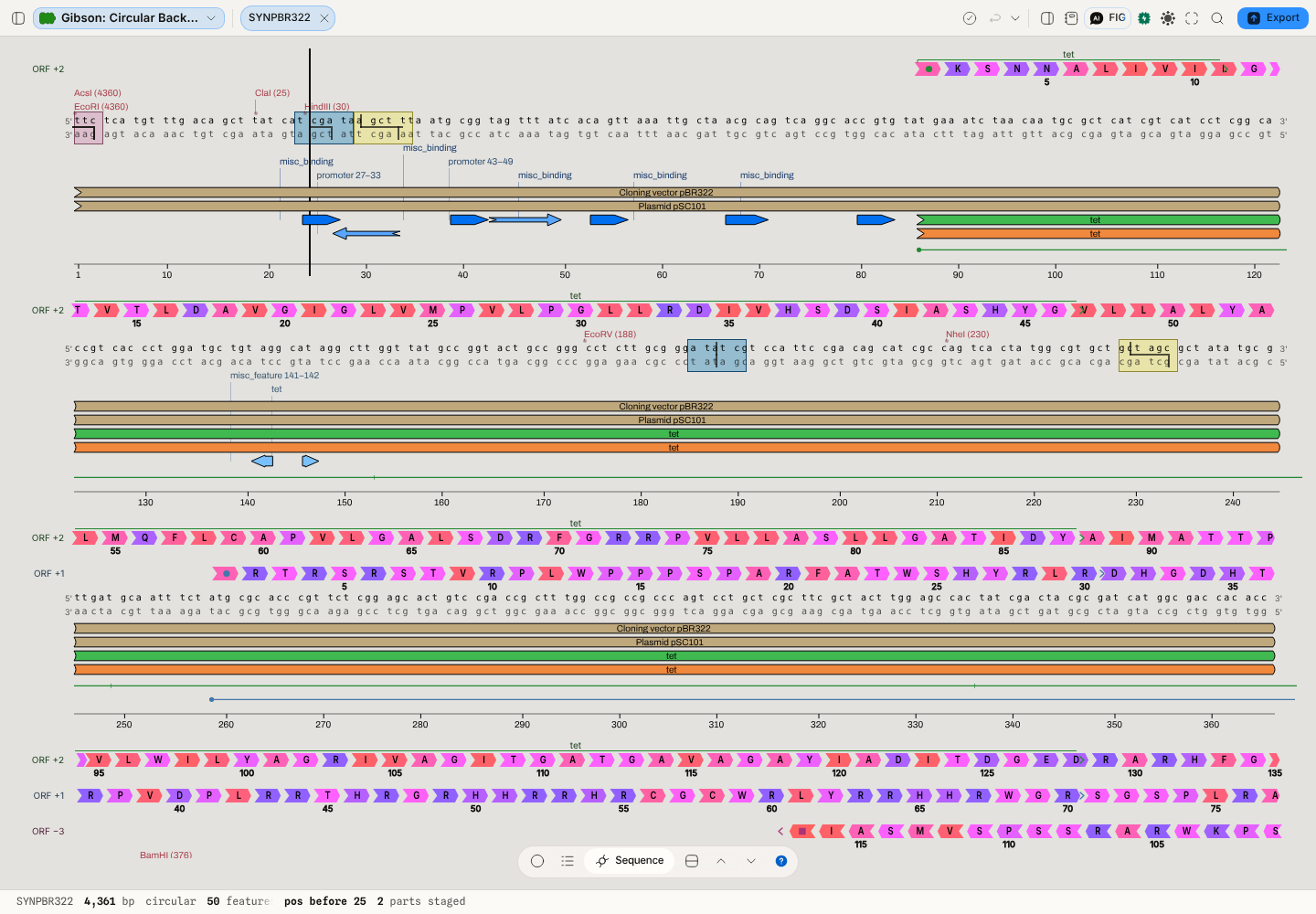 The ruler. Groups run from base 1 of the file, straight through a region that codes for nothing.
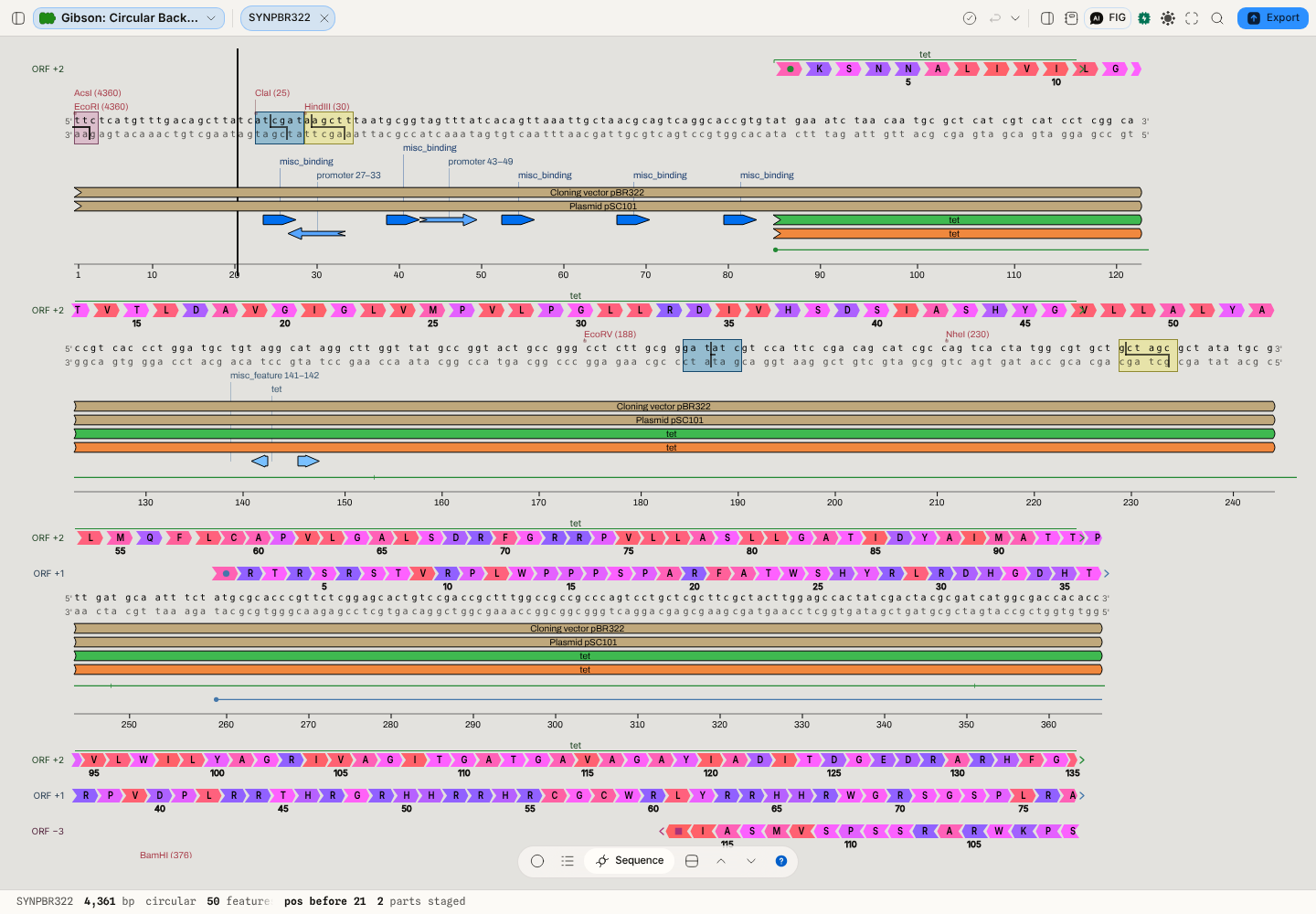 Following the translations. The same molecule, the same row: the grouping now starts where
 tetstarts, and the bases in front of it — which are not read as codons by anything — are not grouped. On pBR322 the difference is not cosmetic:tetbegins at base 86, so every one of its codons sits one base off the ruler's groups.Two reading frames over the same bases have two correct answers, and one row of text can show one — so neither is drawn. Where windows in different frames overlap, the grouping stops and the control says how many bases that covers. This falls out of the rule rather than being a special case: switch on one reading frame and the whole molecule groups by it; switch on two and nothing groups, because you have asked to see two frames at once. The panel states what it did — how many bases were grouped, out of how many, from how many translation windows, and how many were left ungrouped because two frames disagree — so a stretch that stops grouping reads as a decision rather than as a glitch.
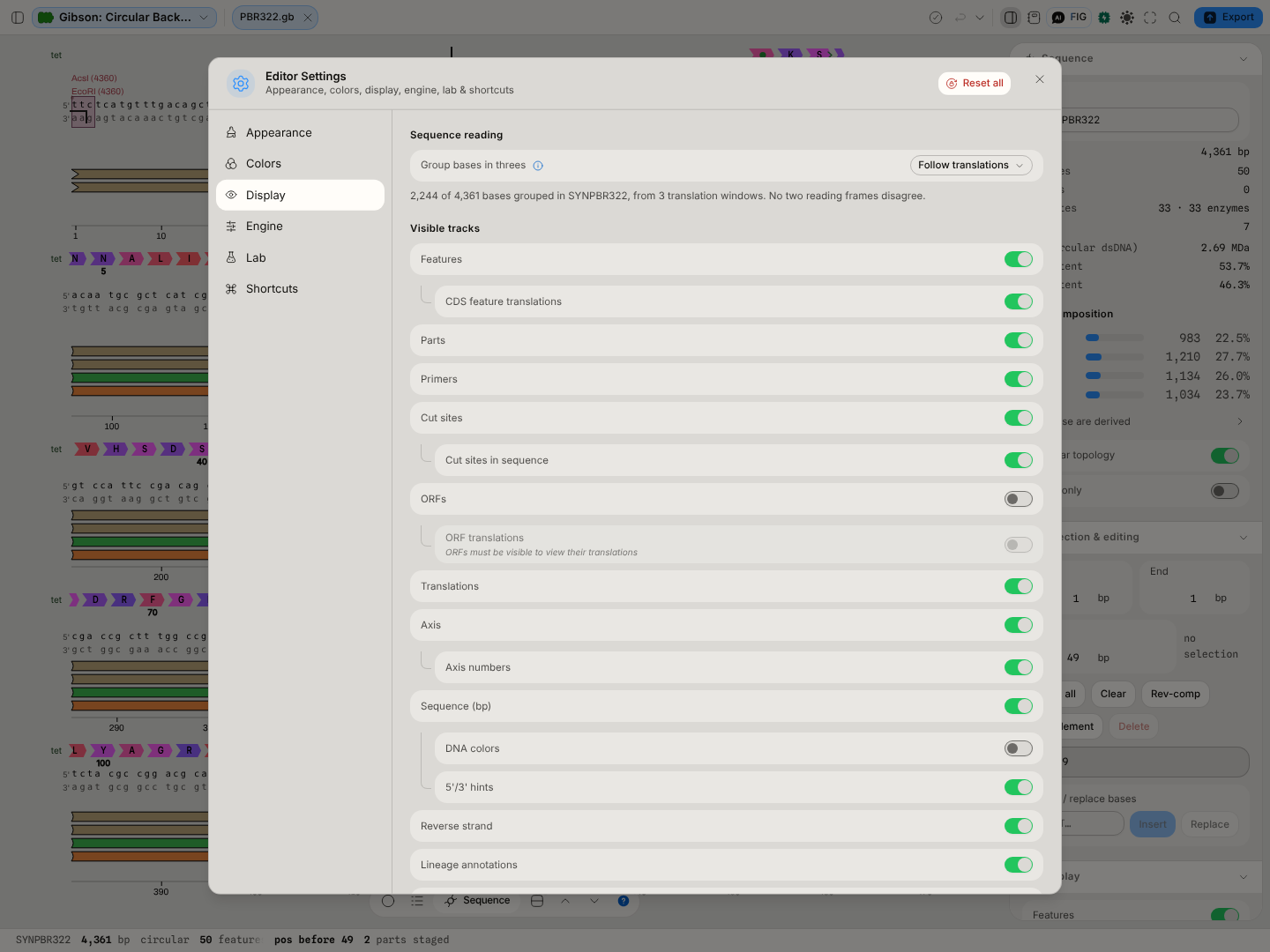 The setting, and what it did, with open reading frames switched off so that only the record's own
annotations count: 2,244 of pBR322's 4,361 bases are inside a translated window — its three coding
sequences, summing to 1,191 + 192 + 861 — and no two of them disagree about phase. With open
reading frames on, as they are by default, their predicted frames join in and the readout says how
many bases they leave ungrouped.
The setting, and what it did, with open reading frames switched off so that only the record's own
annotations count: 2,244 of pBR322's 4,361 bases are inside a translated window — its three coding
sequences, summing to 1,191 + 192 + 861 — and no two of them disagree about phase. With open
reading frames on, as they are by default, their predicted frames join in and the readout says how
many bases they leave ungrouped.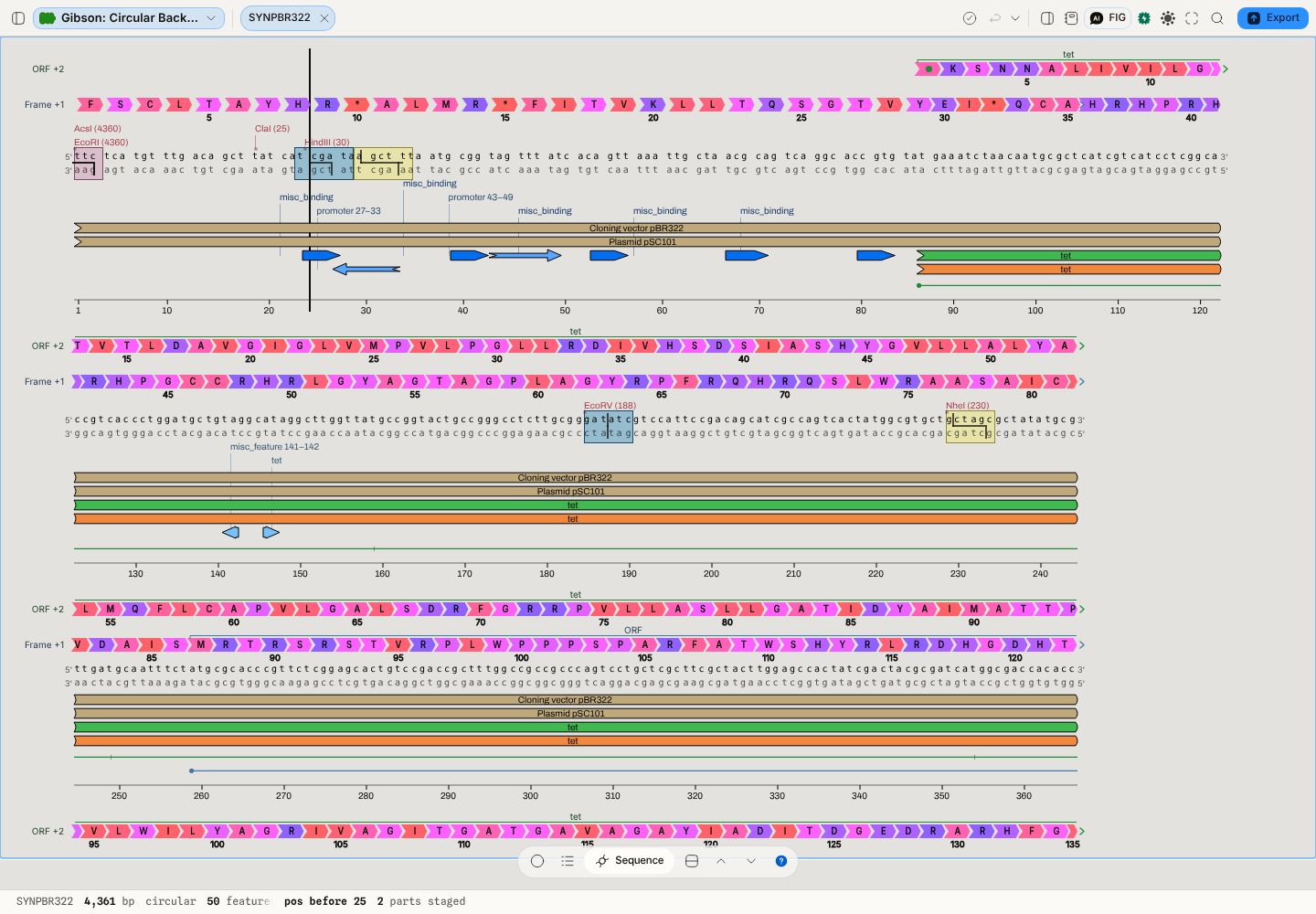 And the same molecule with reading frame +1 switched on as well.
 tetreads in one phase and the frame in another, so from base 86 there is no single grouping and none is drawn — while bases 1-85, which only the frame covers, still group. The setting reports it: 2,052 bases left ungrouped, which istet's 1,191 plusbla's 861.Nothing about the sequence changes either way. The gaps are drawing; the bases, the coordinates, the exports and everything computed from them are untouched, and a coordinate you read off a grouped row is the same coordinate you read off an ungrouped one.
Navigating the circular map
The circular map is not a picture of a plasmid that you magnify. Zooming changes the geometry: the drawn radius grows, so the slice of the molecule in front of you flattens out, and past a certain point the loop has unrolled far enough that the ring becomes a straight run of sequence with the bases written along it. One continuous gesture takes you from "here is the whole 4.4 kb construct" to "here are the twelve bases at the BamHI site", and nothing switches views on the way.
The gestures:
- ⌘ / Ctrl + scroll, a trackpad pinch, or a two-finger pinch on a touchscreen — zoom. It zooms about the pointer, or about the midpoint between your fingers: whatever base is under it when you start stays under it the whole way down, so you can put the cursor on a cut site and simply zoom until you can read the recognition sequence. There is no separate "find it again" step.
- Scroll (or two-finger swipe) — travel along the sequence. On a circle that is rotation, and the map spins under a fixed viewpoint. The step is measured in what you can see rather than in degrees: one notch moves the same visible distance whether the whole plasmid is on screen or thirty bases are, so it does not fly past the region you are reading once you have zoomed in.
- Drag — select. A drag on the map selects the arc between where you pressed and where you released, wrapping the origin if that is the shorter way round. The selection is a wedge through every ring at once, and its length, GC content and translation appear as you go.
- The zoom and rotate sliders in the canvas toolbar do the same two things by hand, with a readout of the fraction of the molecule currently on screen.
Zoom is bounded, deliberately. The radius that would be needed to show a single base of a 200 kb record exactly is large enough that the drawing loses arithmetic precision and arcs start degenerating into straight chords, so the map holds the geometry at the point where it is still faithful. You cannot zoom it into meaninglessness, and you will not see arcs quietly disappear.
The whole map is framed to fit the pane it is in, labels included — on a heavily annotated construct the outermost enzyme labels sit well outside the ring, and the frame accounts for them rather than letting them run off the edge.
The zoom is one continuous motion the whole way. There is no point at which the map switches from
"a circle you are magnifying" to "an arc you are reading" — it grows, more labels resolve out of
their stacked +N more groups as room appears, the curvature flattens, and eventually the bases
appear. Nothing pops.
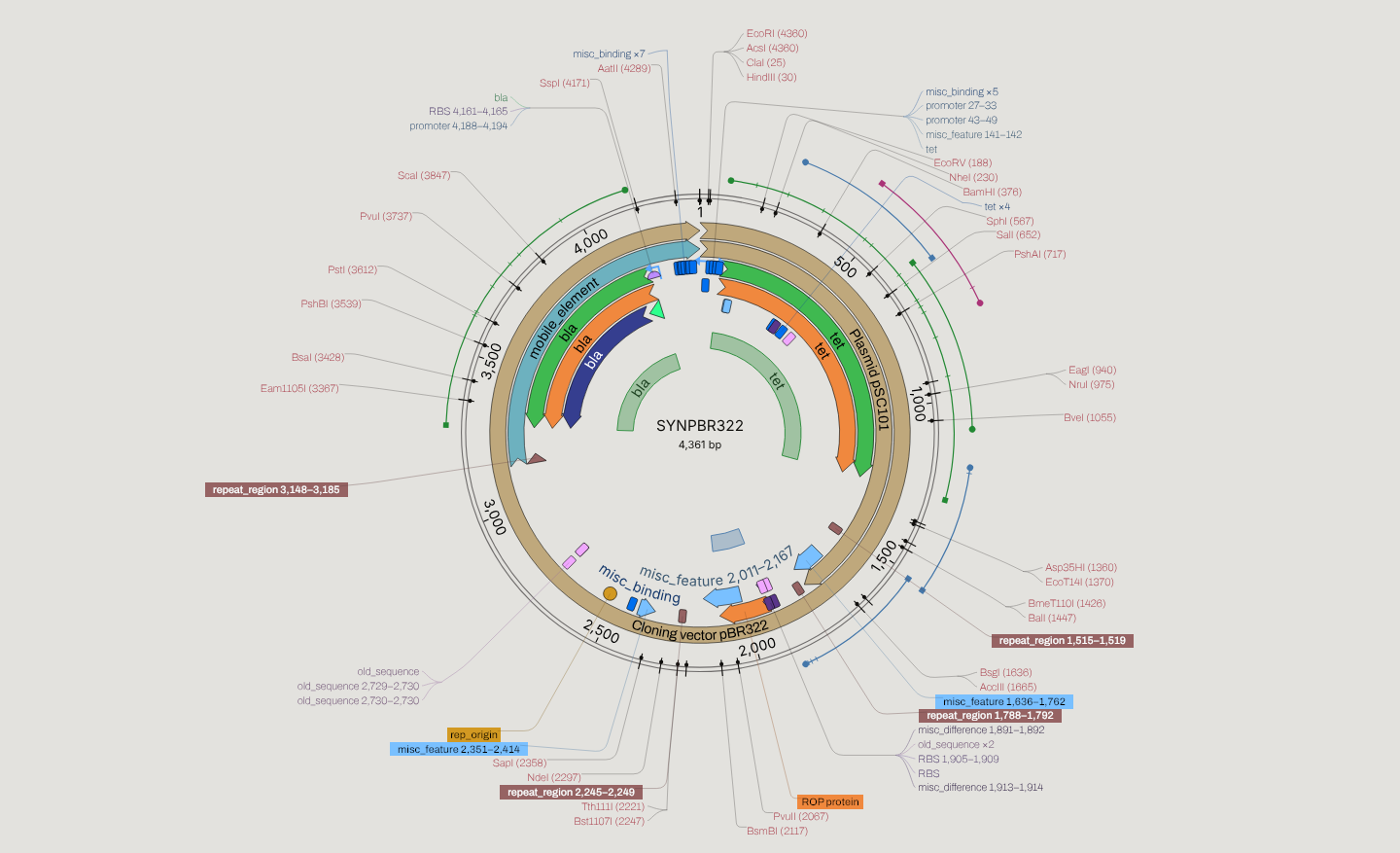 pBR322 — 50 features and its 33 unique 6+ cut sites, whole map, every label inside the frame.
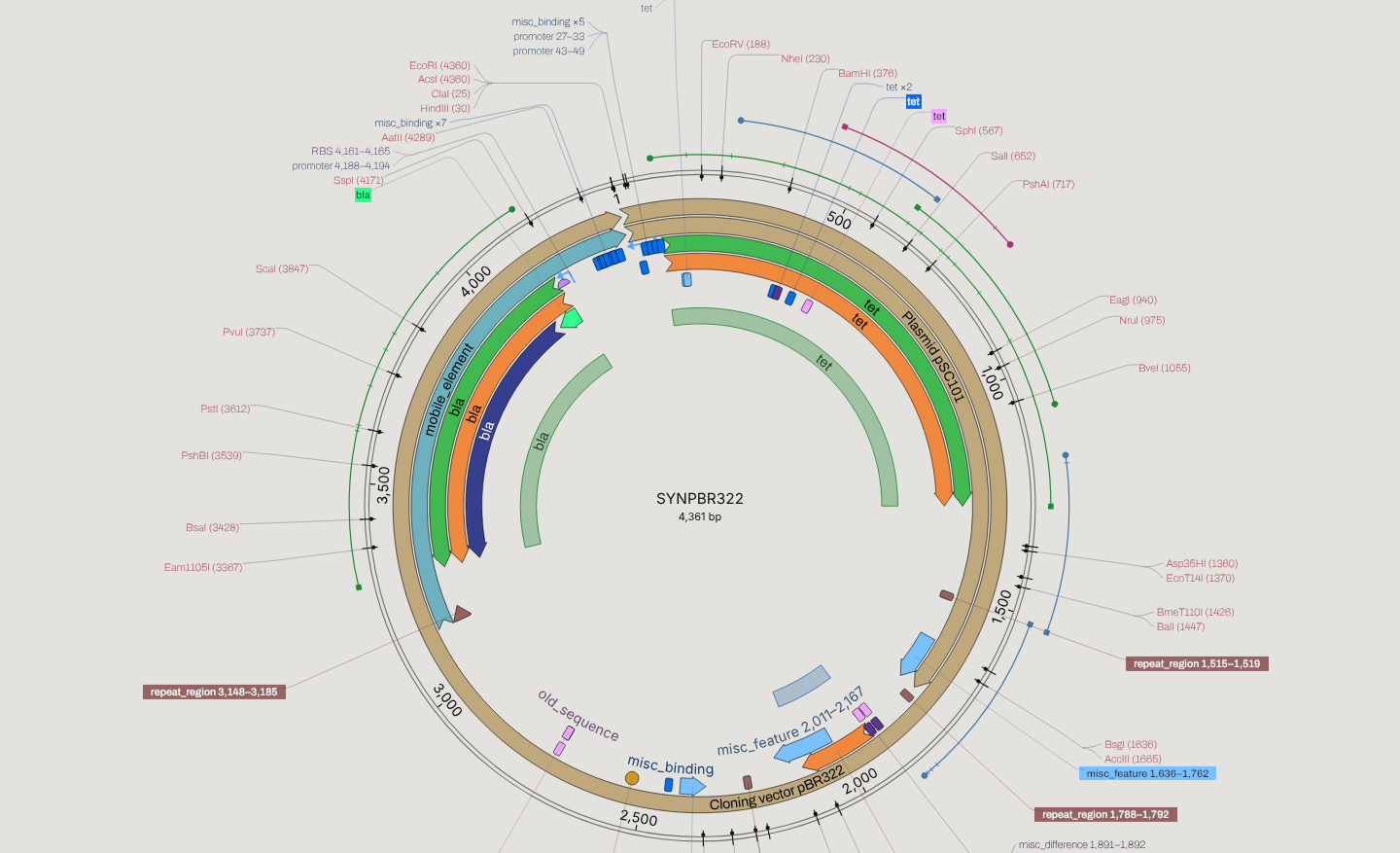 Two notches in: the circle is larger than the pane, and the arc in front of you now has room for each cut site from 188 to 1055 to carry its own label.
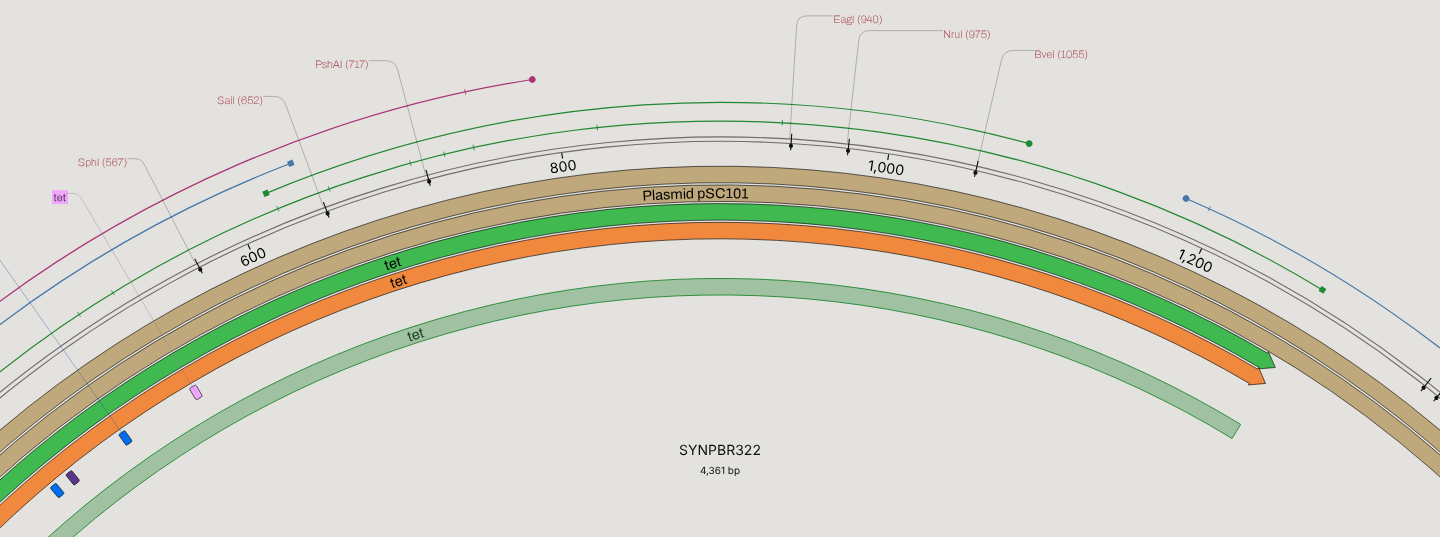 Further down: the loop has flattened into an arc and the cut sites around the tet gene (SphI, SalI, PshAI, EagI, NruI, BveI) are separately legible. The small circle at the top is the minimap, showing which part of the molecule is in view.
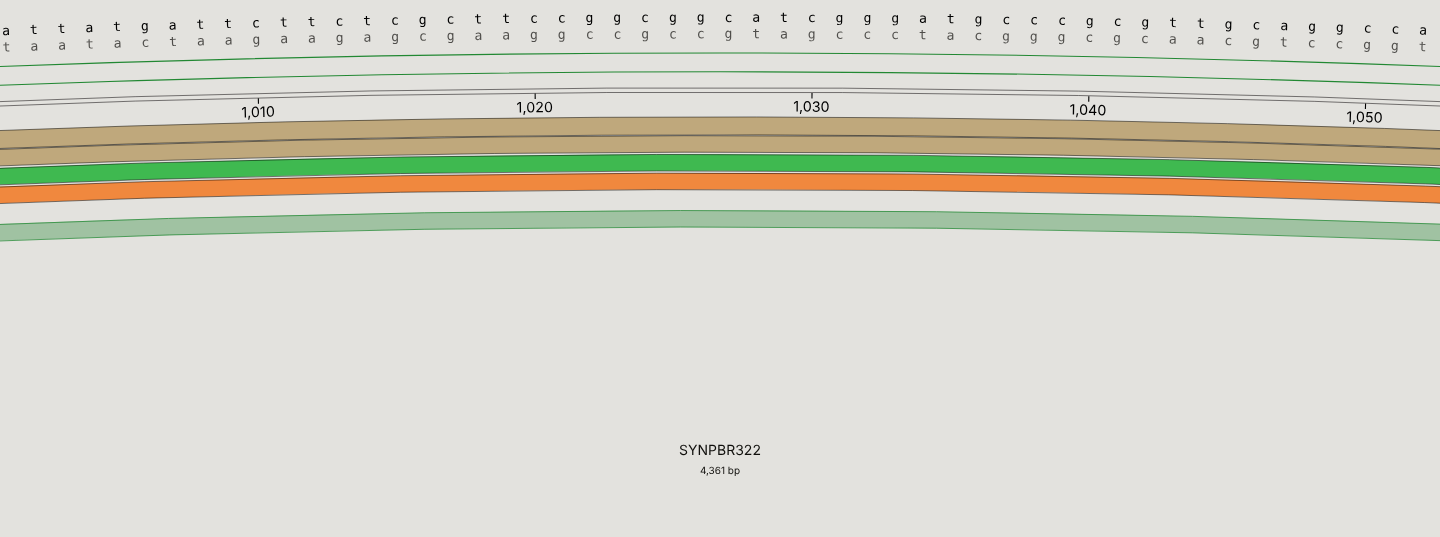 The same gesture carried to base level: both strands, the feature rings under them, and the EagI site at 940 still labelled.
Controls
Controls are data, filtered by mode — one declaration drawn by one component, so a knob cannot exist in the stage and be missing from the preview by accident.
- View — circular · linear · row · sequence.
- Track toggles — features, parts, primers, cut sites, ORFs, translations, guides, GC content, GC skew, codon ticks. Each is a real layer; switching one off removes it from every view.
- Base-content tracks — the plot window and the codon-scan controls, which are separated by labelled dividers in the menu because one flat list reads as though the window applied to the codon scan. It does not.
- Zoom — bounded-radius on the circular view, so it cannot be zoomed into meaninglessness. The gestures that drive it are above.
- Bookmarks with
1–9shortcut keys, on-map legend with clickable swatches that recolour a feature type, captions at nine canvas-anchored positions, track dividers, and a rich hover popup carrying the real datum rather than a name. - Edit-only (absent in the read-only preview): the caret, selection editing, annotation creation, and anything that writes.
A disabled control always states why. That is a rule for this codebase, not a nicety — a dead knob with no reason is indistinguishable from a bug.
Where it appears
The same component in three places, which is what stops a preview disagreeing with the editor:
- The stage tab —
editmode, everything. - The file-manager preview —
previewmode, read-only. Every control with a reason to exist when you are not editing survives (zoom, layout, tracks, colour-by); everything that writes does not. Read-only is enforced at the store, not by hiding buttons — hiding a button is a cosmetic claim, refusing the write is a real one. - An off-screen host that rasterizes the real renderer for project covers and image exports, so a card never shows a simplified drawing that disagrees with the editor.
Performance and limits
This canvas is expected to open a megabase record, and it degrades legibly rather than hanging:
- A load-time gate classifies heavy tracks and auto-hides them above a size threshold, with a performance overlay stating what was hidden and why. Nothing disappears silently.
- Base-content plots use an O(1) prefix-sum sliding window — an 816 kb genome computes ~81,600 windows in about 14 ms, byte-identical to the reference implementation.
- Codon ticks are capped and sampled, plots decimate to a maximum point count, and row lanes cap at one point per pixel.
- Sequence computation runs in a dedicated worker, so the canvas stays responsive while it works.
- Below 200px wide the preview refuses to draw. The floor sits under the file manager's 380px preview pane on purpose: it guards against a genuinely tiny host, not against the normal one.
Screenshots
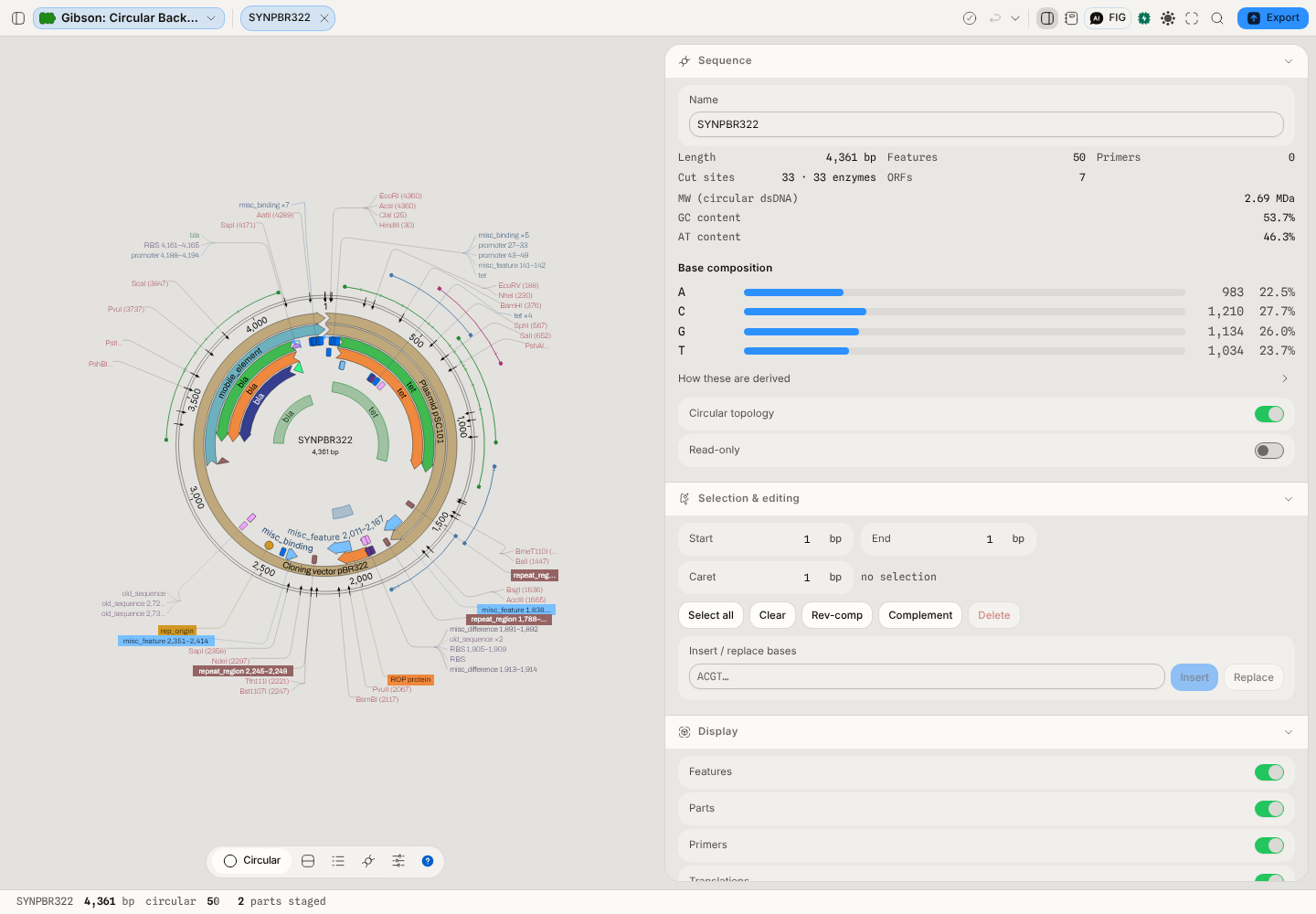 The editor on a real pBR322 GenBank record — circular map, feature ring, cut sites, inspector rail.
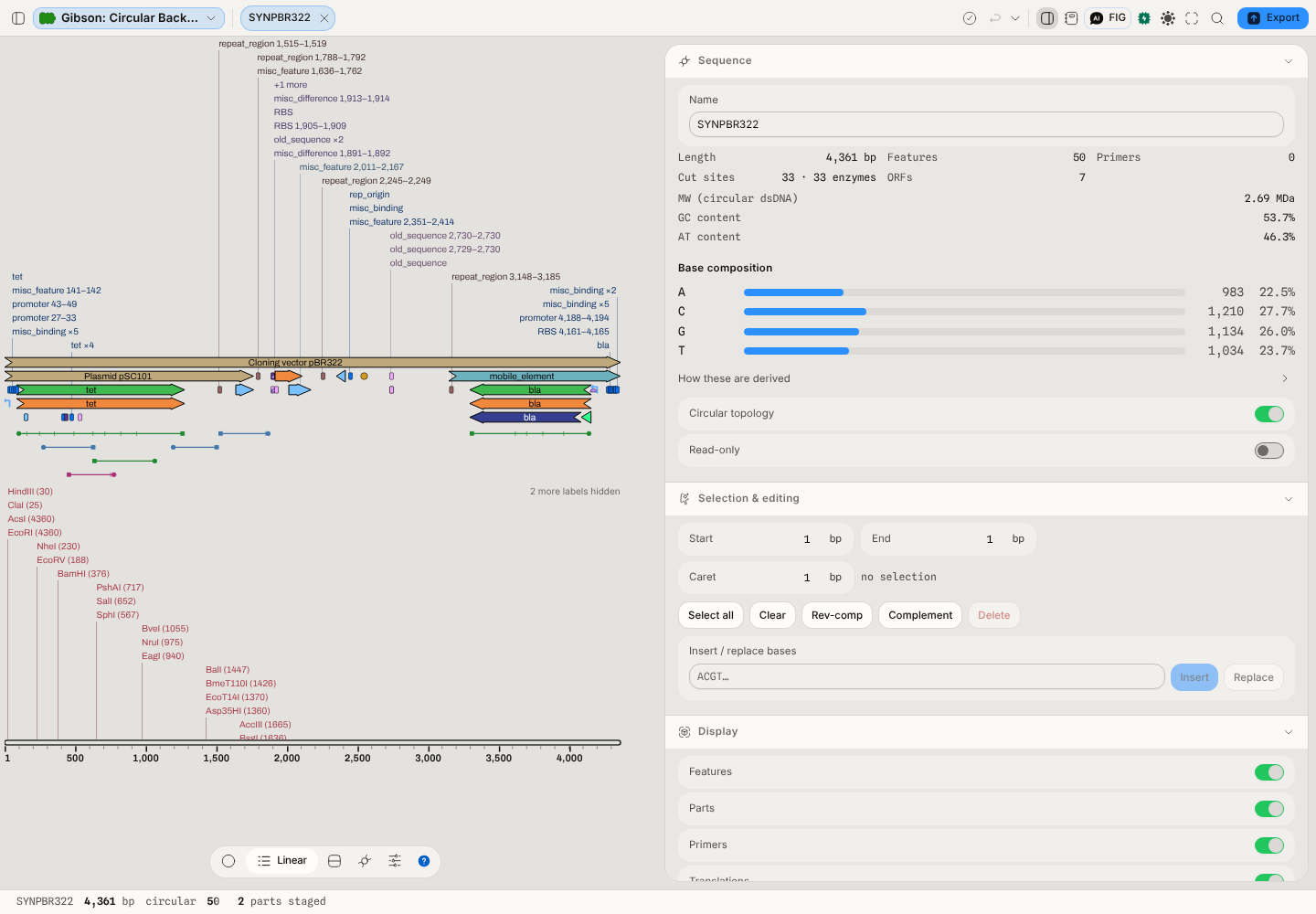 Linear view — the same document, laid out linearly.
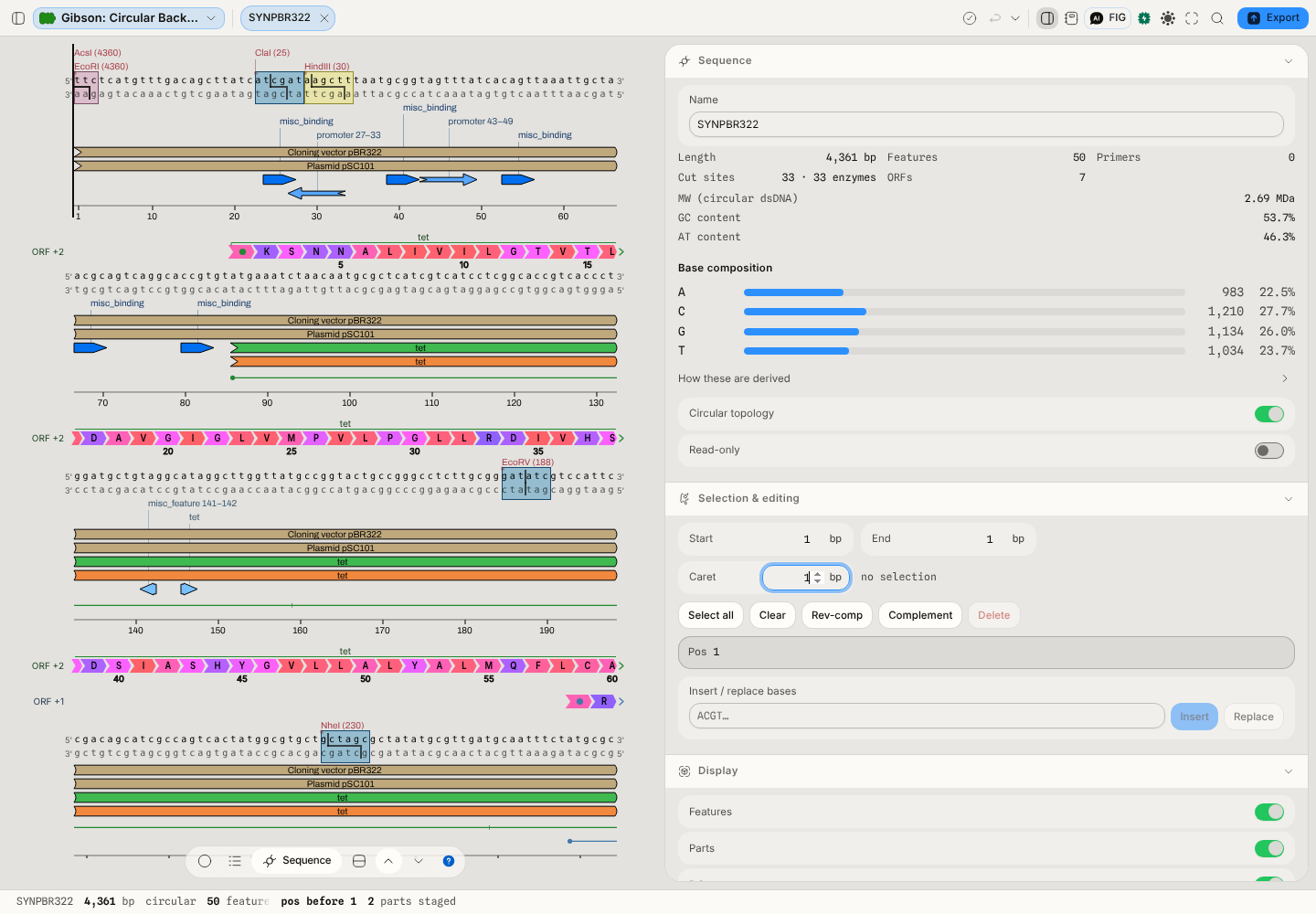 Row view — the bases, with translations and enzyme sites under them.
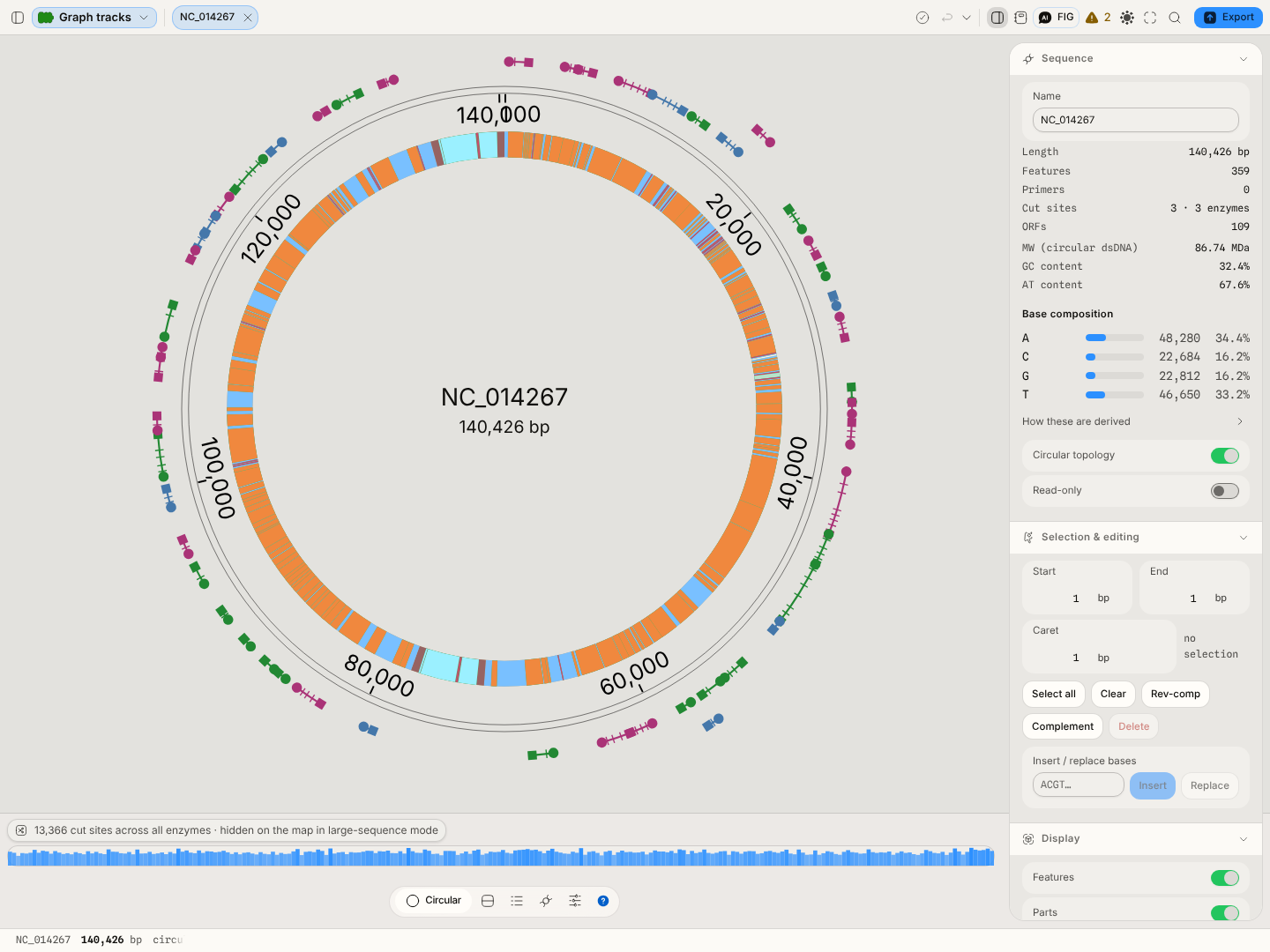 A 140 kb record — the size at which the performance gate starts making decisions.
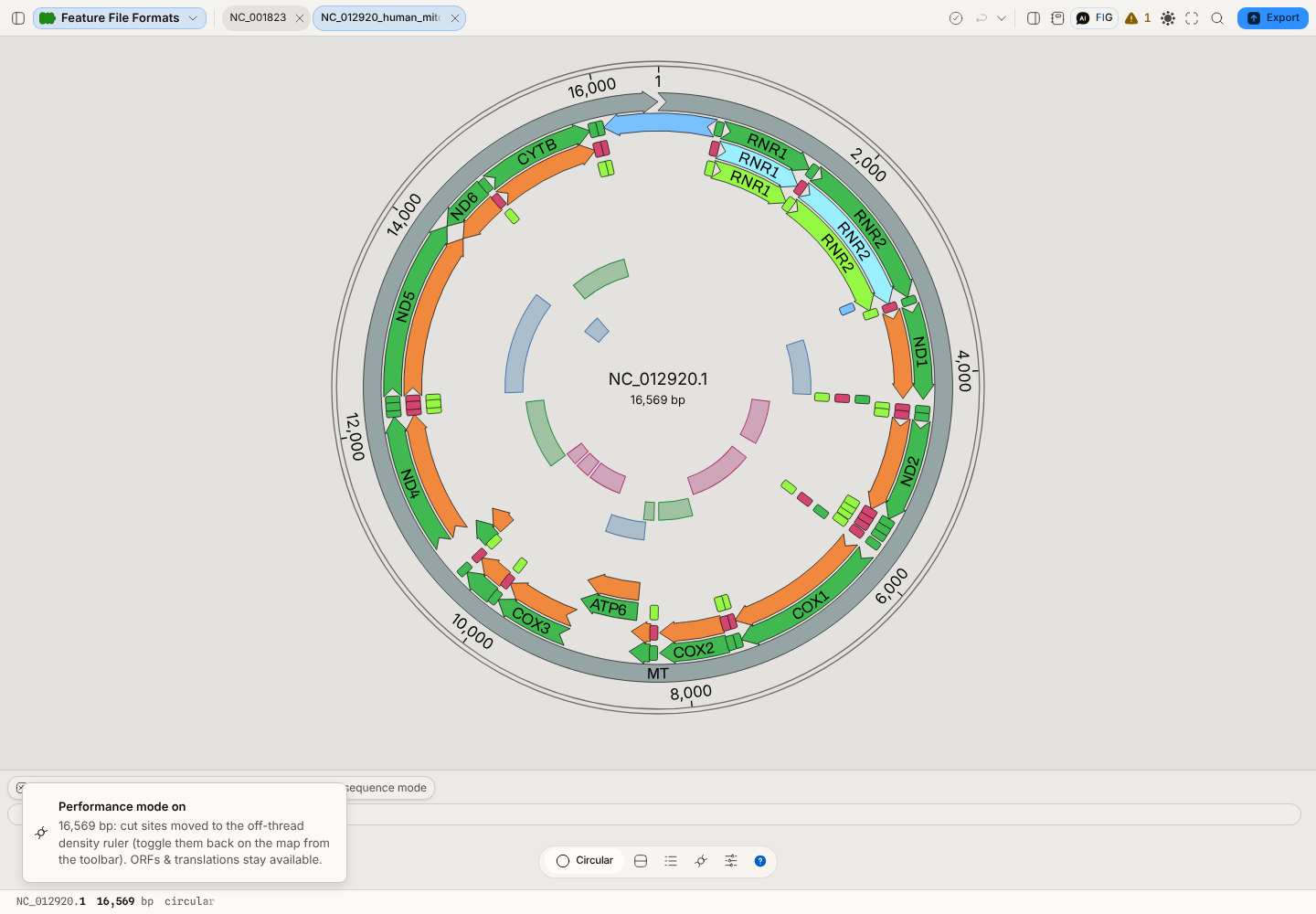 A feature-only GFF3: the annotations are real, the bases are N.
Related
Writes to it: Edit annotation · Auto-Annotate · every cloning tool, whose products open here · Insert sequence.
Draws on it: CRISPR Guide Design (the guide ring) · Restriction Digest (cut sites) · Gibson Assembly (homology painted on the map) · Variant Calls (a record at its coordinates).
Reads from it: every tool that takes the current selection — which is most of them.
Compare with: the Read quality viewer and the Variant table, the two canvases a sequence-bearing file might route to instead.